ezCheckPrinting software is the easy-to-use and affordable check writing & printing software for any business. The network version check writer software can allow users to share the same database file.
Followings are the steps to share the database.
1. Download and install ezCheckPrinting check writer on your first machines with administrator permission (You need the administor permission to install ezCheckPrinting, otherwise the font will not display correctly.)
ezCheckPrinting download link
http://www.halfpricesoft.com/check_printing_software_download.asp
2. Start ezCheckPrinting on the first machine, register the license key and set up the check account. Then click the top menu "Account->Duplicate account" to copy the database file to the shared folder on the server.
You can click here to see how to set up ezCheckPrinting account
http://www.halfpricesoft.com/articles/sb-check-printing-software-add-logo.asp
You can click here to see how to create a shared folder on server
http://support.microsoft.com/kb/301281
3. Edit ezCheckPrinting database path to use the shared file on the server.
- You can click the top menu "Account->Manage Account" to change the database path to the database file on your server.
- Test the connection. If it works, click the SAVE button.

4. Install ezCheckPrinting on the second machine, register the license key, and repeat step 3.
**********************
Note:
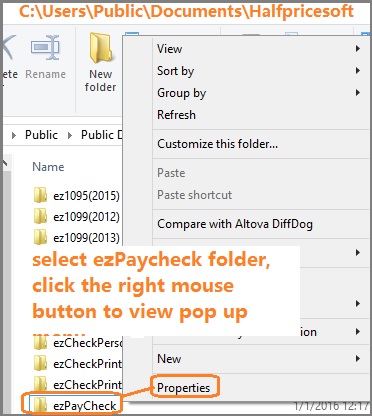
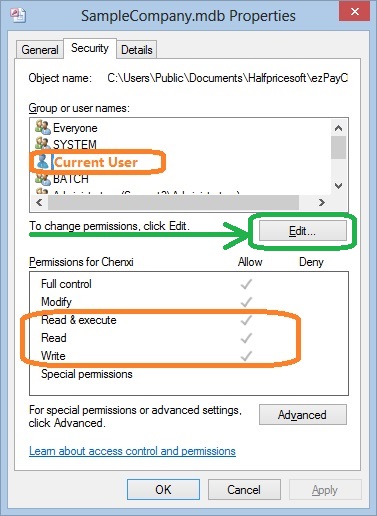
When you share the folder and database file on the server, please give FULL CONTROL permission (or at least Read, Write and Execute Permissions) to ezCheckPrinting users.
How can I know I have enough permission to access the database on the server
- Open Windows Explore, navigate to the database folder on the server
- Select the database file by mouse, right click to view properties. You need to have read, write and execute permisson.
************************
Learn more about ezCheckPrinting at: http://www.halfpricesoft.com/product_ezCheck.asp