ezW2 software supports forms w2, w3, 1099 and 1096. It also save user money and time by printing the SSA approved laser substitute forms W2 copy A and W3 on the plain paper. ezW2 is compatible with Windows 7 system, 32-bit or 64-bit. It can run on Windows XP, Me, 2003 and Vista system too.
More controls and options in the new edition of ezW2 1099 and W2 filing software allow small business owners to better customize the software to fit their tax reporting needs and the way they work.
Followings are the 5 simple steps to printing form W-2.
Step 1: Start ezW2 software.
If you do not have this W2 and 1099 software installed, you can download it for free from
http://www.halfpricesoft.com/w2-software-free-download.asp. No registration needed and no obligation. You can follow the step by step online instructions to finish the installation in minutes.
Step 2: Set up company information for W2 reporting
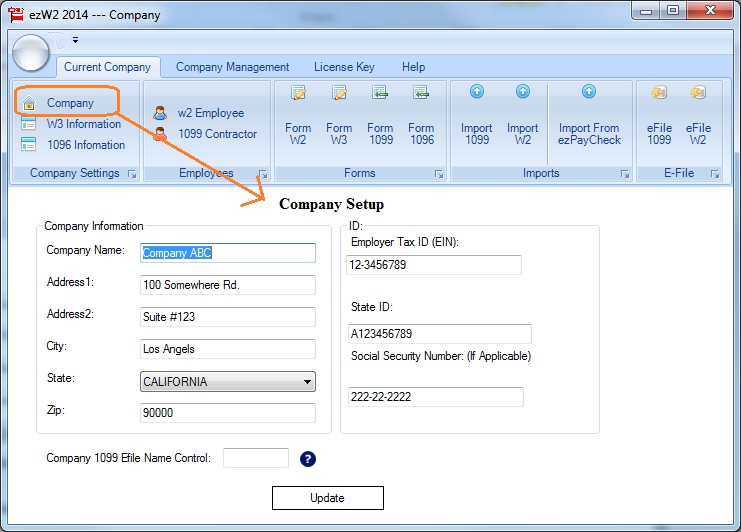
You can access this screen by clicking the top menu “Current Company->Company”.
You need to enter the general company information for w2 and 1099 forms, such as Company Name, Address, Tax ID and others.
Step 3: Set up W-3 information
You can access this screen by clicking the top menu “Current Company->W-3 information”.
You need to enter the W-3 control number, W3 Establishment Number, Contact Information and others. This information will be displayed on both forms W-2 and W-3.
Step 4: Add W-2 Employees
You can access employee by clicking the top menu “Current Company->W2 Employee list”. You can add a new employee or edit or delete an existing one easily by clicking the link on this form.
You can also import Employee information quickly by using W2 import form. You can access this import form by clicking the top menu “Current Company->Import W2”.
Step 5: Enter W-2 information and print W-2 forms
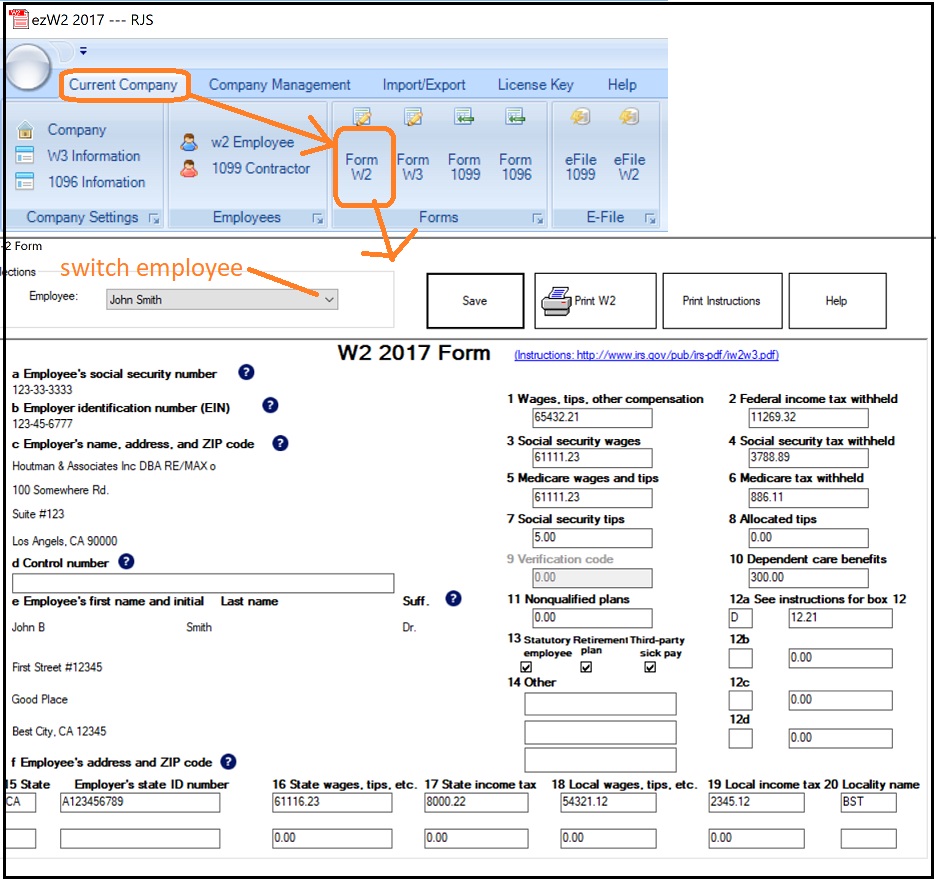
You can access this W-2 editing screen by clicking the top menu “Current Company->Form W-2”..
- Once you select the employee from the list, the employee information will be filled automatically.
- Fill in the boxes on the w-2 Form.
- Click the Question icon or the instructions link to get help.
- Click the 'save' button to save the W-2 information.
- Click the 'Print W2' button to print the different W2 Copies for this recipient. ezW2 can print forms W2 copy A, B, C, D, 1 and 2
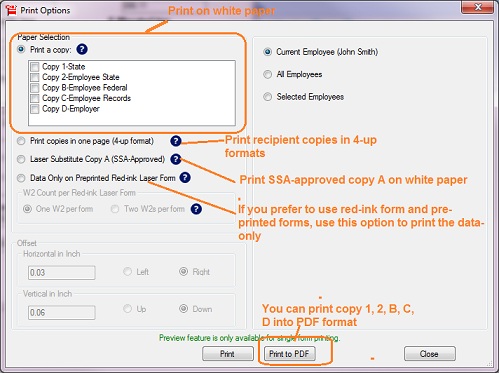
- Click the 'Print Instructions' button to print W-2 instructions.
Note:
- Form W-3 will be generate automatically based on form W2 information
- ezW2 allows user to set up unlimited companies with one flat rate. So if you have multiple companies or you are an accountant, you can add new company by clicking top menu “Company Management->New company”
- YouTube video is available at
http://www.youtube.com/watch?v=Lk_mErjN3Ew