If you purchased ezCheckPrinting before 2014, you should not download version 6.0. Your old key code will not for ezCheckPrinting version 6.0 and later. If you decide to upgrade your version to the latest version, you need to purchase the new key code.
The previous version download link is available from download page
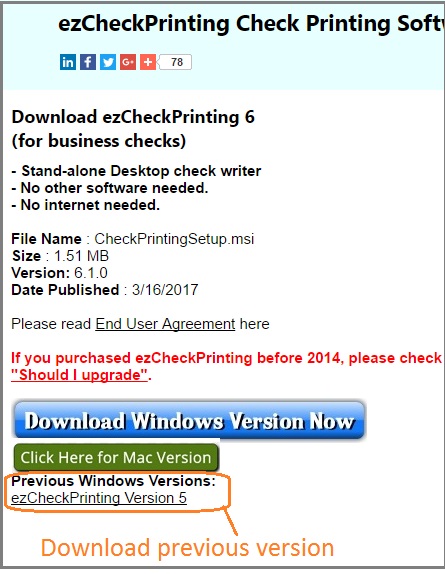
Steps to upgrade ezCheckPrinting software
If you already installed ezCheckPrinting on your machine, you can update it by the following steps:
1. Log in your machine as administrator.
You must have administrator permission to install the MICR font.
2. Backup your data first.
Although your data should be safe during this process, we always suggest you backup it first.
You can click the top menu "Accounts->Back up current account" to back up your data. If you have more than one account, please backup all of them.
3. Uninstall ezCheckprinting from your machine
You can open control panel, then select "Add or remove programs" to see program list. Then remove ezCheckPrinting from there.
4. Download ezCheckPrinting and install it again.
ezCheckPrinting latest version
http://www.halfpricesoft.com/CheckPrintingSetup.msi
ezCheckPrinting Version 5.0 Download
http://www.halfpricesoft.com/CheckPrintingSetup5012.msi
Note:
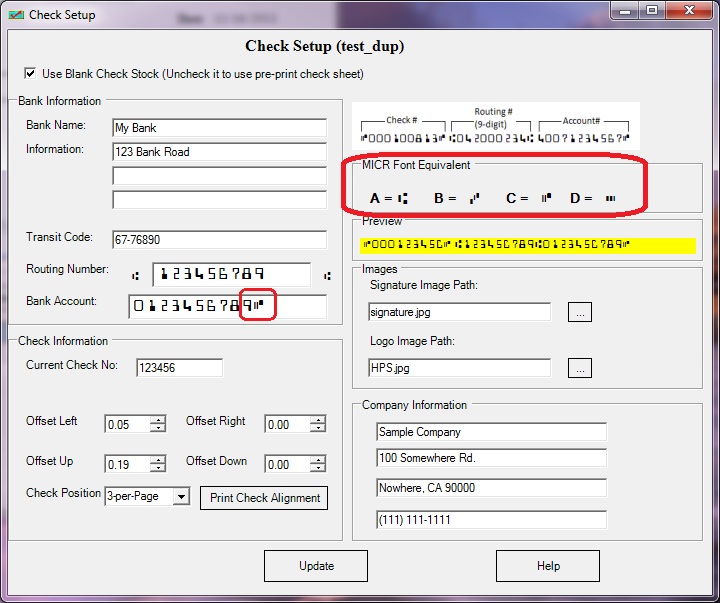
1. If you are user of the previous version 3.0.6 or older, please review the Check Setup (by clicking the top menu "settings->check setup") after you update to this new version. You may need to add the MICR code after the Account Number.
ezCheckPrinting updated database to support more features since version 4.0.1.
2. If you cannot find your database file, you can click the top menu "Accounts->Restore Account" to copy the back up database to your application folder. Then click the top menu "Accounts->select account" to select it as the current account. ezCheckPrinting 5.0.1 changed default database folder.