Monitoring Your W2 Correction eFile in Halfpricesoft
Once you’ve submitted your eFiles through ezW2 Correction, follow the steps in this article to check the status of your submission.
Step 3.1: Log In to Your Halfpricesoft Account
To start monitoring your efile submissions, log in to your Halfpricesoft account. You can access the login page here. Once you have logged in, go to the eFile Management Dashboard.
Step 3.2: Understanding the eFile Management Dashboard
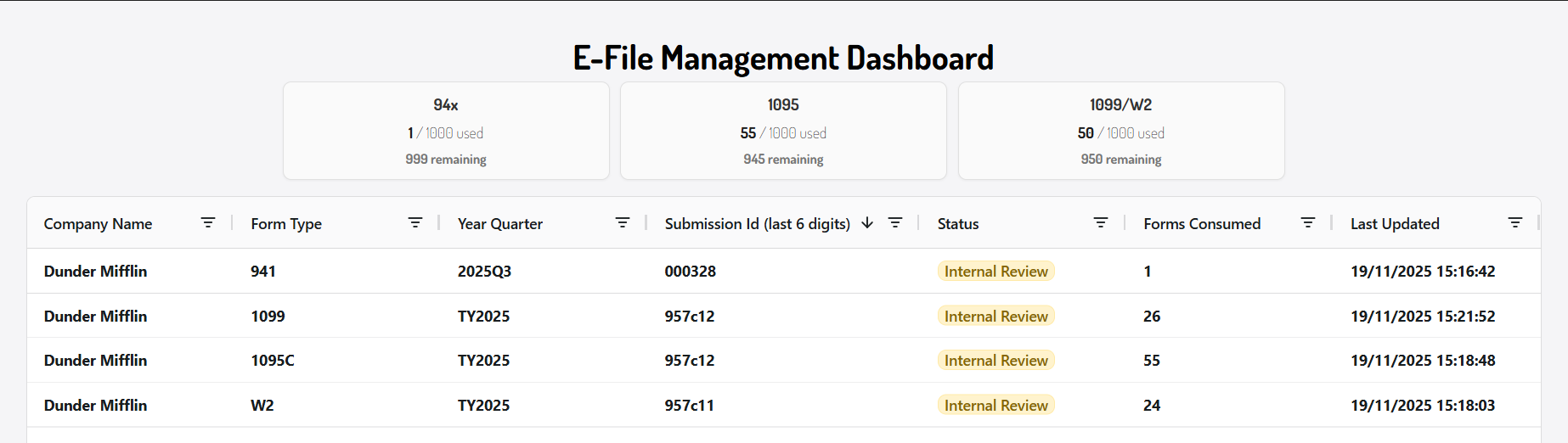
The first section of the dashboard shows how many eFile forms you have used and how many you still have available.

The next section of the eFile Management Dashboard displays the details of your eFile submission. The following information is shown:
- The Company name that the forms were submitted for
- The form type
- The year/quarter that the W2 Correction forms were submitted for
- The submission ID - to view the full submission ID open the detailed view
- The status of the submission
- The number of forms consumed
- The timestamp of when the status was last updated
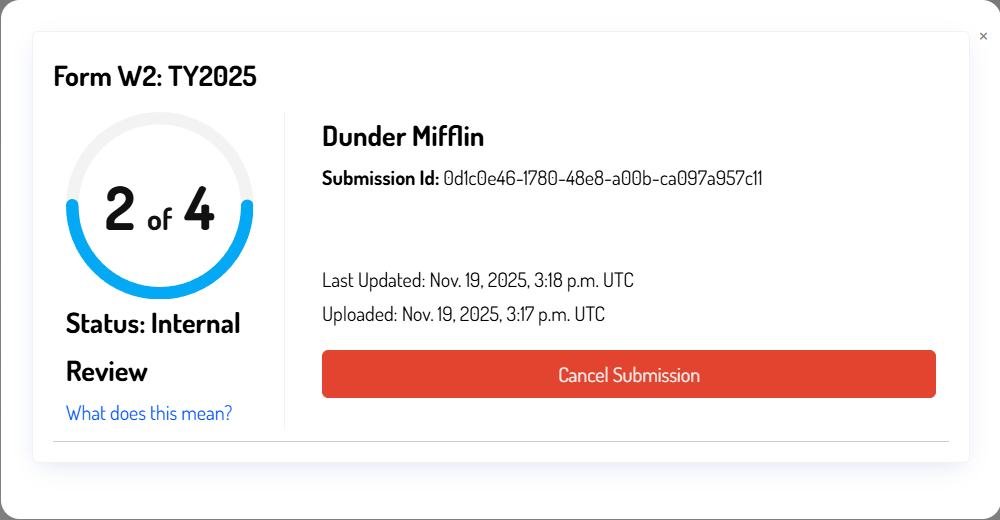
For a more detailed view of your submission status, select any row in the table. A detailed view will appear.
If your submission receives an error message, click into the row to open the detailed view. This view provides additional details about the error returned by the IRS.
Step 3.3: Internal Review Status
After successfully submitting your W2 Correction forms, you will see a new line on the eFile Management Dashboard:

The Internal Review stage indicates that your eFile submission is being processed by Halfpricesoft before it is submitted to the SSA. This process can take up to 2 business days.
Processing can take up to 2 business days, so be sure to submit your W2 Correction forms well before the deadline to ensure they are processed on time.
Step 3.4: SSA Processing Status
After the internal review is complete, Halfpricesoft will submit your W2 Correction eFiles to the SSA. If the submission is successful, the status will change to SSA Processing.

The SSA Processing status means that your W2 Correction eFiles have been submitted and received by the SSA, and they are currently being reviewed.
The SSA acknowledgment will likely take up to 6 weeks to process. When the processing is complete, the status will change to Submission Completed
Step 3.5.1: Submission Completed
After the SSA has successfully processed your eFile submission, the status will change to Submission Completed.

If you reached the Submission Completed status, that means you have successfully eFiled your W2 Correction form with the SSA using ezW2 Correction.
We do not validate the data in your submission. If the SSA later finds errors, you may need to file an additional W2 correction. Please ensure all data is accurate before submitting.
Step 3.5.2: Error Statuses
If you see an error status in the eFile Management Dashboard, select that row to open the detailed view. This view provides information about what prevented the submission from being accepted by the SSA.
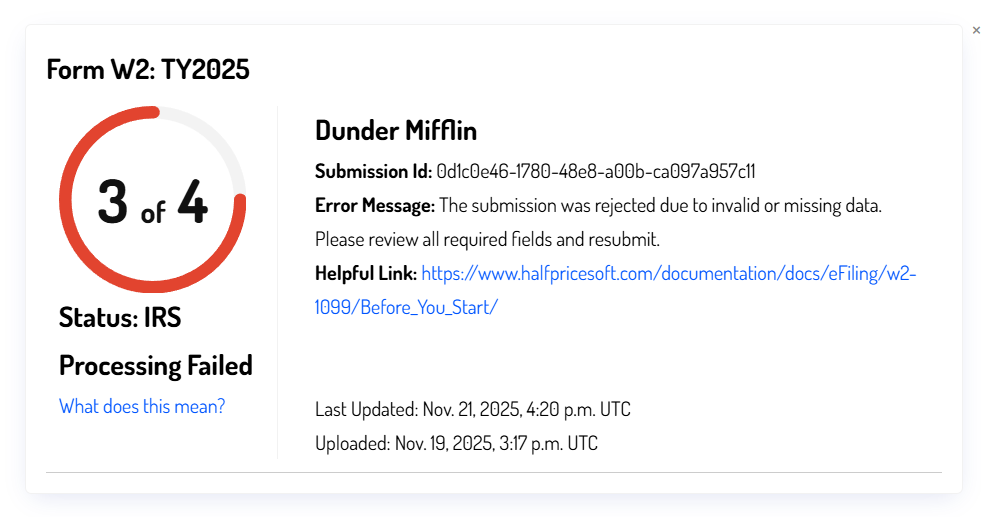
For further questions about a specific error, contact our support team. Be sure to include the Submission ID and the error message when reaching out to our support team.
Cancelling a Submission
To cancel a submission, select the row you want to cancel. The detailed view will appear, and the option to cancel the submission will be available. This can only be done during the Internal Review stage and will prevent the eFile submission from being delivered to the IRS. Cancelled submissions, as well as submissions rejected due to errors, will not count against your total eFile form submissions.
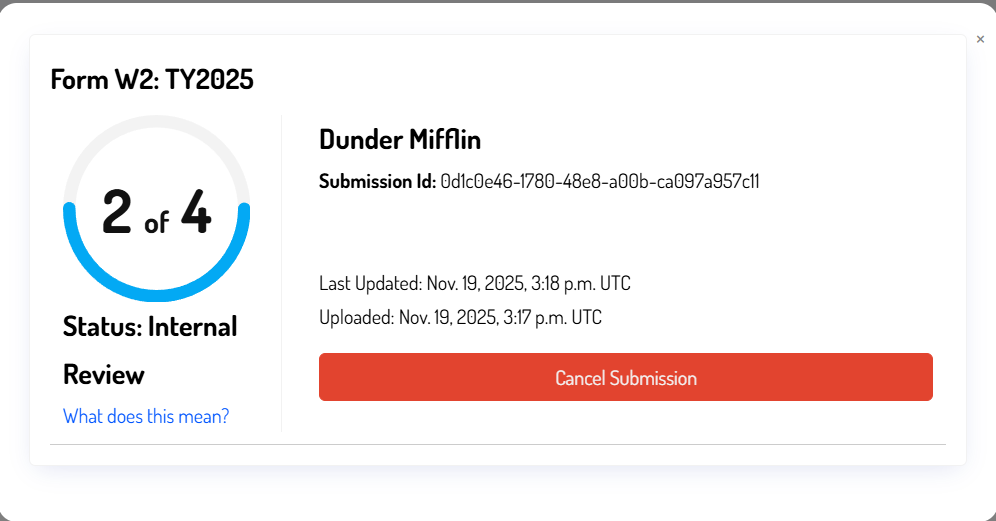
You can only cancel submissions that are in the Internal Review status. Once a submission has been sent to the IRS, it cannot be deleted.