Question: Instead of printing a signature graphic can we print the words "Pre Approved Draft - No Signature Required"?
Answers: Yes. EzCheckPrinting is very flexible and allow user to create a check draft.
(Note: we released ezCheckDraft software in Year 2014. If you have bulk draft checks to print, it will be easier to use ezCheckDraft Software, which is designed for bank draft check printing.)
Any business can create a check draft. A regular check is created by the account holder, and signed (authorized) by the account holder. A check draft is created by the merchant, and the signature is not required. The account holder must authorize the merchant to create a check draft.
Followings are the steps to create a check draft if you receive a check by phone, fax or online.
1. Start ezCheckPrinting
If you do not have ezCheckPrinting installed, you can download it for free from
http://www.halfpricesoft.com/check_printing_software_download.asp
2. Add a new draft check account for this customer XYZ by clicking the top menu "Accounts->New Account". Then select it as the current database by clicking the top menu "Account->Select Account".

3. Enter the customer's bank information.
- You can delete signature image path if it is there.

4. Add the new text label
-- You can access the check layout page by clicking the top menu "settings->check layout".
-- Select "Custom Text 0" from the item picker drop download list.
-- Check the visible option, add the description and drag/drop this item to your target location.
-- Click the Save button to save your change.

5. Add the new check by clicking the "NEW" button from the main screen.

Tips:
1) You can follow the above steps to create a template. Then you can use backup function to duplicate this template easily. You can duplicate this template account by clicking the top menu "Account->Backup current account".
2) To save your time, you can download the draft check template database from
http://www.halfpricesoft.com/draft_check_template.zip
Unzip it and save this file (draft_check_template.mdb) to your local folder. Then you can use the restore function to copy it your local folder.
How to restore data
http://www.halfpricesoft.com/business-blog/post/2012/05/21/How-to-restore-ezCheckPrinting-database-file.aspx
3) If you need to add multiple lines there for signature, you can create a signature image for check draft.
Sigature image (You can right click the signature image and save it to your local folder.)
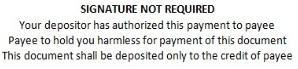
Sample check draft

Related article:
http://www.halfpricesoft.com/business_check_software/create-signature-with-paint.asp
Learn more about ezCheckPrinting at: http://www.halfpricesoft.com/product_ezCheck.asp