|
|
|
Frequently Asked Questions
FAQ:
-
What is the difference between demo version and full
version?
The demo version is the same as full version in functionality
except the demo version will print demo on the label.
-
How to use bearer bar?
You can add horizontal and vertical bearer bar by change the
width of BearerBarHorizontalWidth and
BearerBarVerticalWidth properties. The unit of width is
X-Dimension.
For examples:
| Image |
Description |
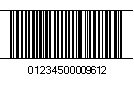 |
BearerBarHorizontalWidth = 1
BearerBarVerticalWidth = 0
|
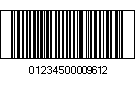 |
BearerBarHorizontalWidth = 1
BearerBarVerticalWidth = 1
|
-
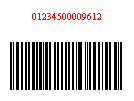
How to modify Human Readable String?
Human Readable String can be modified by the following
parameters:
ShowHumanReadableText sets to show the Human Readable
Text.
Font sets the font of human readable string.
HumanReadableTextPosition sets the space between the
human readable string and the barcode in inches.
HumanReadableTextFontColor sets the caption color.
IsHumanReadableTextOnTop sets the location of human
readable string.
For examples:
| Image |
Description |
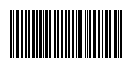 |
ShowHumanReadableText = false
|
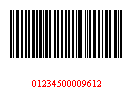 |
ShowHumanReadableText = true
Font = new Font("Times New Roman", 8)
HumanReadableTextPosition = 0.2
HumanReadableTextFontColor = Color.Red
IsHumanReadableTextOnTop = false
|
 |
ShowHumanReadableText = true
Font = new Font("Times New Roman", 8)
HumanReadableTextPosition = 0.2
HumanReadableTextFontColor = Color.Red
IsHumanReadableTextOnTop = true
|
-
How to use Caret?
The UseCaret propeties is set to true by default which is only
applied to Code128, UccEan128, Sscc18, Scc14, PDF417,
MacroPDF417, QR Code, and DataMatrix etc. where full ASCII is
accepted as encoding. The 3 digits data following the caret
will be treated as ASCII code, e.g. ^010 is \\n.
For Code 128, UccEan128, if the FNC1 (ASCII 202) is used,
human readable parentheses can be added to the CodeData
manually by using the following ASCII code
^222 = (XX)
^223 = (XXX)
^224 = (XXXX)
^225 = (XXXXX)
^226 = (XXXXXX)
^227 = (XXXXXXX)
The ^222, ^223, ^224, ^225, ^226, ^227 will be transfer to
FNC1 (ASCII 202) in the barcode, and the parantheses will be
added to human readable text by the digits. The FNC1 can also
be added by using ^202 (ASCII 202), or Ê. For
example, CodeData ="Ê0123456789" is the same as
CodeData ="^2020123456789".
ezBarcodeComponent will automatically identify AI by using the
predefined AI table above. However, you can overwrite the
predefined AI by using caret (^).
For example, to encode (012)345678, the data of
^223012345678 would be used to overwrite the default
(01)23456789.
Copyright 2008,
halfpricesoft.com
All Rights Reserved
|


