Print Options
Click "File ->Print" menu on the top
menu.
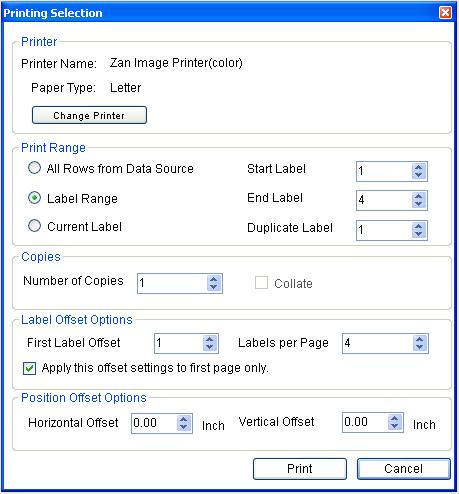
Supported selections
-
"Change Pinter" The printer and paper size can be
changed by clicking this button.
-
"Print Range" There are three options in the print
range select. 1) All rows from data source This option
will print every data row from your data source.
2) Label Range allows you to specify the start label
and end label number to print on paper.
Current Label will print the current label displayed on
the design page. The duplicate selection will allow you
specify the duplicated label count for current print settings.
-
"Copies" allows you to duplicate each page for printing
and set collate if copies larger than 1.
-
"Label Offset Options" sets the offset for the first
label to be printed on paper and the total label number to be
printed. If the
Apply this offset settings to first page only is
selected, the offset setting will only apply to the first
page. Otherwise, this setting will apply to every pages.
-
"Position Offset Options" will shift your printing
Horizontally of Vertically. This option will allow you to tune
your printings.
Copyright 2008,
halfpricesoft.com
All Rights Reserved


