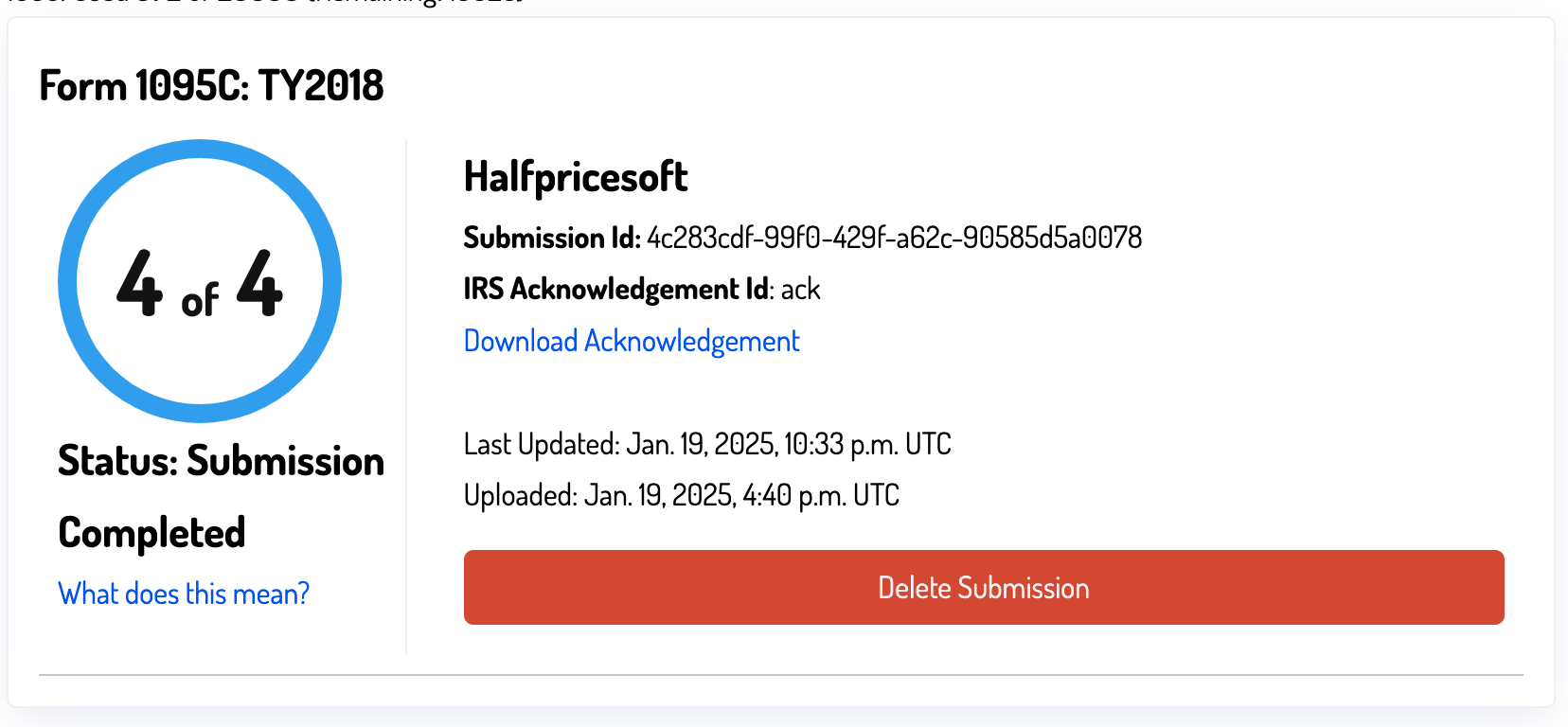
Correcting Accepted With Errors
The "Accepted with Errors" status indicates that the IRS has accepted your file but identified some errors in specific entries. You must correct these errors and resubmit the file. We strongly recommend downloading the acknowledgment file as proof of your submission, as the IRS may request it during an audit.
We count each correction filing as a new submission, so you will need to purchase additional e1095 credits if you run out. You can purchase additional credits on our ez1095 purchase page.
Step 3.1: Steps to Correct Errors
Start by reviewing the error report. You can find the report by visiting the dashboard monitoring page.
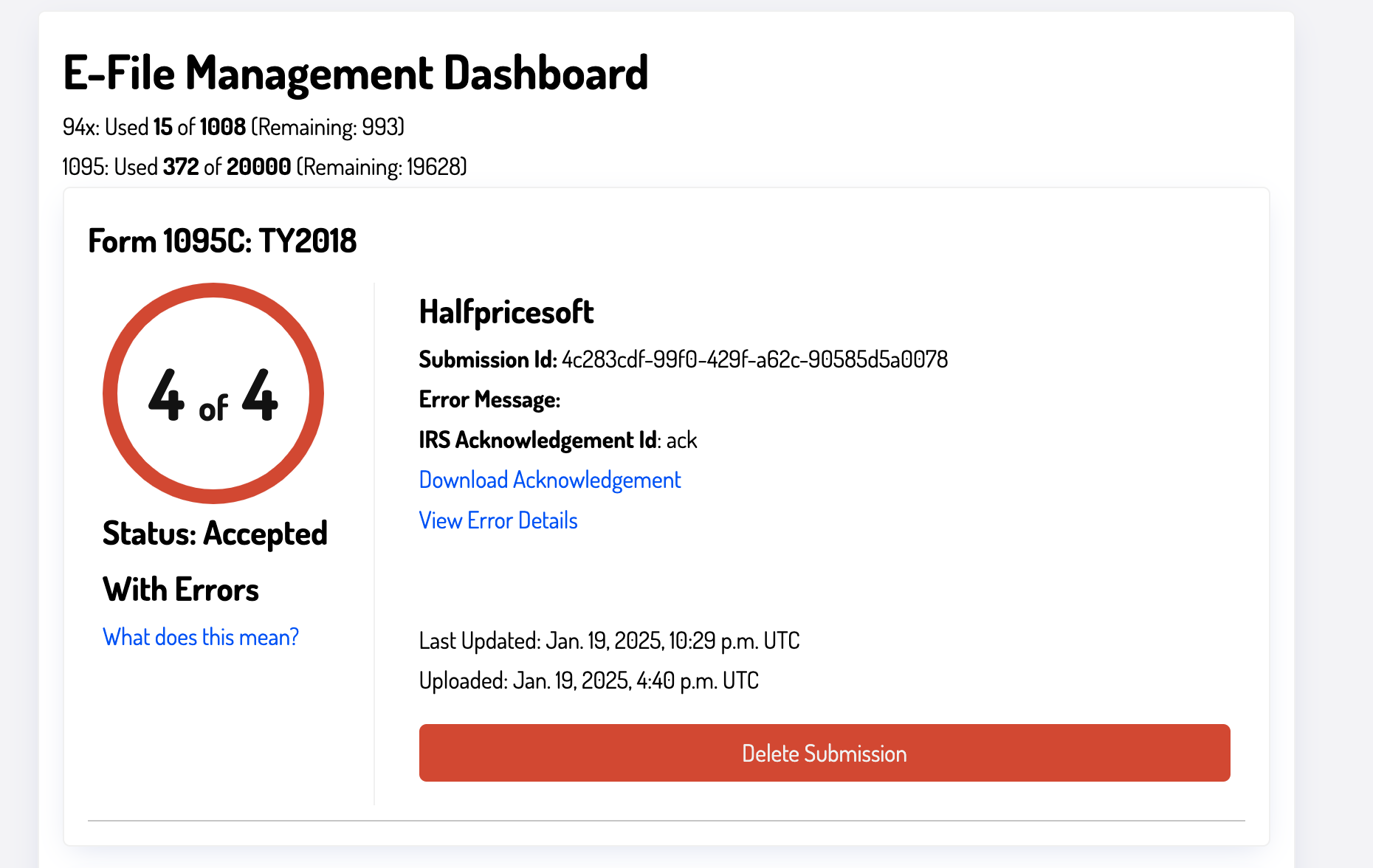
Step 3.1.1: Download the Acknowledgment File
Please download the acknowledgment file, which contains the error report from the IRS. You can find it by clicking on the Download Acknowledgment link. This file is a raw XML report indicating the errors identified by the IRS. Save a copy of this file for your records to demonstrate that you submitted the file to the IRS.
Step 3.1.2: Error Report
For a more user-friendly version of the error report, click on the View Error Details link. This page displays the errors in a more readable format.
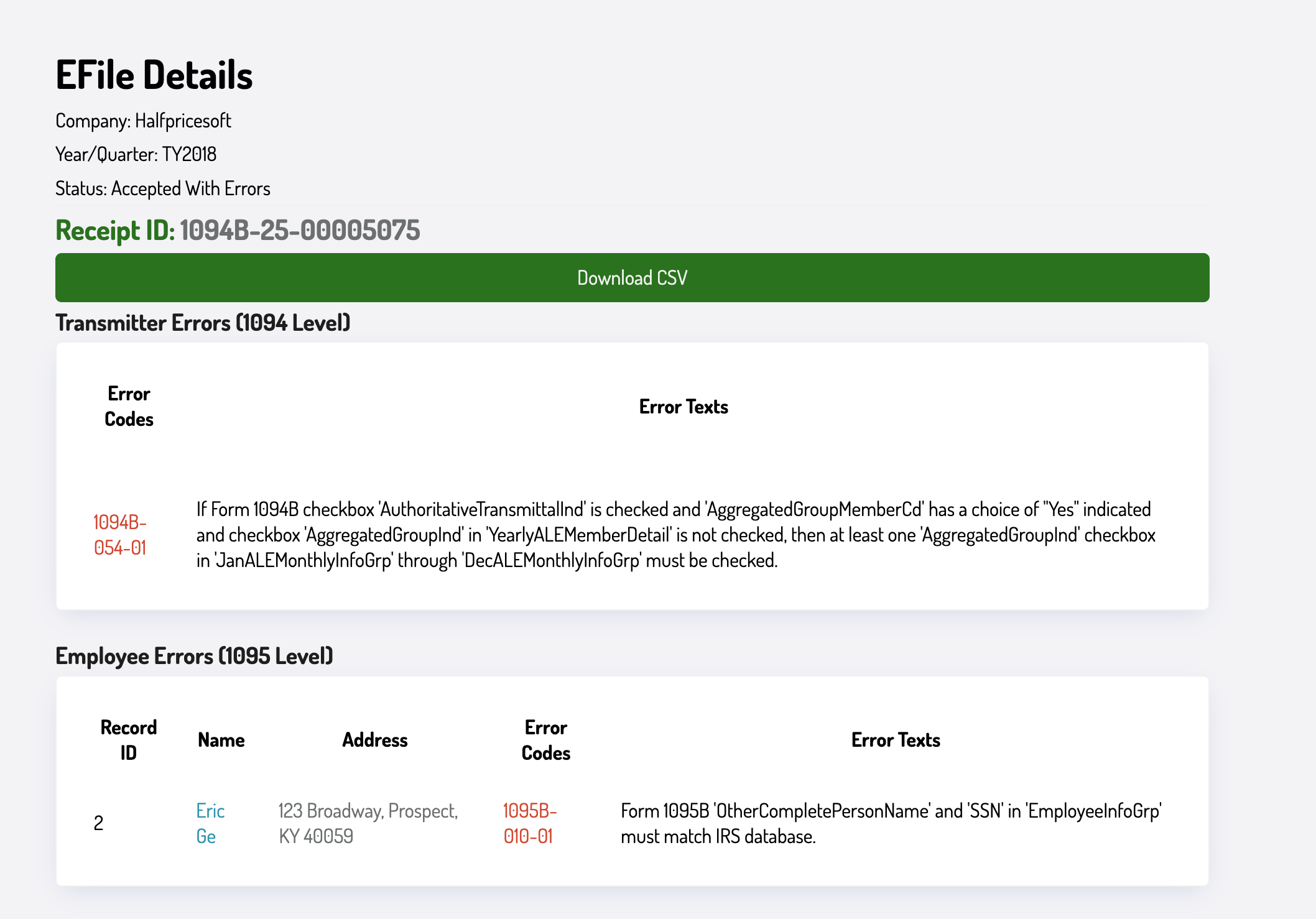
The error report is broken down into three sections:
- Submission Information: Contains information about the submission, including the receipt ID. Take note of this ID, as it is required for filing corrections.
- 1094 B/C Error Details: Includes errors related to the 1094 B/C form, which must be corrected in the corresponding form.
- 1095 B/C Error Details: Contains errors related to the 1095 B/C form. Each employee's form with an error must be corrected individually.
You can also download the error report as a CSV file for importing into spreadsheet programs like Microsoft Excel.
Step 3.1.3: Correcting Errors
To correct errors, open the ez1095 software and make the necessary changes. Navigate to the Form 1094-C or Form 1095-C screen to update the required fields. After making corrections, generate a new e-file.
The next article will cover common errors and how to fix them. For now, assume you have resolved all errors and are ready to generate a corrected e-file.
Step 3.2: Generating a New E-File
Follow these steps to generate a corrected e-file.
Step 3.2.1: Steps to Generate a Corrected E-File
The IRS requires two separate corrections if both the 1094 C form and 1095 C forms need to be corrected. If you do not need to correct the 1094 C form, you can skip that step.
Step 3.2.2: Correcting 1094 C Form
If you do not need to correct the 1094 C form, you can skip this step. Employers filing 1094 B correction forms do not need to submit a separate 1094 B correction. However, employers filing 1094 C forms must submit a separate 1094 C correction form.
How to File 1094 C Correction
-
Correct the 1094 C Form
- Go to the Form 1094-C screen and make the necessary changes. You must correct all errors in the Form 1094-C report.
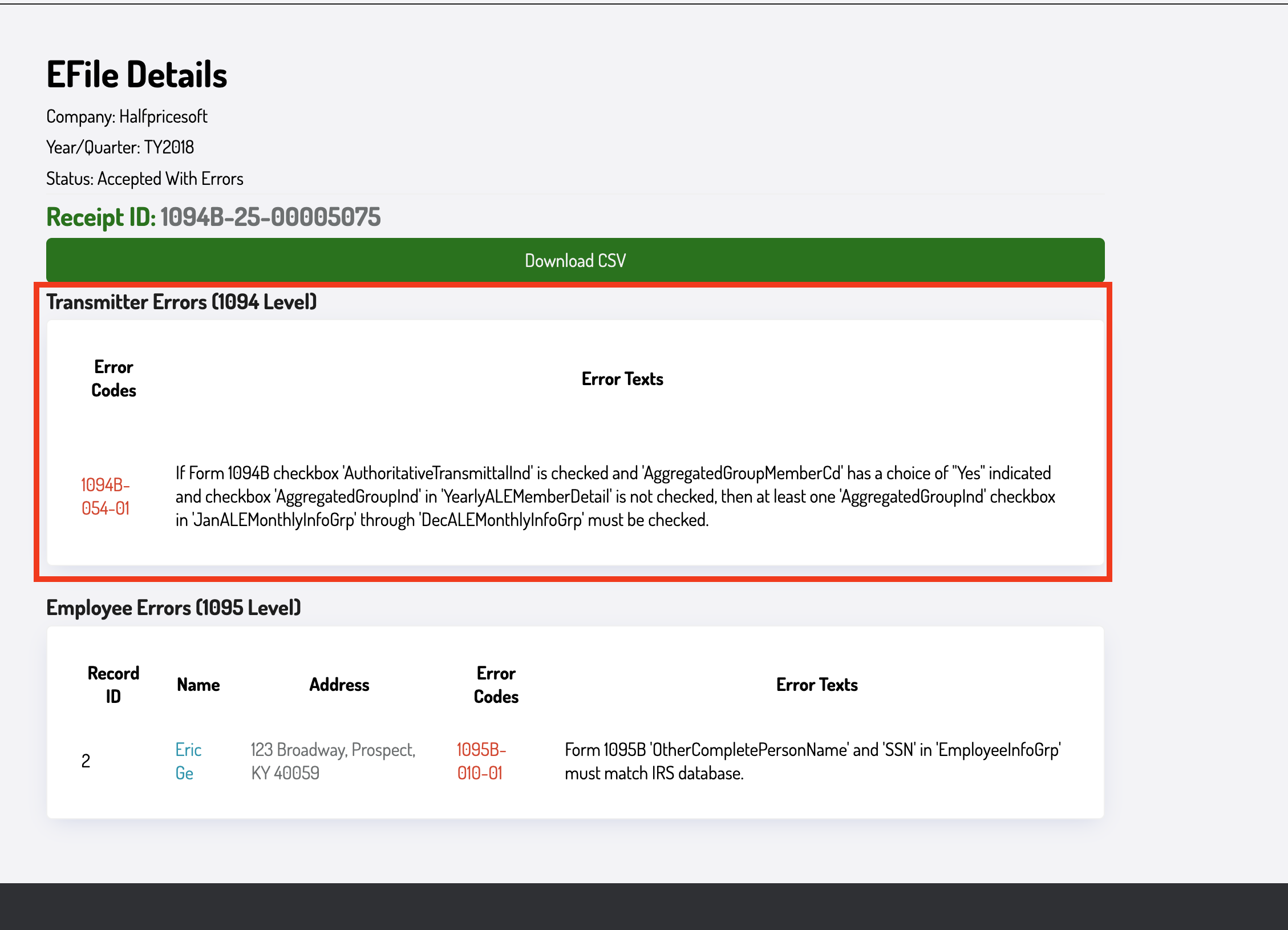
- Select the corrected option and set the total number of 1095 C forms to 0.
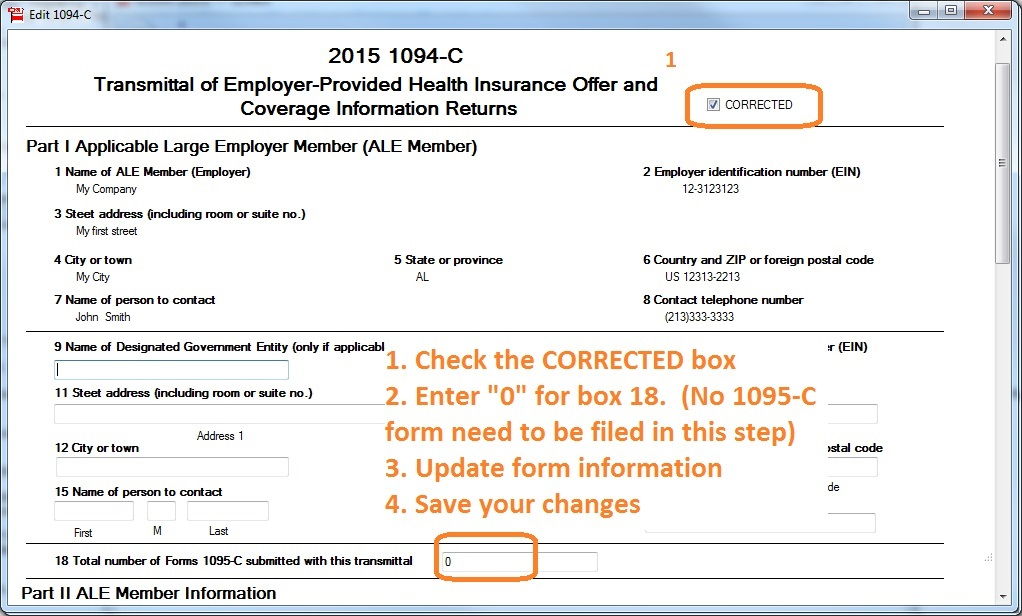
- Do not check the corrected option on any 1095-C forms.
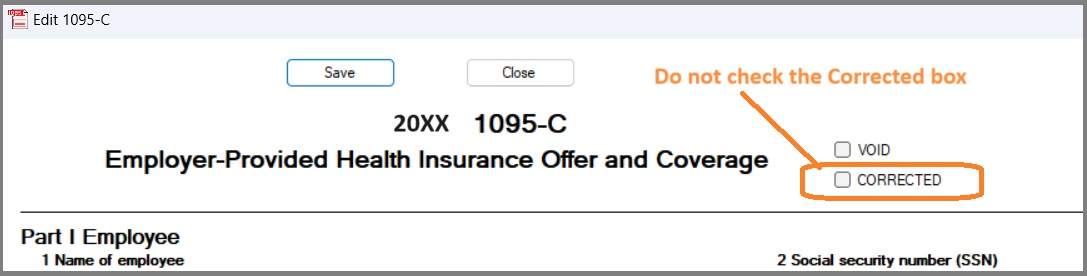
- Go to the Form 1094-C screen and make the necessary changes. You must correct all errors in the Form 1094-C report.
-
Generate the E-File
- Ensure no 1095-C forms are selected. Check this by verifying the selected forms at the bottom of the screen.
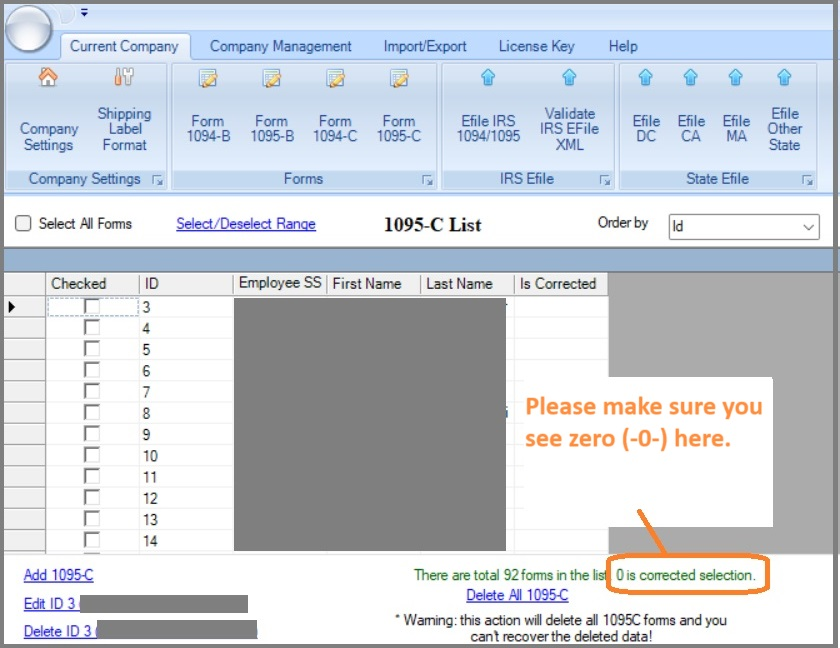
- Select the "E-File IRS 1094/1095" button at the top.
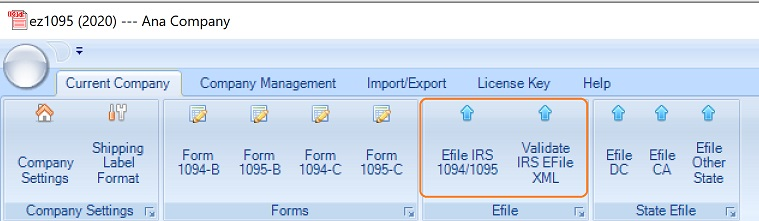
- Ensure no 1095-C forms are selected. Check this by verifying the selected forms at the bottom of the screen.
-
Fill Out the E-File Form
- Complete the E-File form. Select the corrected option and enter the correct number of 1095 C forms.
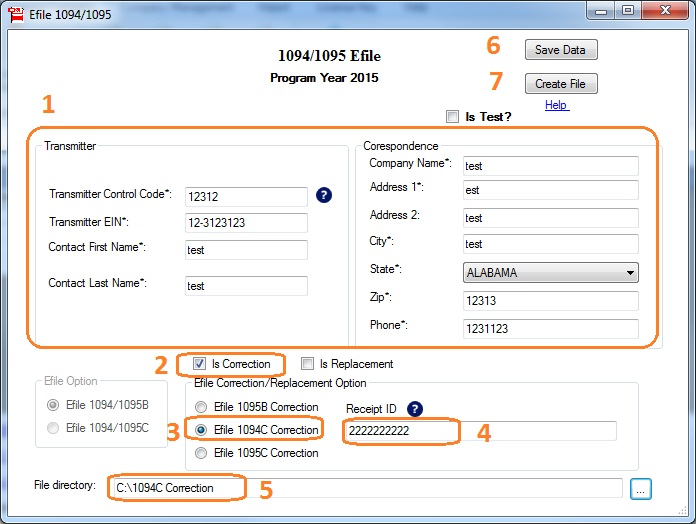
- Use the same Transmitter Control Code (TCC) as before (
MYTCC). Select "Is Correction" and specify the appropriate number of 1094 C corrections. - Enter the receipt ID from the error report (noted earlier).
- Complete the E-File form. Select the corrected option and enter the correct number of 1095 C forms.
-
Submit the XML File
- On the upload page, choose "E-File with Halfpricesoft" and enter your username and password.
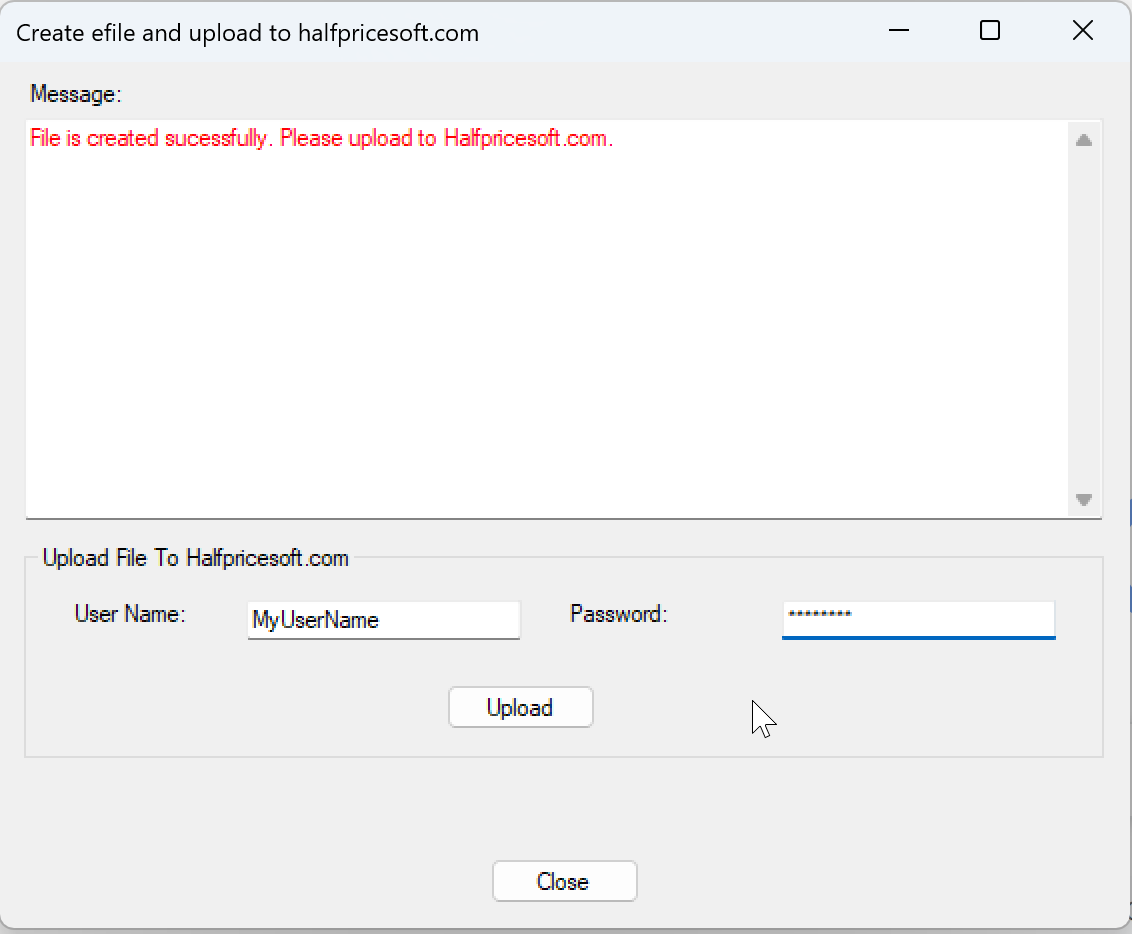
- Click "Upload" to submit the XML file.
- On the upload page, choose "E-File with Halfpricesoft" and enter your username and password.
For ez1095 2023 or earlier, generate an XML file, validate it using the validation tool, and upload it to the e-file 1095 upload page.
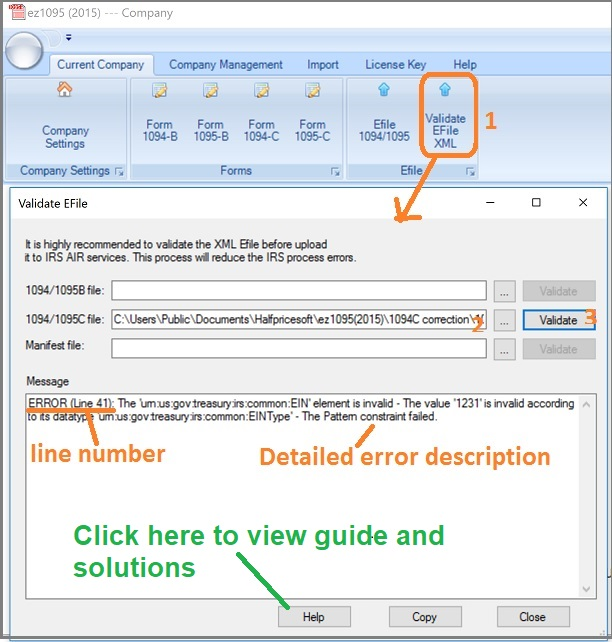
When you upload, you will select 1095 C as the document type even though you are submitting a 1094 C correction.
Step 3.2.3: Correcting 1095 B/C Form
These instructions apply to correcting both the 1095 B/C and 1094 B forms. If you have already corrected the 1094 C form, this will be a separate submission.
How to File 1095 B/C Correction
-
Correct 1095 B/C Forms
- Update each employee's 1095 B/C form as needed. You must fix all errors in the Form 1095-B/C report.
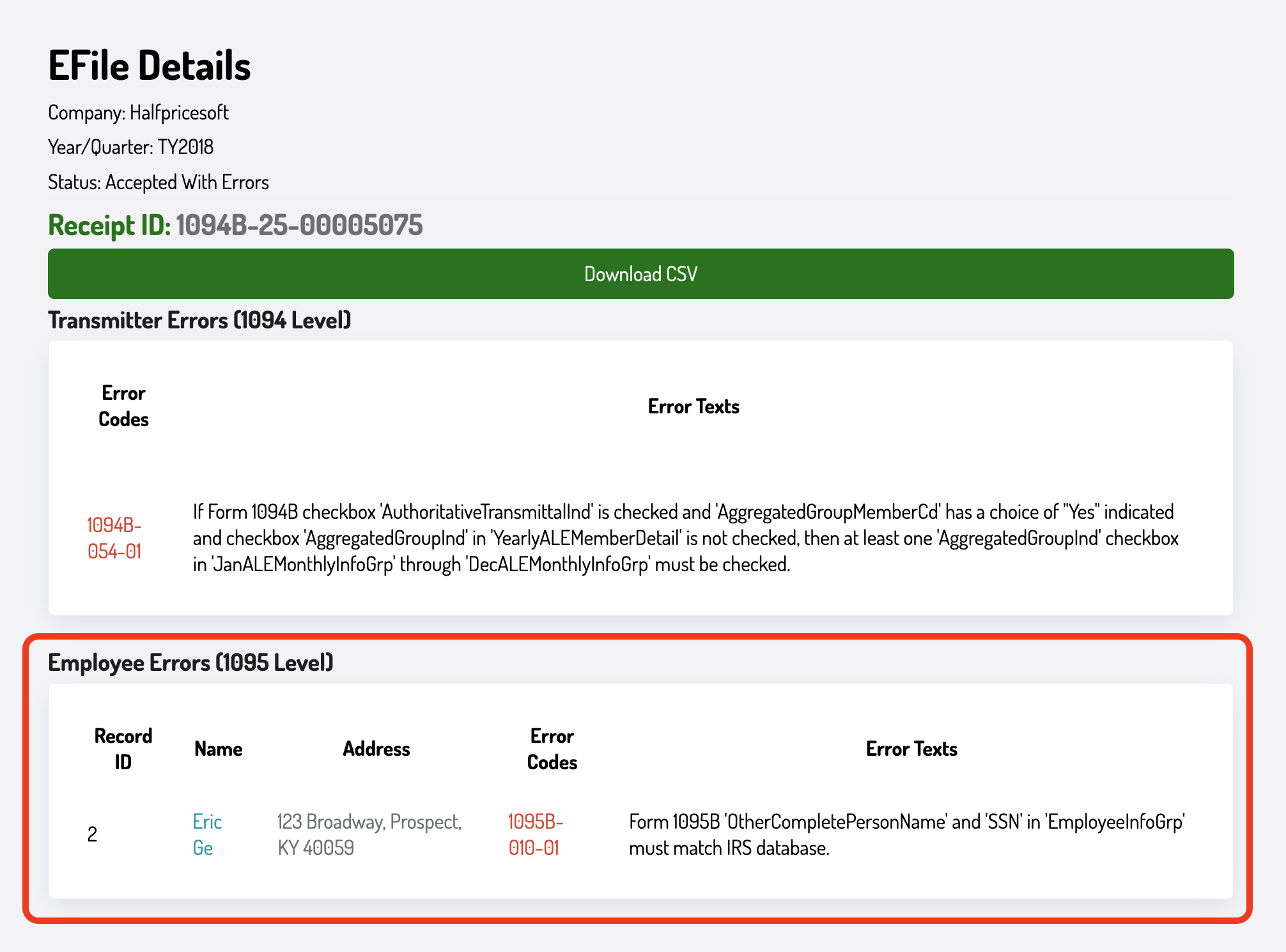
- Select the corrected option on each 1095 B/C form.
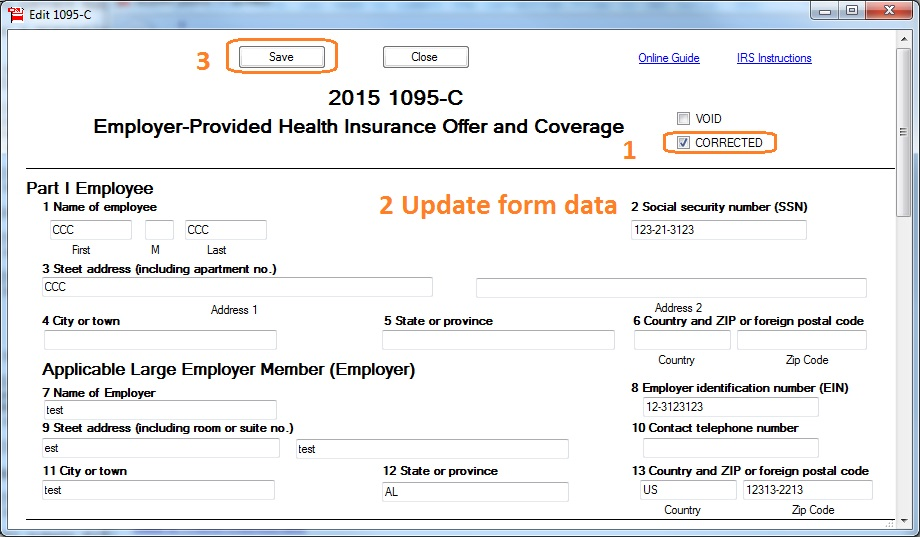
- Update each employee's 1095 B/C form as needed. You must fix all errors in the Form 1095-B/C report.
-
Update the 1094 B/C Form
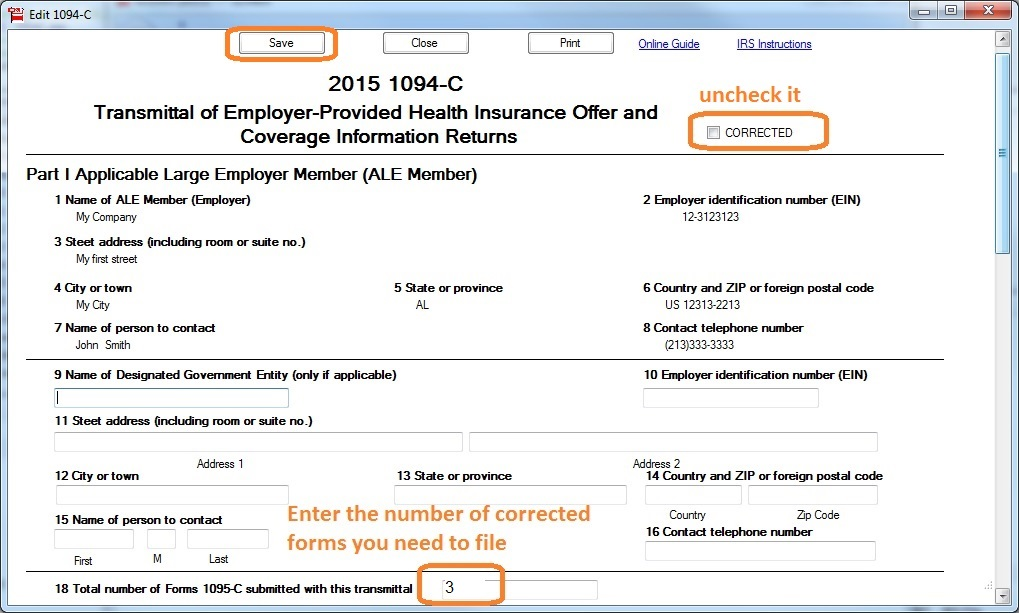
- Enter the number of corrected 1095 forms in the "Total Number of Forms 1095-C" field on the Form 1094-C screen.
- Ensure the corrected option is unchecked (you have already filed the corrected 1094 C form).
-
Generate the E-File
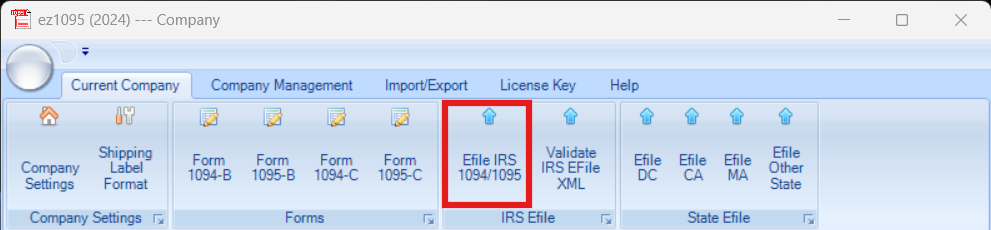
- Select the "E-File IRS 1094/1095" button at the top.
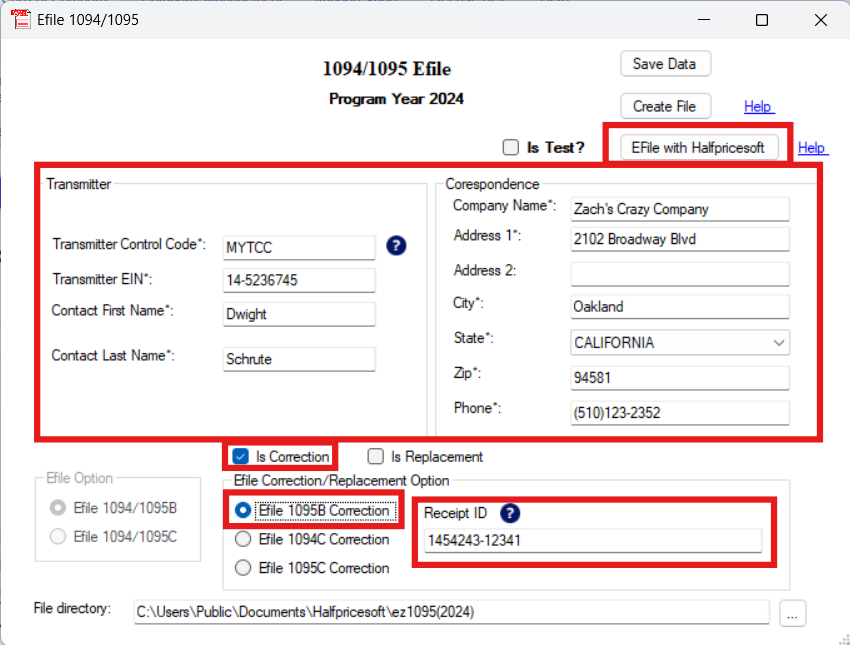
- Make sure the correct data is diplayed in the Transmitter and Correspondence fields. Ensure that the Transmitter Control Code is set to MYTCC
- Select Is Correction and select either Efile 1095B Correction or Efile 1095C Correction based on what form you are correcting. After selecting the type of form you are select filing, enter the receipt ID from the error report and click "E-File with Halfpricesoft" to generate the XML file.
- Select the "E-File IRS 1094/1095" button at the top.
For ez1095 2023 or earlier, you will need to validate and upload the XML file and then upload XML file on the upload page. This article will guide you through generating an XML file, validating it and then uploading it.
When you upload, select 1095 B or C, depending on the form you are correcting.
Make sure the receipt ID is the LATEST receipt ID from the last correction submission. For instance, if you submitted an original on 2025-01-02 and then submitted another correction on 2025-01-16, the receipt ID from the 2025-01-16 submission is the one you should use. If you are unsure, check the latest submission on the dashboard monitoring page.
Step 3.3: Monitor Submission Status
After submitting, monitor your application's status on our dashboard monitoring page. Use the same credentials you used to submit your file.
Only once you see a status of "Submission Completed" should you consider the correction process complete. Until then, continue to monitor the status and file further corrections as needed.