Halfpricesoft Halfpricesoft

ezPaycheck Payroll: How to Handle Qualified Tips for Restaurants, Spas & Hotels

Play

Employer Responsibilities for Qualified Tips and Overtime

In 2026, employer responsibilities for tracking and reporting tips and overtime (OT) will transition from 2025's "reasonable estimate" period to mandatory, standardized reporting under the One Big Beautiful Bill Act (OBBBA).

Standard IRS information return penalties will apply to inaccurate reporting for the 2026 tax year.

What Are Qualified Tips?

Under the One Big Beautiful Bill Act (OBBBA) of 2025,Qualified Tips are voluntary cash or credit card gratuities received by workers in occupations that traditionally receive tips, such as servers, bartenders, and hair stylists.

To be tax-deductible under this new law, the tips must be determined solely by the customer without negotiation and cannot include mandatory service charges or automatic gratuities.

Employers should inform employees that:

  • Federal income tax is still withheld on qualified tips
  • Any tax benefit is claimed on the employee's personal tax return
  • Eligibility, caps, and phase-outs are determined by the IRS, not the employer

Sample for Qualified Tips:

John Smith worked 40 regular hours at $20 per hour in a restaurant. He earned $200 in mandatory service charges (non-qualified tips) and received $100 in voluntary customer tips (qualified tips). Of the voluntary tips, $75 was received in cash.

Break down of this payment is as follows:

Type Hours Rate Total W-2 Reporting (2026)
Regular Pay 40 $20 $800 Box 1 (Included in Gross)
Non-qualified tips     $200 Box 1 (Included in Gross)
Qualified Tips     $100 Box 1 (Included in Gross)
Box 12, Code TP

How to Process a Paycheck with Qualified Tips in ezPaycheck

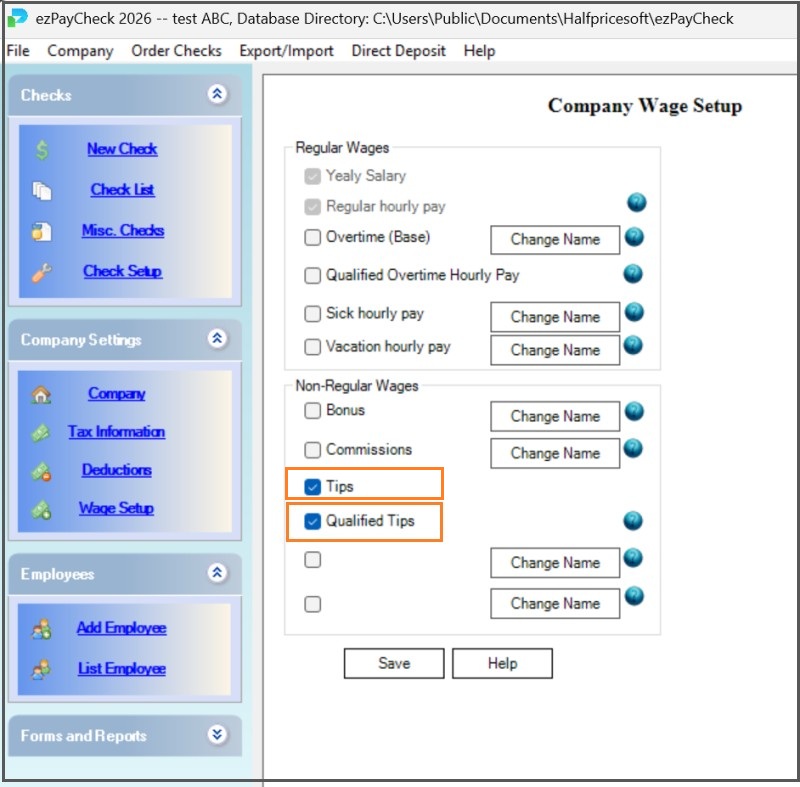
Step 1. Start ezPaycheck payroll software, set up payment type for Qualified Tips


1.1. Click ezPaycheck left menu "Company Settings" then "Wage Setup" to view wage set up screen.

1.2. Check and enable the payment option "Qualified Tips".

1.3. Save the changes.

ezPaycheck wage guide

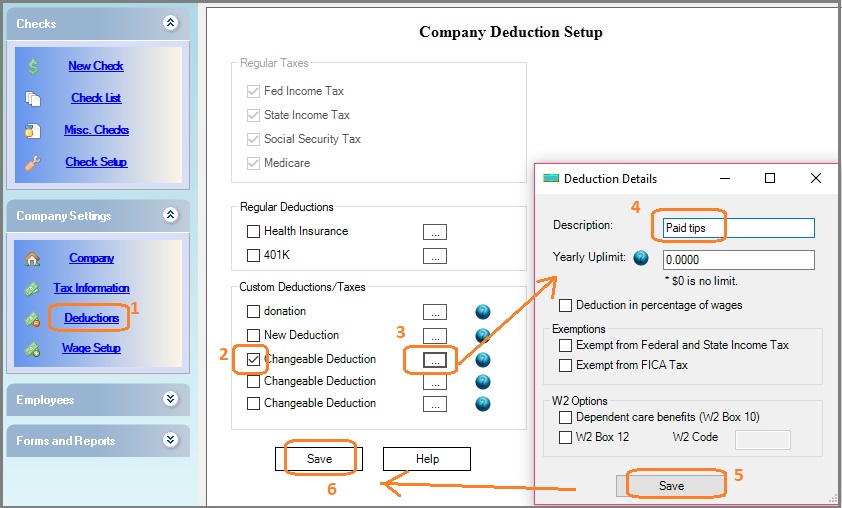
Step 2. Add a deduction for "Paid Tips"


With ezPaycheck, you can add a deduction labeled "Paid Tips" to subtract cash tips already received by the employee from the net pay amount.

    2.1 You can click the left menu "Company Settings" then "Deductions" to view deduction setup.

    2.2 Check one Customized deduction item, and then clicked the button behind it to open the Deduction Details screen.

    2.3 Enter the description (ie: "Paid tips" or another name you like)

    2.4 Click the "Save" button on the Deduction Details screen

    2.5 Click the "Save" button on the Company Deduction Setup screen to update the database.
ezPaycheck paid tips deduction

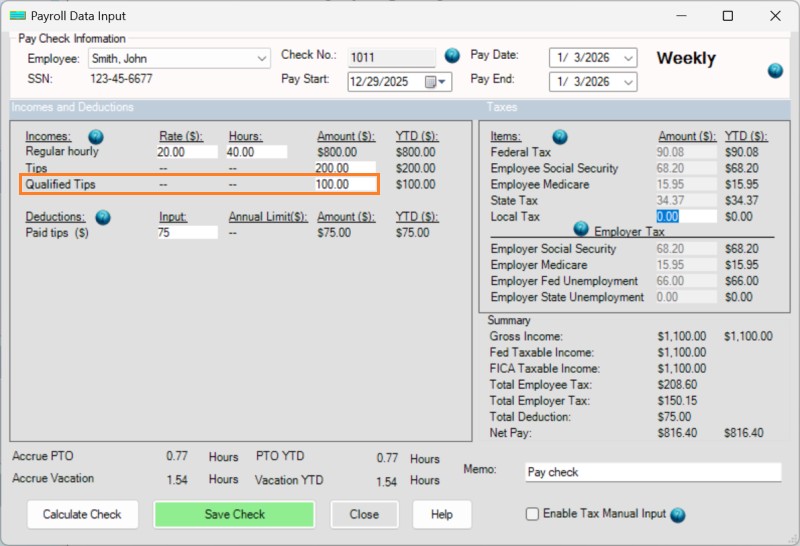
Step 3. Create paycheck with Qualified Tips


Enter the payment amount, label the "Qualified Tips" payment type and record any paid cash tips from the employee.

ezPaycheck qualified tips paycheck

Step 4. Print paychecks


When you print paychecks, you will see the qualified tips pay in the paystub.

ezPaycheck qualified tips paystub

Step 4. W2 Reporting


If you label the Qualified Tips correctly, you will see the qualified tips pay in the year-end W2 form (which is available in November or December 2026).

Should Employers Stop Labeling Qualified Tips/OT after Limits Are Reached?

No.

Employers should continue labeling all qualified tips and overtime, even if:

  • The employee exceeds the $25,000 annual cap, or
  • The employee exceeds the income phase-out threshold

Caps and income limits are handled by the employee on their personal tax return, not by payroll.

IRS Guidance Pages


This information is provided for general educational purposes only and does not constitute tax or legal advice. We are a software developer and cannot determine whether any specific employee's tips or overtime qualify for federal deductions, or how those deductions apply to an individual tax return. Employers and employees should consult the IRS guidance and/or a qualified tax professional for their specific situation.

Get Help

Please feel free to contact us whenever you need assistance. Our support team is glad to assist you.