HalfpricesoftHalfpricesoft

    Accounting Software Free Download (Year 2016 - 2026)

    No obligation. No credit card required. No risk

    Version 3.16.149.08 MBPublished 07/27/2026

    Downloads

    Your platform is detected automatically

    ezAccounting 2026 (Windows).msi2026
    Size: 9.08 MB
    Version: 3.16.14
    Published: 07/27/2026

    Capabilities (for 2026)

    • 2026 federal tax tables
    • 2026 state tax tables
    • 2026 Form 941
    • 2025 W2 and W3 forms
    • 2025 Form 940
    • 2025 Form 943
    • Supports Qualified Tips and Qualified Overtime under 2026 rules

    Legacy Downloads

    Windows XP / 7

    Legacy Windows (XP/7)

    ezAccounting 2026 (Windows XP/7 Special)
    ezAccounting 2026 (Windows XP/7 Special).msi2026
    legacy

    Capabilities (for 2026)

    • 2026 federal tax tables
    • 2026 state tax tables
    • 2026 Form 941
    • 2025 W2 and W3 forms
    • 2025 Form 940
    • 2025 Form 943
    • Supports Qualified Tips and Qualified Overtime under 2026 rules

    Download Previous Versions

    2025+
    ezAccounting 2025 (Windows).msi2025
    Size: 9.08 MB
    Version: 3.15.20
    Published: 1/7/2026

    Capabilities (for 2025)

    • 2025 federal tax tables
    • 2025 state tax tables
    • 2025 Form 941
    • 2025 W2 and W3 forms
    • 2025 Form 940
    • 2025 Form 943
    Windows XP / 7

    Legacy Windows (XP/7)

    ezAccounting 2025 (Windows XP/7 Special)
    ezAccounting 2025 (Windows XP/7 Special).msi2025
    legacy

    Capabilities (for 2025)

    • 2025 federal tax tables
    • 2025 state tax tables
    • 2025 Form 941
    • 2025 W2 and W3 forms
    • 2025 Form 940
    • 2025 Form 943
    2024+
    ezAccounting 2024 (Windows).msi2024
    Size: 8.7 MB
    Version: 3.14.18
    Published: 12/6/2024

    Capabilities (for 2024)

    • 2024 federal tax tables
    • 2024 state tax tables
    • 2024 Form 941
    • 2024 W2 and W3 forms
    • 2024 Form 940
    • 2024 Form 943
    Windows XP / 7

    Legacy Windows (XP/7)

    ezAccounting 2024 (Windows XP/7 Special)
    ezAccounting 2024 (Windows XP/7 Special).msi2024
    legacy

    Capabilities (for 2024)

    • 2024 federal tax tables
    • 2024 state tax tables
    • 2024 Form 941
    • 2024 W2 and W3 forms
    • 2024 Form 940
    • 2024 Form 943
    2023+
    ezAccounting 2023 (Windows).msi2023
    Size: 8.1 MB
    Version: 3.13.16
    Published: 12/9/2023

    Capabilities (for 2023)

    • 2023 federal tax tables
    • 2023 state tax tables
    • 2023 Form 941
    • 2023 W2 and W3 forms
    • 2023 Form 940
    • 2023 Form 943
    Windows XP / 7

    Legacy Windows (XP/7)

    ezAccounting 2023 (Windows XP/7 Special)
    ezAccounting 2023 (Windows XP/7 Special).msi2023
    legacy

    Capabilities (for 2023)

    • 2023 federal tax tables
    • 2023 state tax tables
    • 2023 Form 941
    • 2023 W2 and W3 forms
    • 2023 Form 940
    • 2023 Form 943
    2022+
    ezAccounting 2022 (Windows).msi2022
    Size: 7.2 MB
    Version: 3.12.9
    Published: 12/8/2022

    Capabilities (for 2022)

    • 2022 federal tax tables
    • 2022 state tax tables
    • 2022 Form 941
    • 2022 W2 and W3 forms
    • 2022 Form 940
    Windows XP / 7

    Legacy Windows (XP/7)

    ezAccounting 2022 (Windows XP/7 Special)
    ezAccounting 2022 (Windows XP/7 Special).msi2022
    legacy

    Capabilities (for 2022)

    • 2022 federal tax tables
    • 2022 state tax tables
    • 2022 Form 941
    • 2022 W2 and W3 forms
    • 2022 Form 940
    2021+
    ezAccounting 2021 (Windows).msi2021
    Size: 7.2 MB
    Version: 3.11.13
    Published: 12/11/2021

    Capabilities (for 2021)

    • 2021 federal tax tables
    • 2021 state tax tables
    • 2021 Form 941
    • 2021 W2 and W3 forms
    • 2021 Form 940
    Windows XP / 7

    Legacy Windows (XP/7)

    ezAccounting 2021 (Windows XP/7 Special)
    ezAccounting 2021 (Windows XP/7 Special).msi2021
    legacy

    Capabilities (for 2021)

    • 2021 federal tax tables
    • 2021 state tax tables
    • 2021 Form 941
    • 2021 W2 and W3 forms
    • 2021 Form 940
    2020+
    ezAccounting 2020 (Windows).msi2020
    Size: 6.8 MB
    Version: 3.11.1
    Published: 12/7/2020

    Capabilities (for 2020)

    • 2020 federal tax tables
    • 2020 state tax tables
    • 2020 Form 941
    • 2020 W2 and W3 forms
    • 2020 Form 940
    Windows XP / 7

    Legacy Windows (XP/7)

    ezAccounting 2020 (Windows XP/7 Special)
    ezAccounting 2020 (Windows XP/7 Special).msi2020
    legacy

    Capabilities (for 2020)

    • 2020 federal tax tables
    • 2020 state tax tables
    • 2020 Form 941
    • 2020 W2 and W3 forms
    • 2020 Form 940
    2019+
    ezAccounting 2019 (Windows).msi2019
    Size: 6.8 MB
    Version: 2.5.8
    Published: 12/10/2019

    Capabilities (for 2019)

    • 2019 federal tax tables
    • 2019 state tax tables
    • 2019 Form 941
    • 2019 W2 and W3 forms
    • 2019 Form 940
    Windows XP / 7

    Legacy Windows (XP/7)

    ezAccounting 2019 (Windows XP/7 Special)
    ezAccounting 2019 (Windows XP/7 Special).msi2019
    legacy

    Capabilities (for 2019)

    • 2019 federal tax tables
    • 2019 state tax tables
    • 2019 Form 941
    • 2019 W2 and W3 forms
    • 2019 Form 940
    2018+
    ezAccounting 2018 (Windows).msi2018
    Size: 6.8 MB
    Version: 2.4.14
    Published: 12/3/2018

    Capabilities (for 2018)

    • 2018 federal tax tables
    • 2018 state tax tables
    • 2018 Form 941
    • 2018 W2 and W3 forms
    • 2018 Form 940
    Windows XP / 7

    Legacy Windows (XP/7)

    ezAccounting 2018 (Windows XP/7 Special)
    ezAccounting 2018 (Windows XP/7 Special).msi2018
    legacy

    Capabilities (for 2018)

    • 2018 federal tax tables
    • 2018 state tax tables
    • 2018 Form 941
    • 2018 W2 and W3 forms
    • 2018 Form 940
    2017+
    ezAccounting 2017 (Windows).msi2017
    Size: 6.8 MB
    Version: 2.3.11
    Published: 1/1/2018

    Capabilities (for 2017)

    • 2017 federal tax tables
    • 2017 state tax tables
    • 2017 Form 941
    • 2017 W2 and W3 forms
    • 2017 Form 940
    Windows XP / 7

    Legacy Windows (XP/7)

    ezAccounting 2017 (Windows XP/7 Special)
    ezAccounting 2017 (Windows XP/7 Special).msi2017
    legacy

    Capabilities (for 2017)

    • 2017 federal tax tables
    • 2017 state tax tables
    • 2017 Form 941
    • 2017 W2 and W3 forms
    • 2017 Form 940
    2016+
    ezAccounting 2016 (Windows).msi2016
    Size: 6.8 MB
    Version: 2.1.27
    Published: 12/17/2016

    Capabilities (for 2016)

    • 2016 federal tax tables
    • 2016 state tax tables
    • 2016 Form 941
    • 2016 W2 and W3 forms
    • 2016 Form 940
    Windows XP / 7

    Legacy Windows (XP/7)

    ezAccounting 2016 (Windows XP/7 Special)
    ezAccounting 2016 (Windows XP/7 Special).msi2016
    legacy

    Capabilities (for 2016)

    • 2016 federal tax tables
    • 2016 state tax tables
    • 2016 Form 941
    • 2016 W2 and W3 forms
    • 2016 Form 940
    2015+
    ezAccounting 2015 (Windows).msi2015
    Size: 6.8 MB
    Version: 2.1.27
    Published: 1/6/2016

    Capabilities (for 2015)

    • 2015 federal tax tables
    • 2015 state tax tables
    • 2015 Form 941
    • 2015 W2 and W3 forms
    • 2015 Form 940
    Windows XP / 7

    Legacy Windows (XP/7)

    ezAccounting 2015 (Windows XP/7 Special)
    ezAccounting 2015 (Windows XP/7 Special).msi2015
    legacy

    Capabilities (for 2015)

    • 2015 federal tax tables
    • 2015 state tax tables
    • 2015 Form 941
    • 2015 W2 and W3 forms
    • 2015 Form 940

    Installation Guide

    Follow these simple steps

    Watch Installation Video
    1

    Prepare for Installation

    Ensure you're logged into Windows as an administrator or a user with installation permissions.

    2

    Download the Installation Package

    Click the Download button above to get ezaccountingsetup.msi. Once downloaded, find it in your browser's downloads or your Downloads folder and double-click to launch the installer.

    3

    Run the Installation

    Follow these sub-steps during installation:

    3.1 If you encounter an alert stating that ezAccounting is not listed in the Microsoft Store, confidently click Install anyway to proceed.
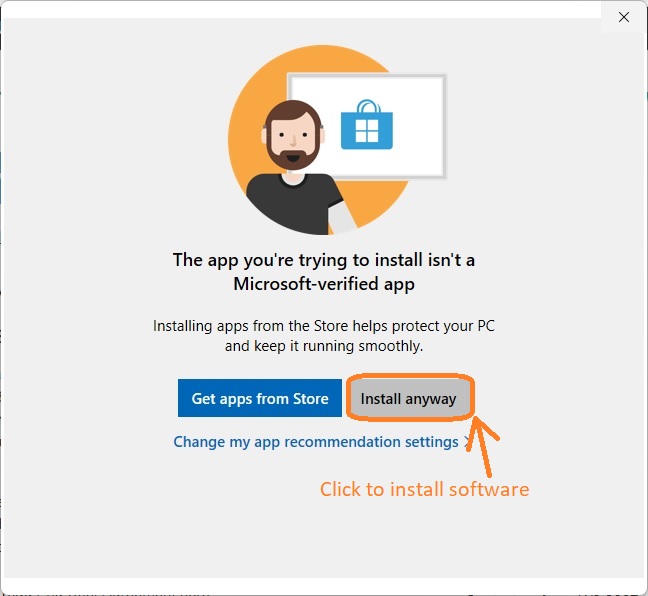
    download accounting software

    3.2 Navigate through the user-friendly ezAccounting installation wizard. Accept the terms by clicking I Agree on the license agreement screen.

    3.3 Choose whether to install ezAccounting for yourself or all users on the computer.

    3.4 Follow the on-screen instructions to complete the installation process seamlessly.
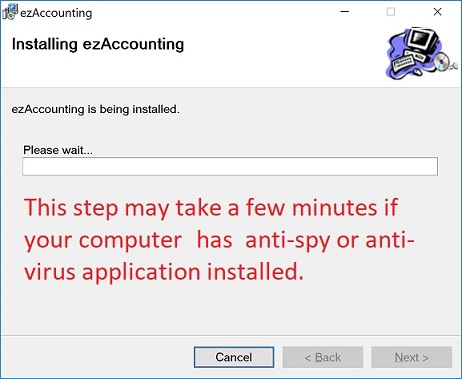
    download ezAccounting tax calculator
    4

    Accessing ezAccounting

    A desktop shortcut will be created for easy access. Click it to run ezAccounting software.

    ezAccounting shortcut
    5

    Get Started

    New customers, follow the quick start guide to set up ezAccounting step by step.

    ezAccounting Quick Start Guide
