Halfpricesoft Halfpricesoft

What Permissions Are Needed to Run ezACH Software

With ezACH software, you can create the NACHA ACH file to make ACH Payment easily.

1. Permissions

To run ezACH correctly, you need to have at least read, write and execute permissions to access the following folders and the files inside the folders.

1.1. Datebase folder

The default data folder path is:
C:\Users\Public\Documents\Halfpricesoft\ezACH

1.2. Application folder

The default application folder path is:
C:\Program Files (x86)\Halfpricesoft\ezACH Deposit

2. How to view folder permission

2.1. In Windows Explorer, right-click the file or folder you want to work with.

2.2 From the pop-up menu, select Properties, and then in the Properties dialog box click the Security tab.

2.3 In the Name list box, select the user, contact, computer, or group whose permissions you want to view.

3. How to edit folder or file permission

3.1. Right-click the file or folder for which you want to set permissions, click Properties, and then click the Security tab.

3.2. Click Edit to open the Permissions

3.3 In the Name list box, select the user, contact, computer, or group.

3.4 Select the Allow or Deny check box.

3.5 Save the changes

4. Sample: How to view and edit the permissions

If you do not have enough permisisons, you may not be able to start an application or you will get database error when you save a new check or form. Please make sure you have enough permissions.

4.1 Open Windows Explore, navigate to the database folder

The default database on your machine is:
C:\Users\Public\Documents\Halfpricesoft

4.2 Select the ezCheckPrinting folder by mouse, right click.
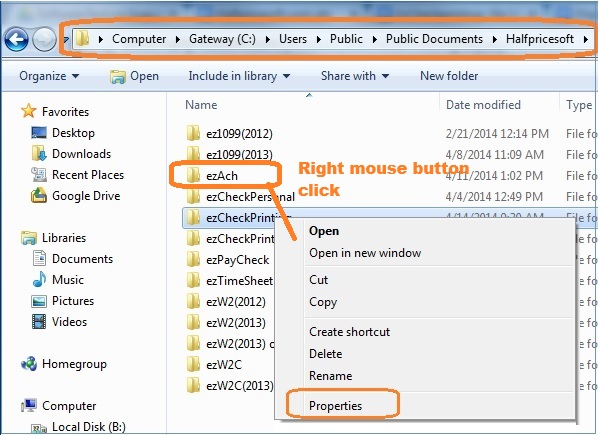


4.3 From the pop-up menu, select Properties, and then in the Properties dialog box click the Security tab. You need to have at least read, write and execute permisson.

4.4 Click Edit to open the Permissions
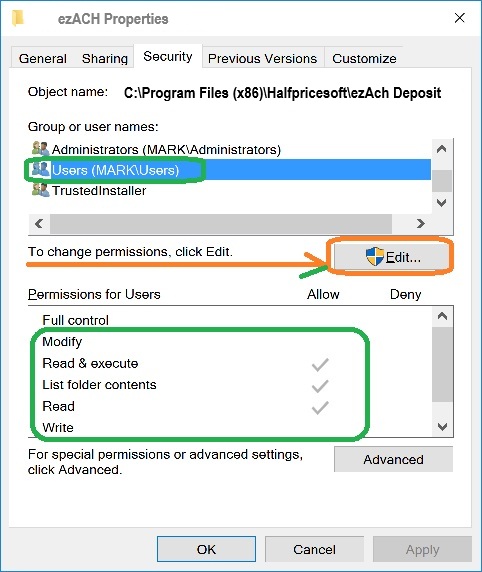


4.5 Select the Allow check box for FULL CONTROL.
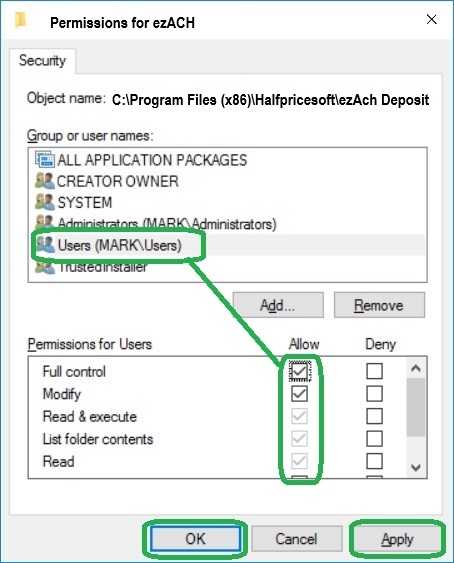


4.6 Apply and save the changes

4.7 Please repeat step 4.1 to 4.3 to double check if you have updated the permissions successfully. If not, you need to contact the system administrator in your company for help. You may not have the permissions to change settings.


ACH software
From $295

Generate ACH Files for Direct Deposit In-House

ezACH: Trusted By Thousands.

  • Generate ACH files for direct deposit paychecks
  • Generate ACH files for vendor payments
  • Generate ACH files for government payments
  • Unlimited accounts. Unlimited transactions.
  • For both federal and states.
  • Try free DEMO today. No obligation. No credit card required. No risk.

  • ezACH is compatible with Windows 11, 10, 8.1, 8, 7, and other Windows system, 32-bit or 64-bit.