Halfpricesoft Halfpricesoft

How to Unregister ezPaycheck License

If you purchased a new computer, you can unregister ezPaycheck license from the current computer and register it on a new computer.
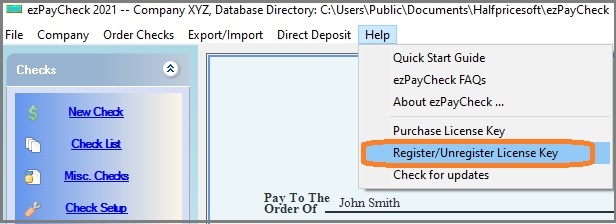
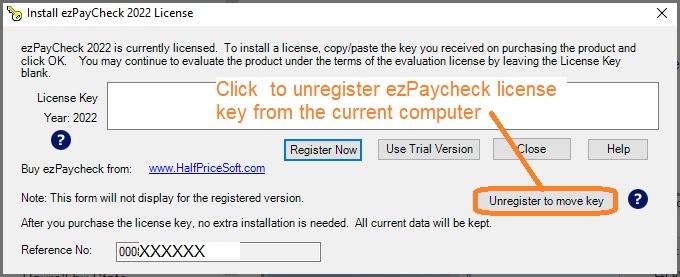
Option 1: Unregister license from within the application

1. Start ezPaycheck 2026 on the old computer, click the top menu "Help" then click the sub menu "register/unregister license key".


2. Unregister the license key.


Option 2: Unregister license from customer account

If your computer has crashed or you are unable to unregister the license from within the application, you can create a client account (if you don't already have one) and unregister it through your customer account instead.


payroll software
From $169

ezPaycheck Makes Payroll An Easy, In-House Task!

(For Windows and Mac )

  • Trusted by Thousands for Two decades.
  • Calculate Federal & State Taxes, Print Paychecks, Print W2, W3, 941, 943 and 940.
  • User-friendly, Easy-to-use
  • No monthly fee.

Act Now: Save with the ezPaycheck 2025 + 2026 Combo. Automate payroll with ease..

Try it free for 30 days with no obligation. No credit card required.