ezPaycheck: How to add a new payroll deduction and withhold it from each paycheck automatically
ezPaycheck payroll software is very flexible. With ezPaycheck, user can easily add a new deduction to handle IRA plan, insurance, garnishment, donation, dependent care, flexible account, local taxes or more. Here are the steps on how to add a new payroll deduction:
Option 1: By percent deductionOption 2: By amount deductionOption 1: How to add a by percent deduction
Step 1.1. Add a deduction
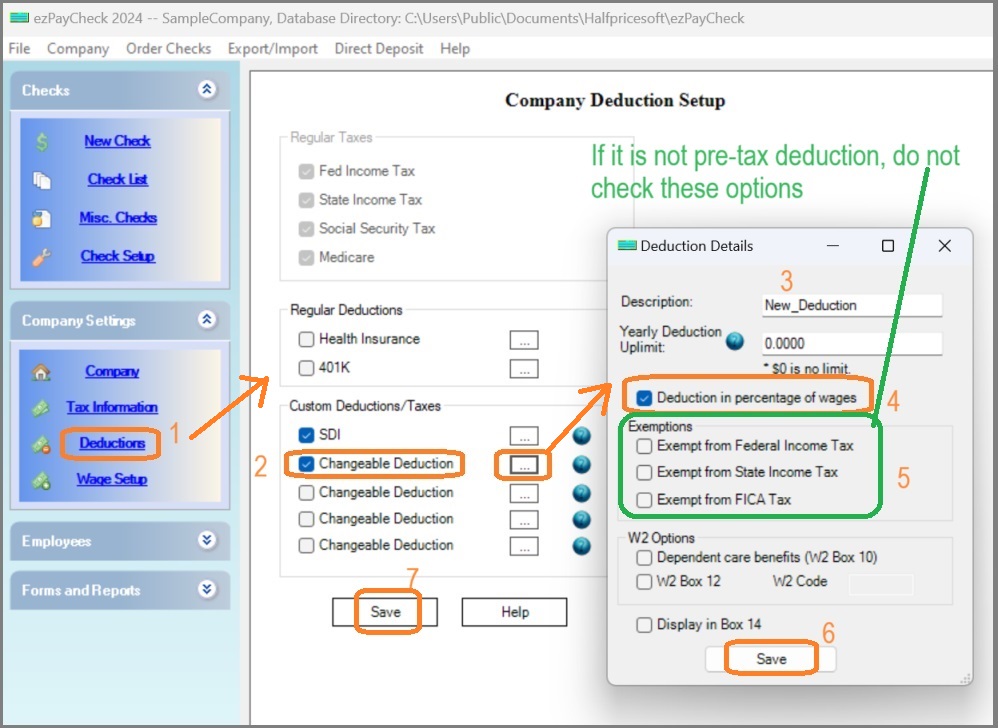 1.1.1. Start ezPaycheck, click the left menu "Company Settings->Deductions" to open the Company Deduction Setup screen.1.1.2. Check one Customized deduction item, then clicked the button behind it to open the Deduction Details screen.1.1.3. Input the new name (ie: My_dedution).1.1.4. Please check the "Deduction in percentage of wage" option box.1.1.5. Exemptions: if it is a pretax deduction (ie: exempt from FICA tax, fedetal/state tax), you can check exemption option box. Otherwise, leave it unchecked.1.1.6. Click the "Save" button on Deduction Details screen.1.1.7. Click the "Save" button on Company Deduction Setup screen to update the database.
Step 1.2. Edit employee settings to specify the rate/amount of the new deduction
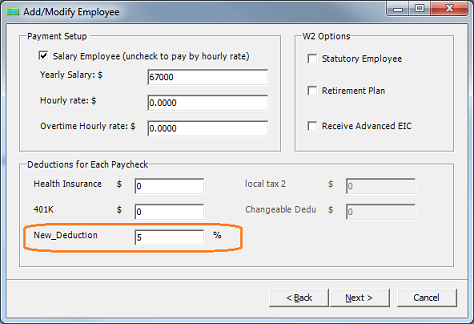 1.2.1. Select one employee from employee list and edited his deduction option.1.2.2. Enter the percent value.1.2.3. Click the "Next" button until the last page, then click the "Finish" button to save the change.
Step 1.3. Generate a new check
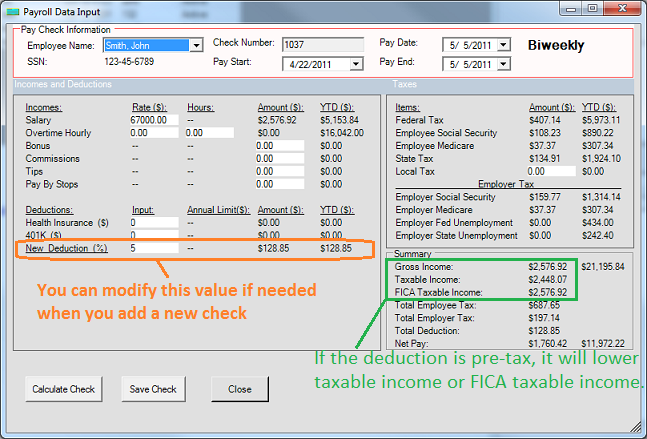
- If you added a new pre-tax deduction (because you check the exempt option in step 1.5) , you will see lower taxable income or lower FICA taxable income on screen.
- If it is post-tax deduction, you will see the same values for Gross Payment, Taxable Income and FICA Taxable Income on screen.
Option 2: How to add a by amount deduction
Step 2.1. Add a deduction
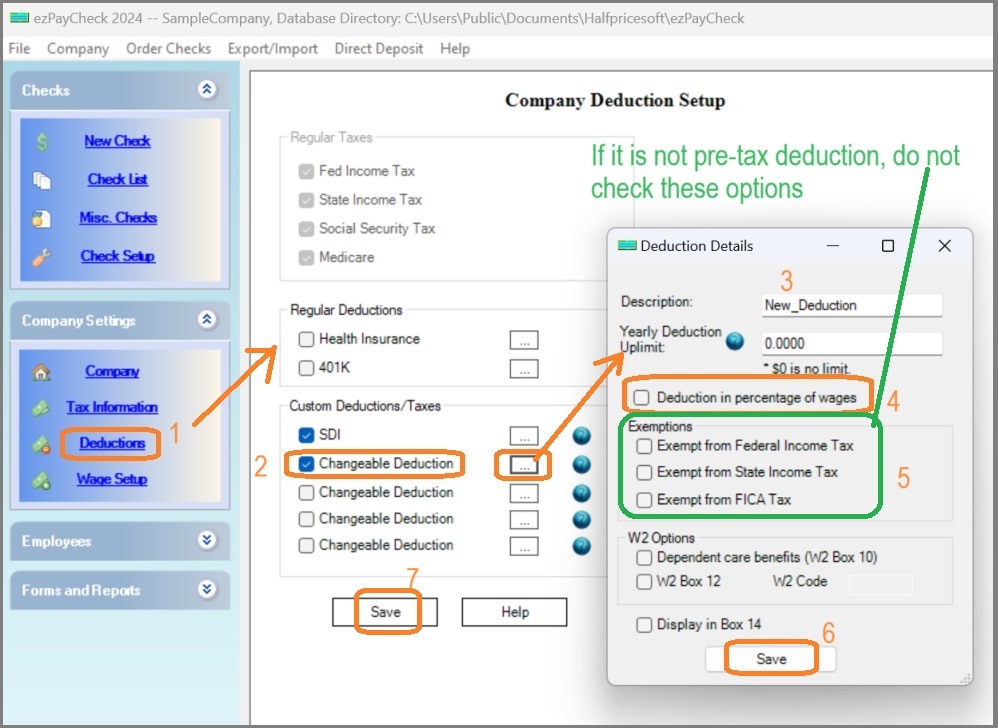 2.1.1. Start ezPaycheck, click the left menu "Company Settings->Deductions" to open the Company Deduction Setup screen.2.1.2. Check one Customized deduction item, then clicked the button behind it to open the Deduction Details screen.2.1.3. Input the new name (ie: My_dedution).2.1.4. Please uncheck the "Deduction in percentage of wage" option box.2.1.5. Exemptions: if it is a pretax deduction (ie: exempt from FICA tax, fedetal/state tax), you can check exemption option box. Otherwise, leave it unchecked.2.1.6. Click the "Save" button on Deduction Details screen.2.1.7. Click the "Save" button on Company Deduction Setup screen to update the database.
Step 2.2. Edit employee settings to specify the rate/amount of the new deduction
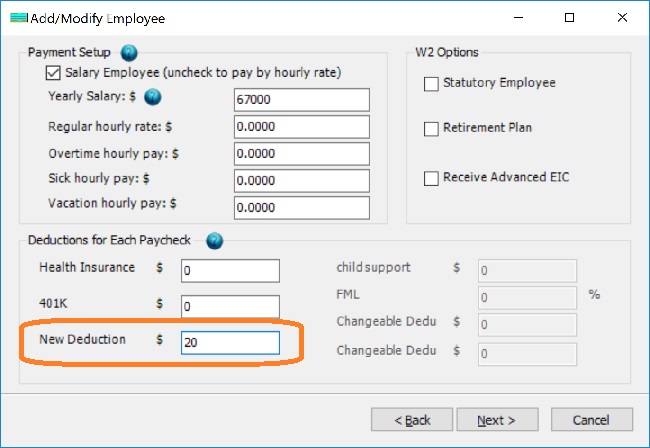 2.2.1. Select one employee from employee list and edited his deduction option.2.2.2. Enter the amount value.2.2.3. Click "next" button until the last page, then click the "Finish" button to save the change.
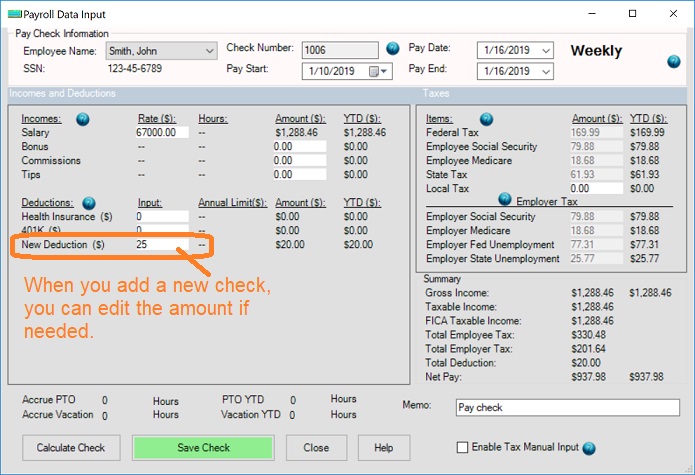
Step 2.3. Generate a new check
- If you added a new pre-tax deduction (because you check the exempt option in step 1.5) , you will see lower taxable income or lower FICA taxable income on screen.
- If it is post-tax deduction, you will see the same values for Gross Payment, Taxable Income and FICA Taxable Income on screen.
Samples
How to handle SDI taxHow to handle Oregon transit taxHow to handle child supportHow to set up pre-tax health insurance payroll deductionHow to handle occupational tax or professional taxHow to handle CO Family Leave DeductionHow to handle MA Family Leave Deduction
Troubleshooting
Why the social security tax is not correctWhy the federal income tax is not correctWhy the state income tax is not correct
(
back to top)
Related Topics
ezPaycheck Quick Start GuideHow a add a new company accountHow to handle both employees and contractorsHow to handle restaurant tipsHow to add a custom deduction and withhold it from each paycheck automaticallyHow to handle local taxesHow to handle State Disability Insurance (SDI)How to print paycheck in different formats: check-on-top, check-in-middle, check-at-bottom or 3-per-pageHow to print paycheck on blank stockHow to print paycheck on pre-printed checksHow to print paycheck with company logoHow to adjust check printing positionSample PaychecksDetermine a Company's Name for e-Filing