Halfpricesoft Halfpricesoft

How to Withhold Family and Medical Leave(FMLA) from Paycheck?

ezPaycheck payroll software is very flexible. With ezPaycheck, you can withhold FMLA (Family and Medical Leave) from each employee paycheck easily.


Part 1: FMLA Rate

FMLA contribution rates vary by state. States like California, New York, Colorado, and Washington have established paid family and medical leave programs funded through payroll taxes, which may be paid by employers, employees, or both. These programs typically set contribution rates annually.

If you are unsure about the applicable rate in your state, please contact your local state office or labor department for clarification.


Part 2: Steps to Withhold FMLA from Employee Paychecks


Step 1. Set up FMLA deduction

1.1 Start ezPaycheck, click the left menu "Company Settings->Deductions" to open the Company Deduction Setup screen.

1.2 Check one changeable deduction item, then clicked the button behind it to open the Deduction Details screen.

1.3. Input the name (ie: "CO FAMLI" or "WA FMLA" or others)

1.4. Enter Yearly Uplimit (the maximum to withhold for each employee in a year)

1.5. Check the "Deduction in percentage of wage" option box if you need to withhold this deduction by percent.

1.6. Click the "Save" button on Deduction Details screen.

1.7. Click the "Save" button on Company Deduction Setup screen to update the database.
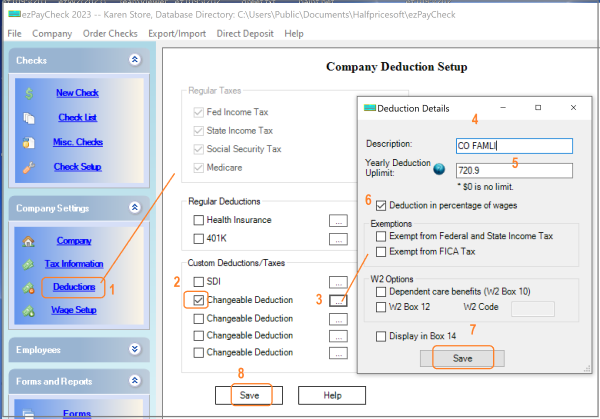
CO FAMLI


Step 2. Edit employee settings to specify the rate of the new deduction
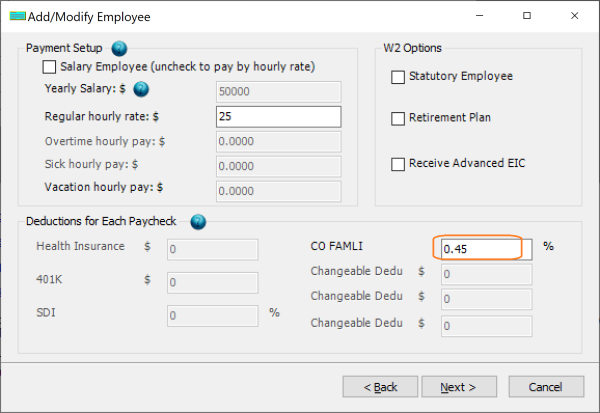
set employee CO FAMLI rate

2.1. Select one employee from employee list and edit the deduction option.

2.2. Enter the percent value or default amount value.

For example: You need to withhold this deduction by hours and your pay period is weekly. You can enter the deduction value for 40 hours.

2.3. Click the "Next" button until the last page, then click the "Finish" button to save the change.


Step 3. Generate a new check

When you generate the new check, you will see the default percent/amount value for this deduction on paycheck. You can edit this value if needed.
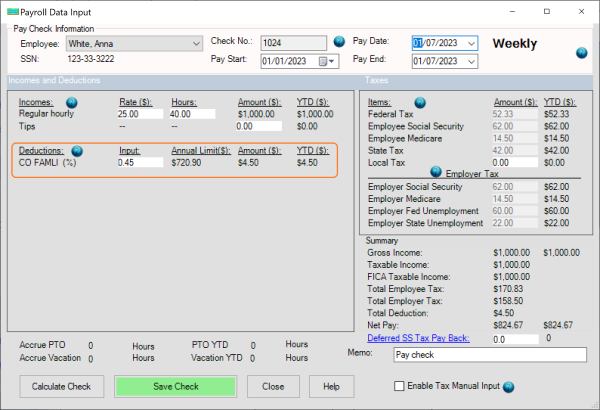
add paycheck with CO FAMLI deduction


Part 3: Employer-Side Contributions

ezPaycheck does not track employer side contribution.

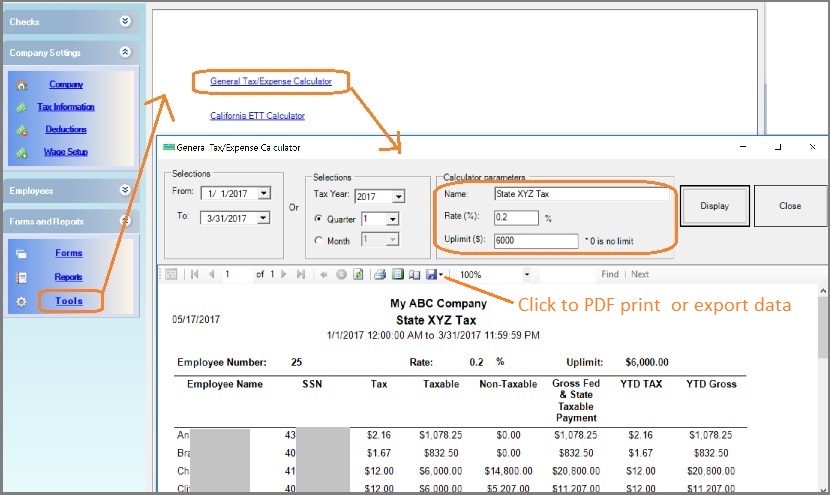
Clients can use the payroll tools to calculate employer side contributions.

payroll tools


payroll software
From $119
(Regular $169)

ezPaycheck Makes Payroll An Easy, In-House Task!

(For Windows and Mac )

  • Trusted by Thousands for Two decades.
  • Calculate Federal & State Taxes, Print Paychecks, Print W2, W3, 941, 943 and 940.
  • User-friendly, Easy-to-use
  • No monthly fee.

Act Now: Save with the ezPaycheck 2025 + 2026 Combo. Automate payroll with ease..

Try it free for 30 days with no obligation. No credit card required.