Halfpricesoft Halfpricesoft

1094C-086-01 CorrectedUniqueSubmissionId Receipt ID Error and Solution

ez1095 software makes it easy to file ACA forms to IRS. Please follow this guide if you encounter:
The Error (1094C-086-01)

If Form 1094C 'CorrectedUniqueSubmissionId' has a value, then the Unique Submission ID ('ReceiptId' | 'SubmissionId') of the 'CorrectedUniqueSubmissionId' must match a Unique Submission ID from a Submission that was previously accepted by IRS.


Reason:

You are using the wrong Receipt ID. The Receipt ID in CorrectedUniqueSubmissionId must be the ID of the original submission (the one that was Accepted with Errors)—not the Receipt ID of a correction (which may have been rejected or is just a prior correction).

For example:
You filed an original submission and it came back Accepted with Errors with Receipt ID "1094C-11-11111111". Later you filed a correction (which was rejected or you are filing another correction).

When you file your correction, you must enter the Receipt ID of the original—i.e. "1094C-11-11111111" . If you enter the Receipt ID of the correction by mistake, the IRS will return error 1094C-086-01. Always use the Receipt ID of the original submission, not the correction.

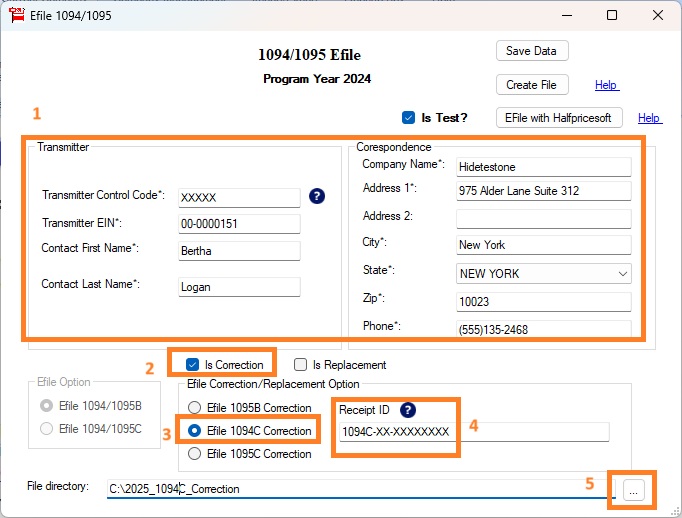
1094C correction efile screen

Solution:

Use the Receipt ID (or Submission ID) of the original submission (the one that was Accepted with Errors)—not the Receipt ID of a correction. Enter the original submission's ID in the CorrectedUniqueSubmissionId / Receipt ID field on the efile screen and submit your correction again.

How to find the correct Receipt ID?

  • If you file through Halfpricesoft 1095 efile service, log in to your client account and find the original submission (the one that was Accepted with Errors). Use that submission's Receipt ID.

  • If you file with your own TCC, log in to your IRS account and find the original submission (Accepted with Errors). Use its Unique Submission ID (ReceiptId/SubmissionId) as the CorrectedUniqueSubmissionId for your new correction.


  • 1095 software
    From $295

    Securely File 1095 & 1094 ACA Forms In-House

    ez1095: IRS Approved. Trusted By Thousands.

  • Prepare, print, PDF print and e-file 1095-B, 1094-B, 1095-C and 1094-C ACA forms
  • Unlimited accounts. Unlimited forms.
  • For 2016 to 2026 tax seasons.
  • For both federal and states.
  • Try free DEMO today. No obligation. No credit card required. No risk.

  • ez1095 is compatible with Windows 11, 10, 8.1, 8, 7, and other Windows system, 32-bit or 64-bit.