Step 2: Apply for your Information Return Transmitter Control Code - TCC
Software developers, transmitters, and issuers must have a TCC to electronically file AIR Forms 1094/1095-B and 1094/1095-C. After you create an e-Services account account (see Step 1), you will have access to the ACA Application for TCC.
2.1. Complete the ACA Application for TCC
2.2 The Responsible Officials must sign the terms of agreement with the PIN created during the registration process.
2.3. When the application is in completed status, the Transmitter Control Code(s) will be visible online and will be mailed to you via U.S. Postal mail.
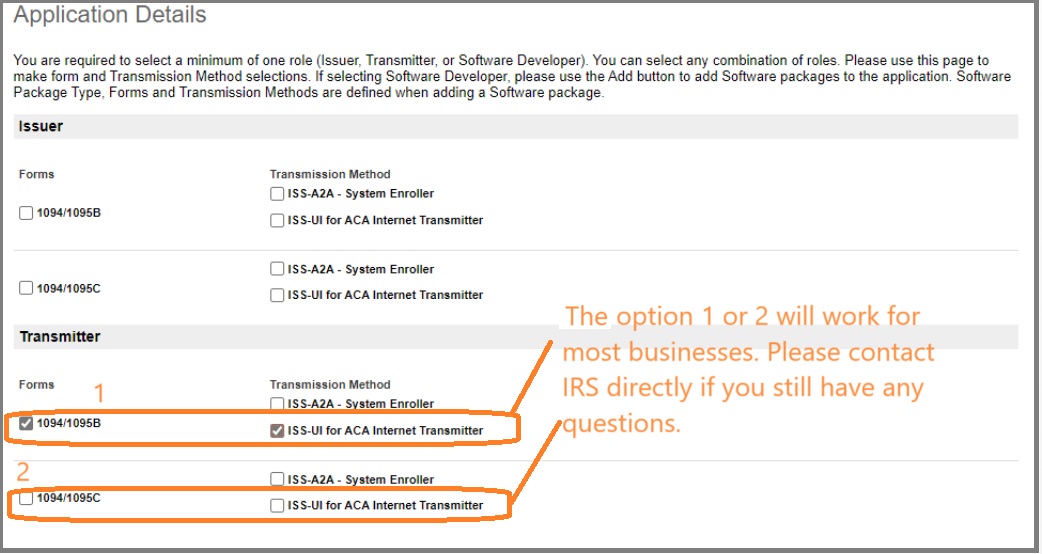
Which role to select when apply for TCC?
Each role selected on the application - software developer, transmitter, and issuer - results in a separate TCC. Most of our ez1095 clients can select the role of
"transmitter".
| Role | If.. | And | Then |
| Issuer | I am an employer or insurance issuer/carrier purchasing a software package, | I will transmit my own information returns. | Select the role of Issuer on your application.Note: You may not use an Issuer TCC to transmit information returns for other employers or insurance issuers/carriers. |
| Transmitter | I am an employer or insurance issuer/carrier purchasing a software package, | I will transmit my own information returns and transmit for other employers or insurance issuers/carriers. | Select the role of Transmitter on your application.Note: The TCC for a Transmitter can be used to transmit your own returns and others. You may not use an Issuer TCC to transmit information returns for other employers or insurance issuers/carriers. |
 First time efiler: How to pass ACA testing.