HalfpricesoftHalfpricesoft

    How to Unregister ezPaycheck License

    If you purchased a new computer, you can unregister ezPaycheck license from the current computer and register it on a new computer.
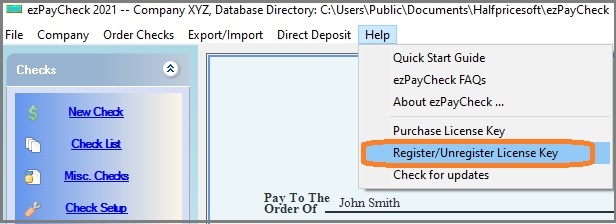
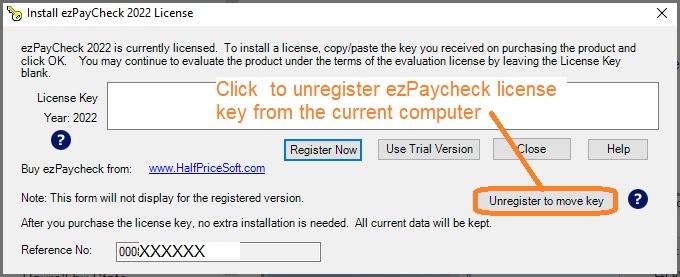
    Option 1: Unregister license from within the application

    1. Start ezPaycheck 2026 on the old computer, click the top menu "Help" then click the sub menu "register/unregister license key".


    2. Unregister the license key.


    Option 2: Unregister license from customer account

    If your computer has crashed or you are unable to unregister the license from within the application, you can create a client account (if you don't already have one) and unregister it through your customer account instead.


    payroll software
    From $159
    (Regular $189)

    ezPaycheck Makes Payroll An Easy, In-House Task!

    (For Windows and Mac)

    • Trusted by Thousands for Two decades.
    • Calculate Federal & State Taxes, Print Paychecks, Print W2, W3, 941, 943 and 940.
    • User-friendly, Easy-to-use
    • No monthly fee.

    Switching Payroll? Get ezPaycheck 2026 + 2027 Together & Save

    Try it free for 30 days with no obligation. No credit card required.