I love your software so I bought a license on 8/20/2010.
I have a computer repair business and will let my business customers know about your software.
Chris
We were very impressed with the software so far. ezPaycheck gives us exactly what we need.
Regards, Linda
Wow, you are amazingly fast! I thought it would take a while to get this up and running again but that is as close to as instant customer service/response as you can get!
Thank you again,
Laure
Great. We do a lot of check printing for our clients and used another check printing software which was not flexible at all. Yours is very simple and kind of what we were looking for, so that’s why I am trying to give feedback so you can do it even better.
jtort
All I can say is WOW!! I know that I made those suggestions and you had said something about a gift. I honestly didn't think you would take it to this level. I want you to know that is it so nice and( I say that from the bottom of my heart) cause you know that most people would not have even remembered that they said anything about that and would have charged me for the upgrades. So I want to Thank you and the people of Halfpricesoft.com. If for nothing else than for renewing my faith in people and companies. Tell the bosses that everyone deserves a raise. WOW ! Again I want to thank you all. You all have made a friend today.
Your new Friend
Michael (but all friends call me Mike)
Thanks a bunch. You are the first one in a business that has ever been really nice like that.
Mike
I have to start by saying that you folks are amazing. I've been in the software business for over 20 years and I've never heard of such a quick response to a customer inquiry. I am really impressed and send you kudos or high fives or whatever is current now (fist bumps?).
Really great customer service.
Steve
Thank you for your prompt and excellent support. Not many customer-servicers have the capacity to look beyond getting a dollar today, I think most would have said, "well, we have his money, and it was HIS choice to buy 2010-only rather than wait until the bug was fixed, so case closed". They would keep my dollar today, but never get another one from me again. You, on the other hand, now have my loyatly (though perhaps not much for me to buy from you, haha)
If you don't have a sincere desire to help others, you should not be in "CUSTOMER service", eh?
Thank you again.
Regards,
Chris
ezCheckpersonal worked out great! the Logo option really makes a difference on the checks. i went ahead and purchased this version.
Thanks again!
Vikki
ezPaycheck worked great! Thank you so much...
You have already given me 1000% more customer service than company I am changing from.
I appreciate that.
Stacey
Stop Ordering Checks From Bank!
Step by step guide on how to print your bank checks from your home printer in minutes at $0 cost.
Do you know you are able to print your bank checks from your home printer? And
the cost can be as low as $0.
Printing checks from your own printer is perfectly legal. However, checks must
be printed on special paper. Most banks accept checks printed with the regular
laser print toner. All items user needed are a laser printer, blank check paper
and ezCheckPersonal software. If you already have a laser computer, your total
cost for the software and the check paper can be $0.
The main advantage to people who use check printing and writing software is that
it saves them time and money in a variety of ways - and that is especially true
during these economic times. With ezCheckPersonal, you can have the flexibility
to print quality bank checks immediately in a secure environment. You will
never run out of checks and you are never left with stacks of unused preprinted
checks when your bank changes names or you move to a new address.
Followings are the step by step guide on how to print your bank checks from
your home printer in minutes at possible $0 cost.
Step 1: Download this personal check writing software from halfpricesoft.com
ezCheckPersonal runs on a machine with Windows system only. If you have a MAC
machine, it will not work. This check printing and writing software support
Windows 98, Windows NT, Windows 2000, Windows 2003, Windows XP and Windows
Vista. It supports both 32-bit and 64-bit operating system.
Just following the intructions on the free check writing software download page
to install this check writer.
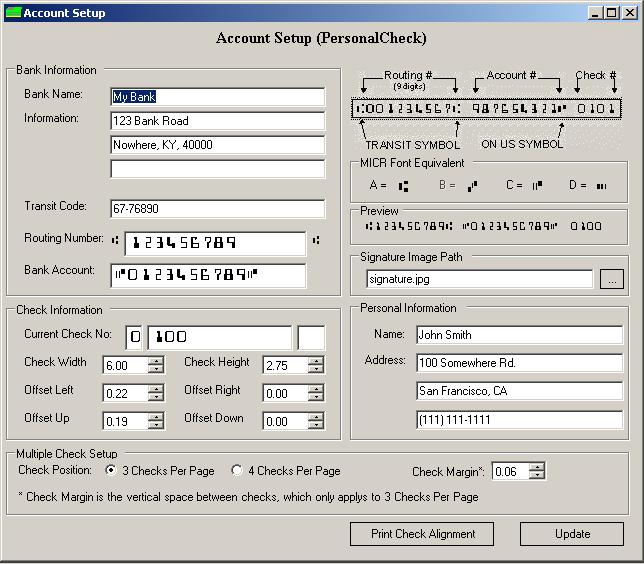
Step 2: Set up your own the bank information
click the icon on disktop to start ezCheckPersonal.
For testing purpose, you can ignore this step because ezCheckPersonal comes with
a sample database. If you want to setup your personal bank information,
you can do it by clicking the top menu "Settings->Edit Current Account" to
open check setup page. After you modify the information there, please do not
forget to click the save button.
Step 3: Add a new check and print it from your laser printer
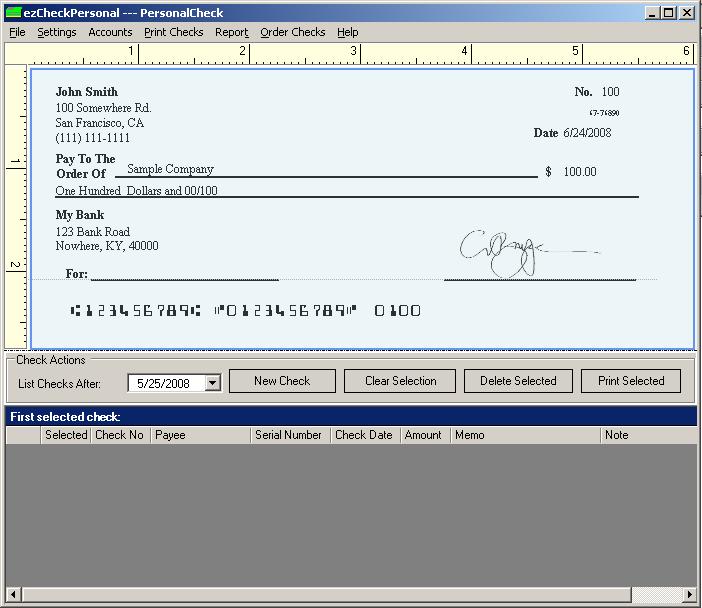
Click the "New Check" button from the main screen to add a new check. Then you
select this check from the list and print it by simply clicking the "Print
Selected" button. Now your first check is ready from your printer.
ezCheckPersonal print check from the default printer. So make sure you set up
your laser printer as your default one. If you have blank check paper, you can
use it. For testing purpose, blank white paper is fine.