Invalid format
Problem 1: QuickBooks mobile app
The virtual printer does not work with the QuickBooks app. Open QuickBooks Online in Chrome, Edge, or Internet Explorer and print from the browser.
Problem 2: Adobe Reader is missing or not the PDF handler
QuickBooks Desktop
- Install Adobe Acrobat Reader.
- Restart the computer.
- Make Adobe the default app for .pdf. Open Default apps, then choose Default apps by file type.
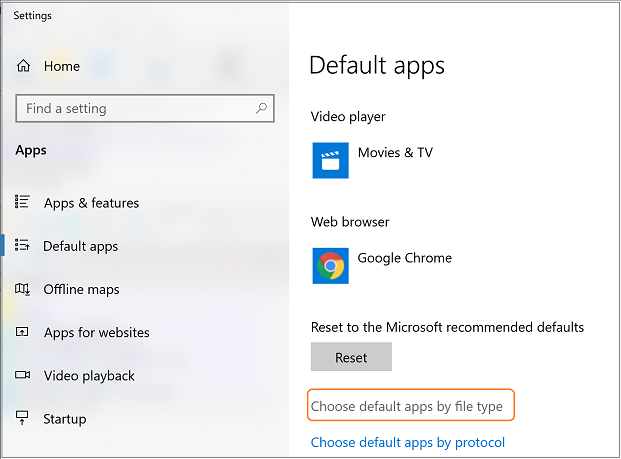
- Find .pdf.
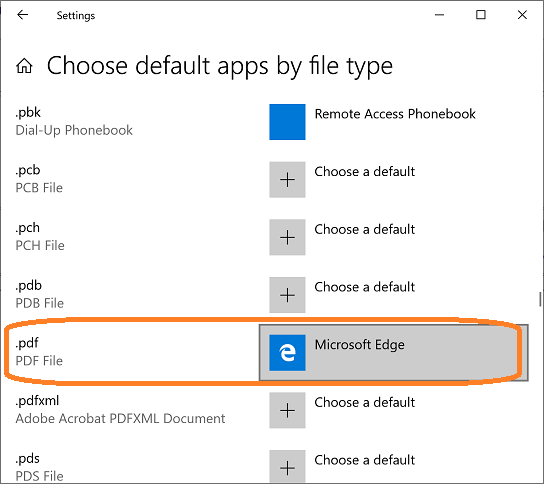
- Change it from Edge (or whatever is listed) to Adobe Acrobat Reader DC or Acrobat DC, then close Settings.
QuickBooks Online
Enable Adobe in the browser. See Index out of bounds / PDF reader (QuickBooks Online). Internet Explorer and Edge have fewer of these problems than Chrome.
Still stuck? See What to send if you still need help.