Other installation errors
1. User permission
Run the software as an Administrator. If you're an end user who doesn't have access to the Administrator account, ask your IT department for help.
2. System permission
On a locked-down machine, save the installer to a local folder and run it from there. Do not run it only from the browser download prompt. The ezCheckPrinting download page walks through installing from a local folder.
3. "Invalid Argument"
- Ask the company IT administrator to install the QuickBooks virtual printer.
- If you are the only user of the computer, create a new local administrator account and change the original account to a standard account. Install the QuickBooks virtual printer using the new administrator account.
Microsoft guide: Manage User Accounts in Windows.
4. "Port Error"
Follow Printer missing or port error.
5. Antivirus or antispyware blocked the install
These products have blocked the download or the program for some customers. Allow ezCheckPrinting QuickBooks printer in that product, then install again.
- Bitdefender: Allow an application in Bitdefender.
- Webroot: View and disable shields in Webroot.
- Kaspersky: Allow ezCheckPrinting in the Kaspersky application control or exclusions list.
- Windows Defender: Add an exclusion and, if Controlled folder access is on, allow the app. The steps are in Allow ezCheckPrinting through Windows Security.
- Microsoft: Virus and Threat Protection in the Windows Security App.
6. .NET Framework error
.NET may be turned off.
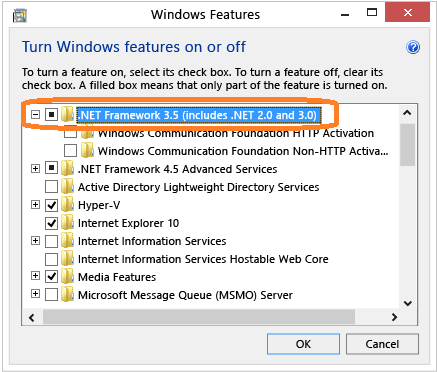
- Open Control Panel.
- Choose Programs and Features.
- Choose Turn Windows features on or off.
- Select .NET Framework 3.5 (includes .NET 2.0 and 3.0). This needs an internet connection. You do not need the child items for Windows Communication Foundation (WCF) HTTP activation unless you are a developer who needs WCF script and handler mapping.
7. Installation interrupted
Seen when .NET Framework 4.0 is missing or cannot run. Two options:
- Install .NET Framework 4.0 from Microsoft: Download .NET Framework 4.0
- Or use the special build compiled for Windows XP and Windows 7.
8. ezCheckPrinting will not start after a successful install
That problem is the check-writing application, not the virtual printer driver. See ezCheckPrinting stops working.