#7 .net Framework Error
Windows computers should have .net framework installed by default. You may receive this error if the .net framework is disabled on your computer. You can follow this guide to enable it from the control panel.
1) Open Control Panel.
2) In Control Panel, choose Programs and Features
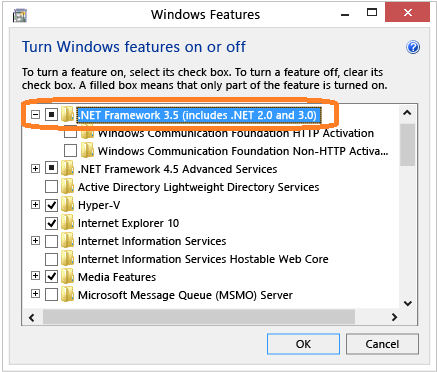
3) Choose Turn Windows features on or off, and then select the .NET Framework 3.5 (includes .NET 2.0 and 3.0) check box.
This option requires an Internet connection. You do not need to select the child items for Windows Communication Foundation (WCF) HTTP activation unless you are a developer who requires WCF script and handler mapping functionality.
#8 Warning 1909: Could not create shortcut .lnk. Verify that the destination folder exists and that you can access it.
Please click
this link for solution.