W2 and 1099 Software: How to Print Tax Forms over Network
With ezW2's multiple-user version, users can seamlessly share data via a server, a shared folder, cloud storage like Google Drive, or other platforms.
Here are the two options to share the data with a sever:
Option 1: Install ezW2 on Client Computers and Share the Same Database File On the Server.
1.1. Download and install ezW2 on the first computer and enter the license key.
1.2. Start ezW2 application, set up company, employee and tax information and print one test form to make sure ezW2 works correctly. You can learn more from
Click the top menu "Company Management" then click "Backup Current Company" sub menu to copy current database file to a network folder. You can rename the file if needed
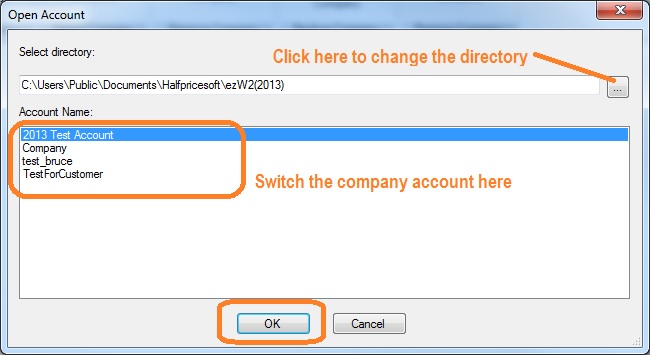
1.4. Switch the current account Click the top menu "Company Management" and click sub menu "select company" to switch the current company. Change the database path and name to the file on your server. Click the "OK" button to save your changes.
(Click image to enlarge)
Option 2: Install ezW2 on Server and Give Remote Access Permission to Multiple Users
You can download and install ezW2 on server and give access permissions to multiple users.
2.1. Log on server as administrator, download and install ezW2 on server.
2.2. Start ezW2 application, setup company, employee information and print one test form to make sure ezW2 works normally. You can learn more from
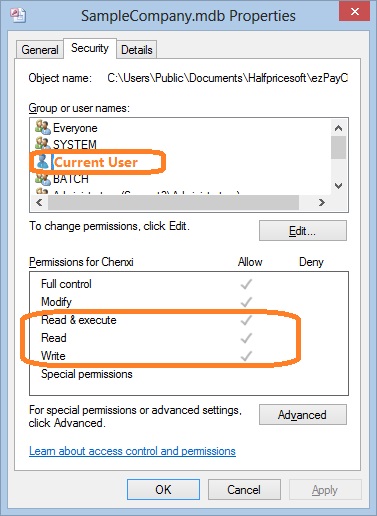
2.3. Log on client computer and test ezW2. Each client should enough permissions(read, write and execute permissions) to access ezW2 application and database file.
How can I know I have enough permission to access the database on the server
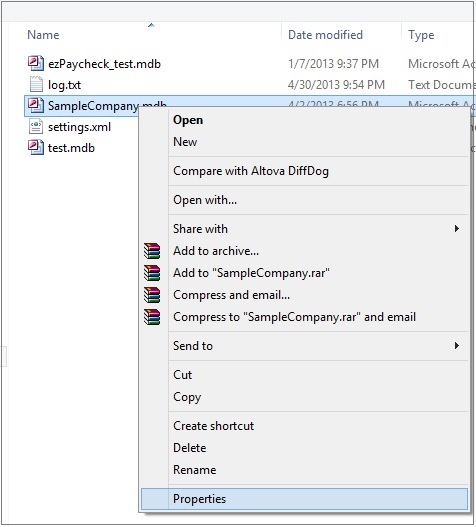
- Open Windows Explore, navigate to the database folder on the server - Select the database file by mouse, right click to view properties. You need to have read, write and execute permisson.
ezW2 software: SSA Approved. Trusted By Thousands for Two Decades.
Print and eFile Form W2, W3, 1099-NEC & 1096 in House.
Unlimited Company Accounts! Unlimited Forms!
Compatible with Windows 11, 10, 8.1, 8, 7, Vista, XP and other Windows computers.
Try it free today. No obligation. No credit card required.