How to start W2C software and set up account
Preprinted W2C and W3C forms are NOT necessary!
As an employer, you are required to print W-2 forms for your employees and file w-2 form to government. If you discover an error, you need to file Forms W-2c (Corrected Wage and Tax Statement) and W-3c (Transmittal of Corrected Wage and Tax Statement) as soon as possible.To correct a Form W-2 you have already submitted, you will need to file a Form W-2c with a separate Form W-3c for each year requiring correction. You need to file a Form W-3c whenever you file a Form W-2c, even if you are only filing a Form W-2c to correct an employee's name or Social Security number (SSN).
Below are the steps on how to setup company information to W-2c and W-3c quickly and easily withezW2Correction software.ezW2Correction software is approved by SSA to print all W-2c forms and W-3 on the white blank paper.
If you have not installed ezW2Correction software, you need to download and install it first.
After you installed ezW2Correction, you see the a desktop shortcut icon. You can double click it to start ezW2Correction software.

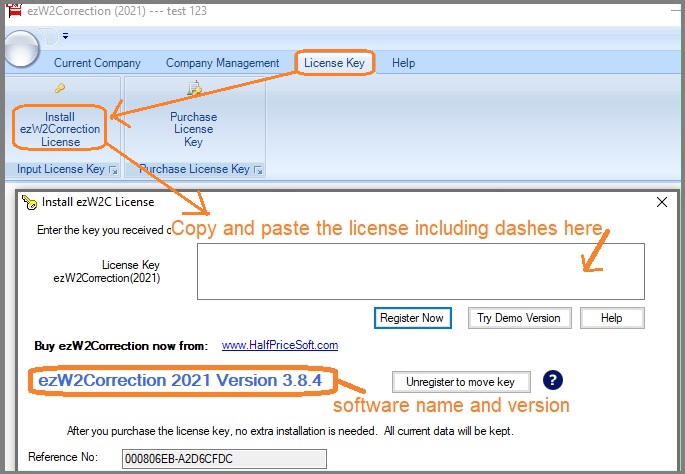
When you start ezW2Correction software for the first time, you will see the key input pop up screen. Once you enter the key code, you will not see this message again.
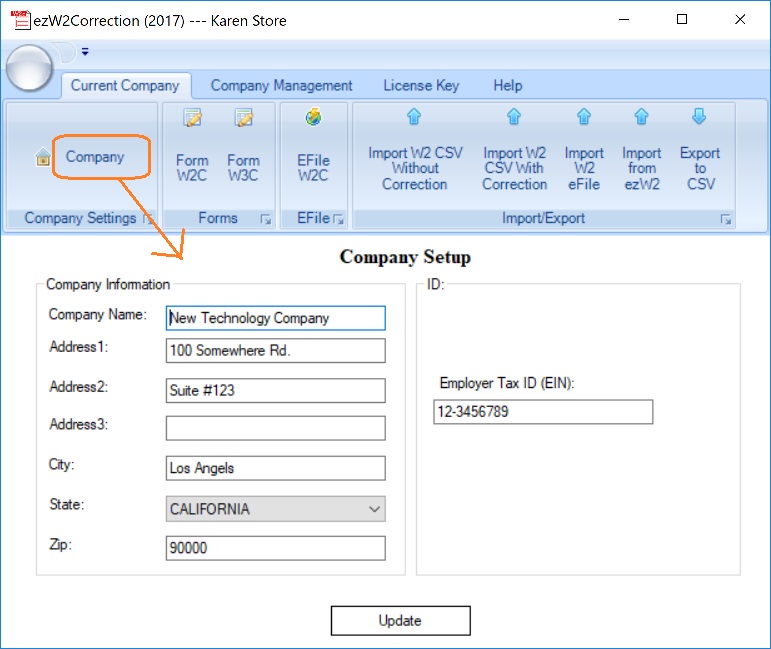
You can click the top menu "Current Company → Company". You need to enter the general company information for w-2c, such as Company Name, Address, Tax ID and others.
 | With ezW2Correction, you can paper print, PDF print and efile W-2C and W-3C forms for the previous 10 years. The white paper printing and data import features can save you valuable time and money. Please feel free to test drive ezW2Correction demo version for free before purchasing with no registration needed and no obligation. You can follow the step by step online instructions to finish the installation in minutes ezW2Correction software is compatible with Windows 11, 10, 8.1, 8, 7, 2003 Vista and other Windows computers. |
Please feel free to contact us whenever you need assistance. Our support team is glad to assist you.

