HalfpricesoftHalfpricesoft

    ezCheckPrinting Check Printing Software Free Download for Windows Computers

    Professional check printing software for Windows. Free trial with no obligation.

    Mac Users: Please check ezCheckPrinting for Mac here

    Free Trial - No Credit Card Required

    Try ezCheckPrinting for free with no credit card required. The trial version will print "TRIAL" on checks. Purchase a license key to remove the trial watermark.

    Download Options

    ezCheckPrinting Version 9

    Stand-alone desktop check writer

    File: checkprintingsetup.msi
    Size: 1.80 MB
    Version: 9.1.16
    Published: 02/24/2026
    System Requirements: Windows with .NET Framework 4.0+

    Virtual Printer

    QuickBooks & Quicken Integration

    Optional add-on that allows you to print checks from QuickBooks and Quicken on blank stock in one step. Check data is automatically imported into ezCheckPrinting.

    Need help? Check our installation guide orcontact support

    Scroll down for step-by-step installation instructions

    Installation Guide

    Follow these simple steps to get ezCheckPrinting up and running

    Watch Installation Video
    1

    Prepare for Installation

    Ensure you're logged into Windows as an administrator or a user with installation permissions.

    2

    Download the Installation Package

    Click the download button above to get checkprintingsetup.msi. Once downloaded, locate the file in your Downloads folder and double-click to launch the installer.

    3

    Run the Installation

    Follow these sub-steps during installation:
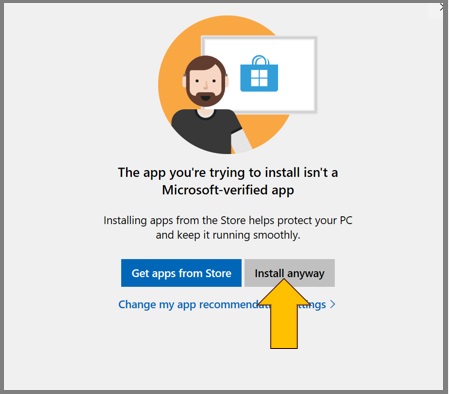
    • If you see a Microsoft Store alert, click "Install anyway" to proceed
    • Accept the license agreement by clicking "I Agree"
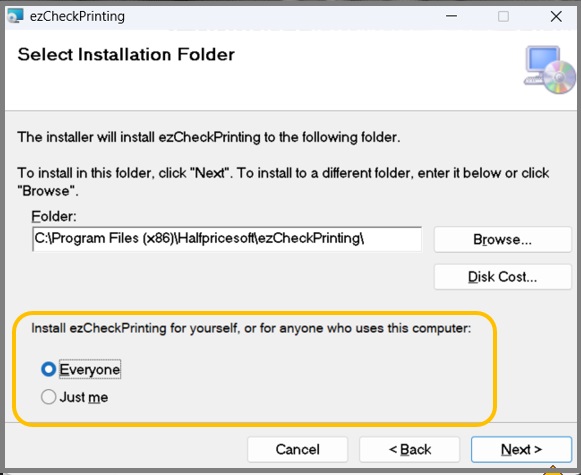
    • Choose installation scope (current user or all users)
    • Follow the remaining on-screen instructions
    Install anyway dialog

    Click "Install anyway" if prompted

    User selection dialog

    Choose installation scope

    4

    Launch ezCheckPrinting

    A desktop shortcut will be created for easy access. Click it to run ezCheckPrinting and start printing professional checks.

    ezCheckPrinting desktop shortcut

    Desktop shortcut for easy access

    License Key Activation

    If you've already purchased a license, start ezCheckPrinting and go to Help -> Input License Key to activate your full version.
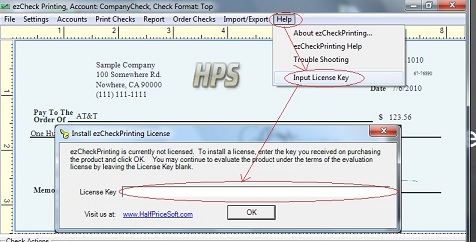
    License key input

    Quick Start Guide

    New to ezCheckPrinting? Follow our step-by-step guide to set up your account and start printing professional checks.

    Get Started Guide

    Troubleshooting

    Having issues? Check our troubleshooting guides for common problems and solutions.

    Ready to Remove the Trial Watermark?

    Purchase your license key to unlock the full version and remove the "TRIAL" watermark from your checks.

    License keys are emailed automatically after purchase. Check your inbox and spam folder within 10 minutes.