Data type mismatch in criteria expression
1. Company name, logo, or signature was checked in QuickBooks
Uncheck those options on the print-check screen.
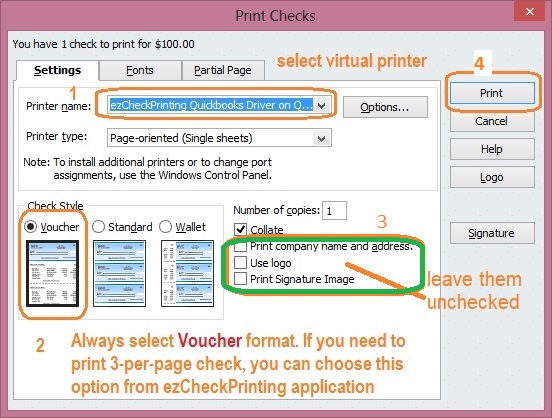
2. A check list was printed instead of a check
Print a voucher-format check with stubs, not a list of checks.

3. A sample check with a grid was printed
Print a real voucher-format check with stubs.

4. The installed version is too old for QuickBooks Online or current Desktop
Update ezCheckPrinting and the QuickBooks virtual printer.
5. Special characters in the account name
Use a name like BankXYZ or Bank 1234. Accounts > Duplicate Current Account, then Accounts > Select Account, and print from the new account.

6. Date format
ezCheckPrinting expects US dates: mm/dd/yyyy or M/d/yyyy (examples: 10/15/2017, 6/28/2018). Dates like 17/5/2018 or July 15, 2018 cause this error. QuickBooks follows the Windows date format. Change the Windows short date.
Canada QuickBooks needs ezCheckPrinting and virtual printer version 7 or later. Version 6 with Canada QuickBooks produces this error.

7. The database file is damaged
- Account > New Account. Name it something like CompanyABC New. Default bank setup is fine for the test.
- Print a check on white paper with a real printer. Do not use the virtual printer. If this fails, contact support.
- Print from QuickBooks through the virtual printer and select the new account.
- If the new account works, stop using the old one.