HalfpricesoftHalfpricesoft


    Why ezCheckPersonal software suddenly stopped working

    With ezCheckPersonal check writing software, you can restore date easily in a few clicks.

    free check printing software

    ezCheckPersonal allows customers to design and print pocket-sized personal checks with MICR encoding and logo on blank stock in house. You can also use it to fill out preprinted blank checks also.

    If you have not installed this software, you can download and try it free with no obligation and no credit card needed.

    ezCheckPersonal is available for both Windows and Mac computers.


    Issue 1: The desktop shortcut is broken (*****)

    Solution 1: Start ezCheckPersonal from program folder

    We noticed some customers could not run ezCheckPersonal because the desktop shortcut was broken. You can also start this pocket-sized personal check printing software from program folder

    The default program folder is:
    C:\Program Files (x86)\Halfpricesoft\ezCheckPersonal

    You can double click ezCheckPersonal.exe file to run it. (If your system hides extension, you just double click ezCheckPersonal). If it works, you can delete the old desktop shortcut and follow this article to create a new shortcut on desktop.

    Issue 2 Some anti-virus and ant-spy applications may block installation by mistake (****)

    Solution 2:

    According to clients' feedback, the following applications may stop our software from downloading or running.

    - Bitdefender - from Romania.
    Our clients said they could edit the setting to allow our software running.
    https://www.bitdefender.com/support/i-can-no-longer-use-an-application-868.html

    - webroot - Our clients said they could edit the settings to allow our software
    https://docs.webroot.com/us/en/home/wsa_pc_userguide/Content/ManagingQuarantine/BlockingOrAllowingFiles.htm

    - Kaspersky - from Russia. If you are still using it, please read this warning news
    https://finance.yahoo.com/news/experts-link-nsa-leaks-shadow-brokers-russia-kaspersky-144840962.html

    - Windows Defender - You can try the following solutions:

    1. Add an exclusion to Windows Defender Antivirus
    https://support.microsoft.com/en-us/help/4028485/windows-10-add-an-exclusion-to-windows-defender-antivirus

    2. Allow a blocked app in Windows Defender Security Center
    https://support.microsoft.com/en-us/help/4046851/windows-10-controlled-folder-access-windows-defender-security-center


    Issue 3: The settings file is messed up(***)

    Solution 2: Create a new settings file

    The default database folder is:
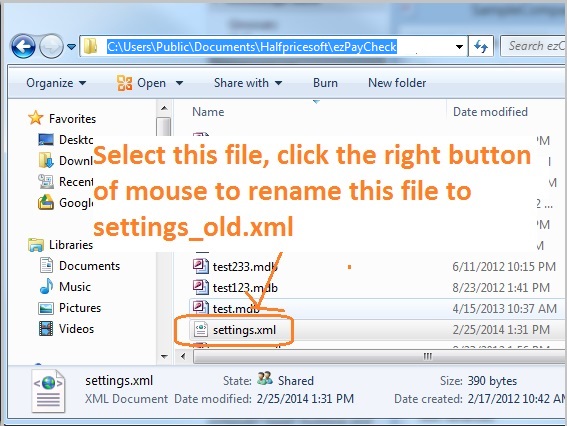
    C:\Users\Public\Documents\Halfpricesoft\ezCheckPersonal

    Open data folder and rename settings.xml to settings_old.xml.

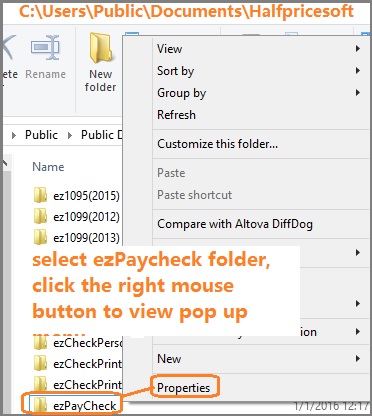
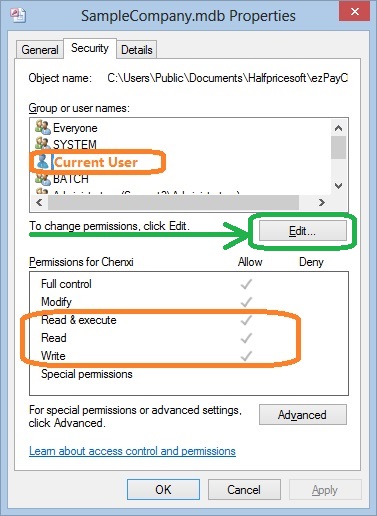
    Solution 4: Give current user permission to access data and application


    We suggest full control permission (at least read, write and execute) on these folders.

    The default program folder
    C:\Program Files (x86)\Halfpricesoft\ezCheckPersonal

    The default database folder is:
    C:\Users\Public\Documents\Halfpricesoft\ezCheckPersonal


    Solution 5: Run ezCheckPersonal as administrator

    You can check this article on how to run a program as the administrator.

    Related Links: