Steps to Download ezW2 Software
Step 1: Prepare for Installation
Ensure you're logged into Windows as an administrator or a user with installation permissions!!!
Step 2. Download ezW2 installation package.
Click "Download ezW2" button. Once the download is complete, open your browser's download file list by clicking the download icon. Launch the installation by clicking on 'ezw2setup.msi.'
Step 3: Install ezW2.
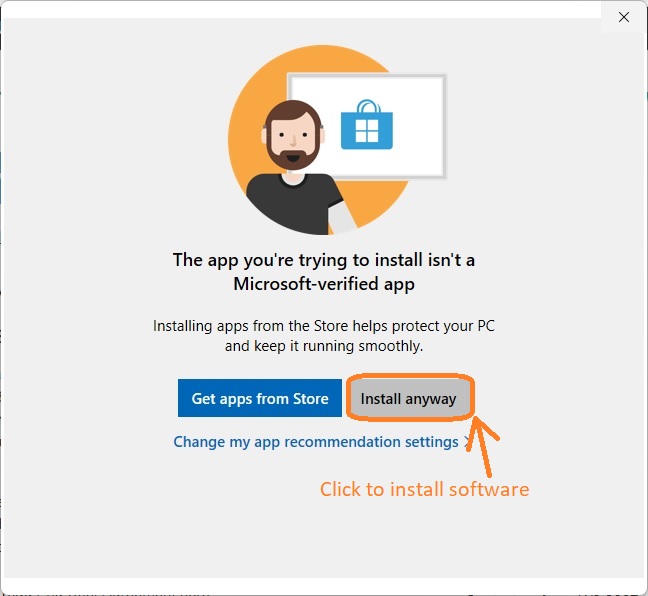
3.1 If you encounter an alert stating that ezW2 is not listed in the Microsoft Store, confidently click 'Install anyway' to proceed.
3.2 Navigate through the user-friendly ezW2 installation wizard. Accept the terms by clicking 'I Agree' on the license agreement screen.
3.3 Choose whether to install ezW2 for yourself or all users on the computer.
3.4 Follow the on-screen instructions to complete the installation process seamlessly.
Step 4: Accessing ezW2.
4.1 A desktop shortcut will be created for easy access. Click it to run ezW2 software.

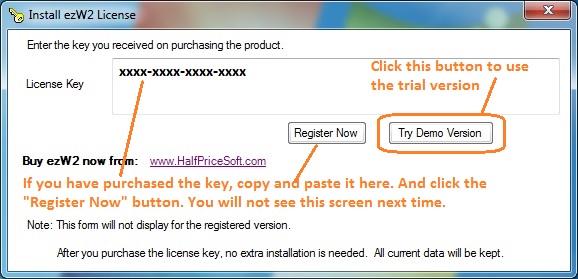
4.2 If you have purchased the license key, you can enter the license key. Otherwise, you can test drive the trial version. The trial version will print Trial image on forms. You need to purchase and enter the license to remove it.
4.3 Prepare and print forms
 ezW2 Software Quick Start Guide
 Common Installation Issues and Solutions
