 How to install ezW2 (for Edge or IE users) How to install ezW2 on a machine with higher security
Instructions1. You need to login as administrator of local machine.
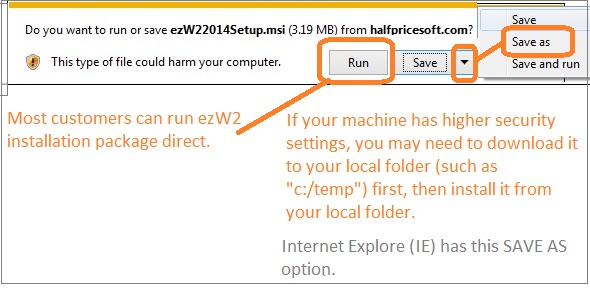
2. If you machine has higher security settings, you may need to save this installation package to the local machine first. (See step 1)
3. You can also download ezW2 from Download.com
4. Please feel free to contact us if you need any help.
Depending on machine settings, some user may need to restart computer after installation.
|
Steps to download and install ezW2 software
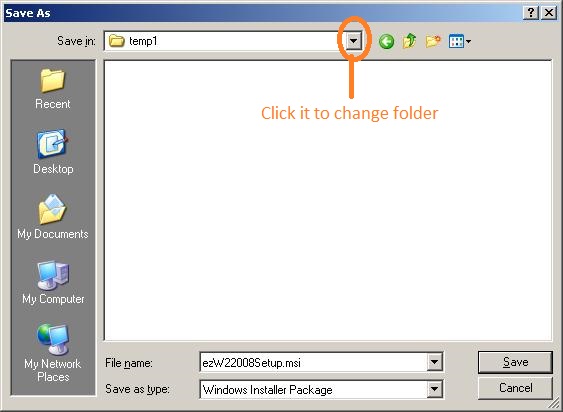
Step 1: Download ezW2 installation to your local machine first Click the
Download Now button above (or the download link for the old version) and save the installation package to your local machine.
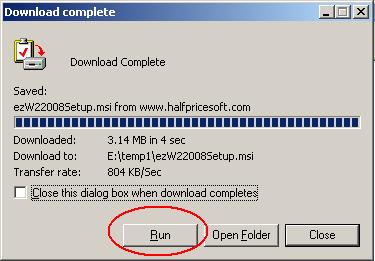
Step 2: After download completes, click
Run button to start installation process.
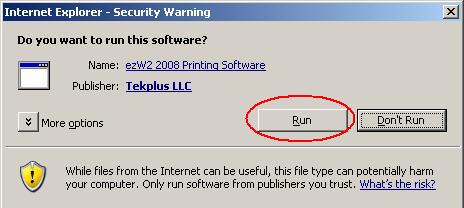
Step 3: start this installation.
Our software can run on Windows 11, 10, 8, 7, Vista and other Windows computers. You may see such message ".net framework version x.x is required" if .net framework is disabled or not installed on your computer.
Please follow this guide to enable .net framework or install .net framework Step 4: Following the instructions on screen to continue installation. After installation is completed, the shortcut will be created on your screen.
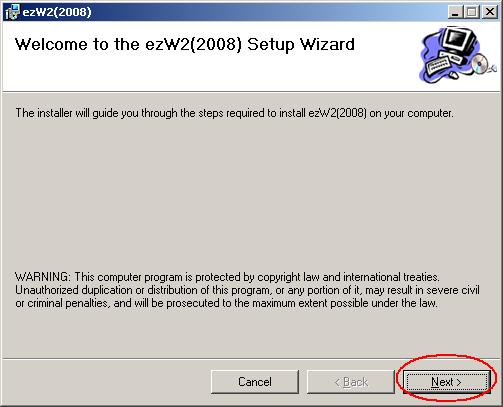
Step 5: Run ezW2 software and print tax forms.
5.1. You can click ezW2 desktop to run ezW2 software

5.2 If you have purchased the license key, you can enter the license key. Otherwise, you can test drive the trial version. The trial version will print Trial image on checks. You need to purchase and enter the license to remove it.
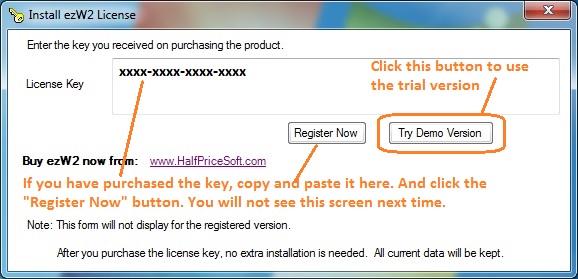
5.3 Prepare and print forms
 ezW2 Software Quick Start Guide
Trouble Shooting:
ezW2 installation issues and solutionsRelated Links:
How to fill out and print Form W2
How to fill out and print Form 1099-misc
How to uninstall ezW2 software
 Common Installation Issues and Solutions
