ezCheckDraft: How to Import Check Data from Spreadsheet
With ezCheckDraft software, you can import data from .csv file and print draft checks easily. You can use this feature if you need to print recurring bank drafts each month or each week.
Step 1: Start ezCheckDraft
If you have not installed ezCheckDraft, you are welcome to download the free trial version. The trial version will print TRIAL watermarks on checks. If you like ezCheckDraft, you can purchase the key code to remove it. All your data will remain.
From $295
Draft Checks Electronically In-House
ezCheckDraft: Trusted By Thousands.
Draft checks electronically
Generate ACH files for draft checks
Unlimited accounts. Unlimited transactions.
For both federal and states.
Try free DEMO today. No obligation. No credit card required. No risk.
ezCheckDraft is compatible with Windows 11, 10, 8.1, 8, 7, and other Windows system, 32-bit or 64-bit.
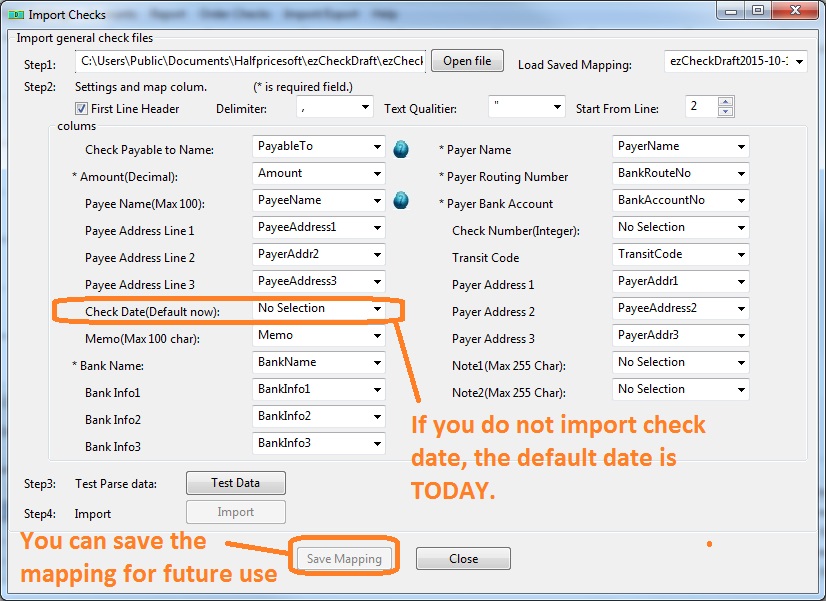
3.1 - You can click ezCheckDraft top menu "Import/Export" then the sub menu "Import Checks" to view import screen
3.2 - Follow the steps on screen to import data
If you do not import check date, ezCheckDraft will use TODAY as check date
If you do not import check number, ezCheckDraft will automatically generate a new check number.
Troubleshooting
1. Cannot import data from file or file with bad data
- 1.1 Please test with our sample data file
- 1.2 Add some rows of your data to the data file, and test import function again
- 1.3 Repeat step 1.2 until you find the bad data
2. Mobile deposit issue
Some banks does not allow users to deposit draft checks with mobile app. You need to deposit the draft check at bank.