What Permissions I Need to Run ezCheckDraft Software
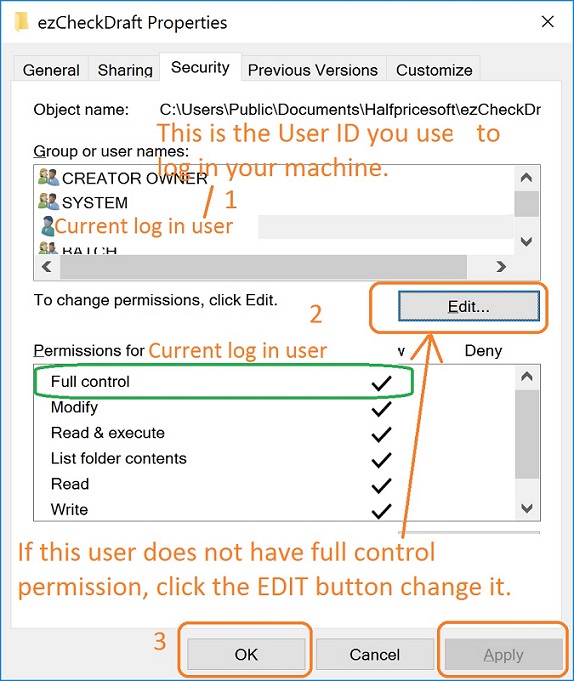
With ezCheckDraft software, you can print professional draft checks with MICR encoding line on blank stock to receive payment via phone, email and fax easily in house. To run ezCheckDraft software correctly, you need to have Full Control permission (at least read, write and run persmissions) for the following two folders.
1. Application folder
Default Application folder
C:\Program Files (x86)\Halfpricesoft\ezCheckDraft
2. Data folder
Default Data folder
C:\Users\Public\Documents\Halfpricesoft\ezCheckDraft
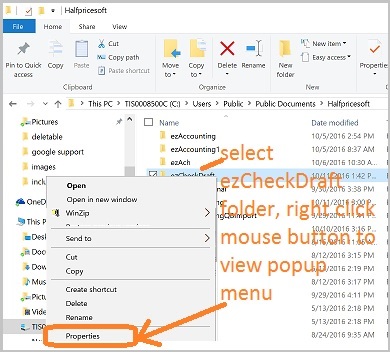
How to View/Edit Permissions 1) Use File Explore to find the folder 2) Select the folder and right click the mouse button to view pop up menu. Click "Properties" to view the permissions 3) View and Edit the permissions. If current user does not have enough permission, click the "Edit" button to change it. From $295 Draft Checks Electronically In-House ezCheckDraft: Trusted By Thousands. Draft checks electronically Generate ACH files for draft checks Unlimited accounts. Unlimited transactions. For both federal and states. Try free DEMO today. No obligation. No credit card required. No risk. Try ezCheckDraft now Buy it now
Related Links Quick Start Guide How multiple users can share the same account to print bank drafts How to print 3 checks on the same sheet How to print bank draft with check-on-top format How to print monthly recurring bank drafts How to print EPC-6 code for RCC Sample Check How to accept check by phone How to accept check by fax How to accept check by internet