ezCheckDraft: How Can Multiple Users Share Data and Print Bank Drafts
With ezCheckDraft software, you can print professional draft checks with MICR encoding line on blank stock to receive payment via phone, email and fax easily in house. The multiple-user network version draft check writer software can allow users to share the same database file.
Followings are the two options to print check over network. Usually option 1 is easier if your server has higher security settings.
Option 1. Install ezCheckDraft on Each Client Workstation and Share the Database File(s) on the Server.
Step 1: Download and install ezCheckDraft check writer on your first machines with administrator permission
Step 2: Set up account and copy it to network folder
2.1 You can follow the quick start guide to set up your bank account and print one test check.
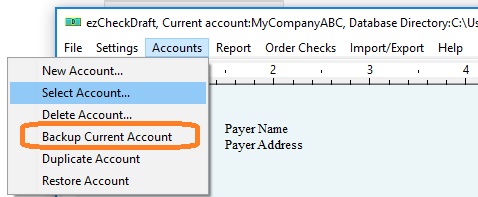
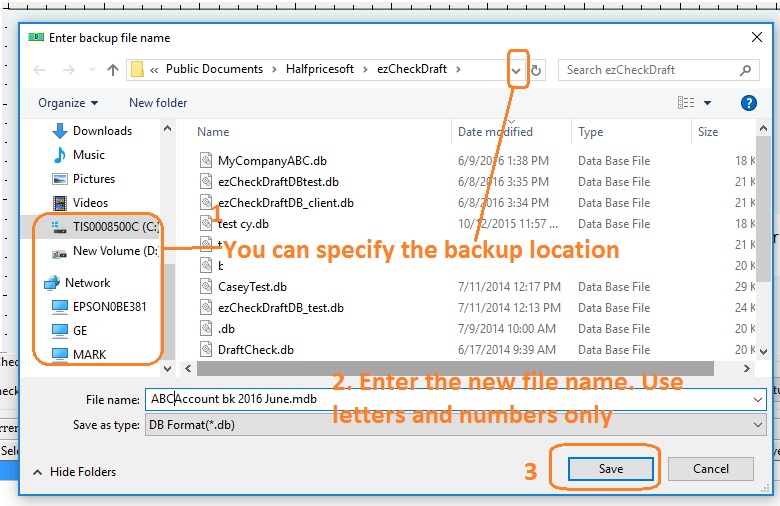
2.2 You can use the database backup feature to copy the current account database file to the server.
Step 3: Change the current account database path to use the file on server
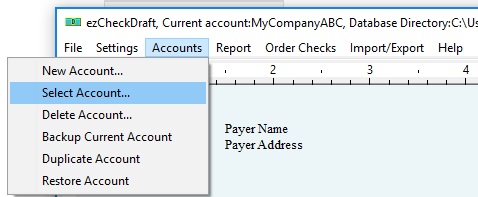
You can click ezCheckDraft top menu "Accounts" then "select account" to change the current to the new backup database file.
Step 4: Install ezCheckDraft on the second machine, register the license key, and repeat step 3. So the second machine will use the same database file.
Please make sure each users have enough permissions