ezCheckPrinting: How to Rollback
With
ezCheckPrinting Software, you can the professional checks easily in house.
How to rollback to previous version if I installed the new version by mistake?
Step 1: As a precaution, back up database. Step 2: Uninstall the current version of ezCheckPrinting.
Click the
Start button , click on Control Panel, click on Programs, and then click on Programs and Features. Select ezCheckPrinting from program list, and then click Uninstall.
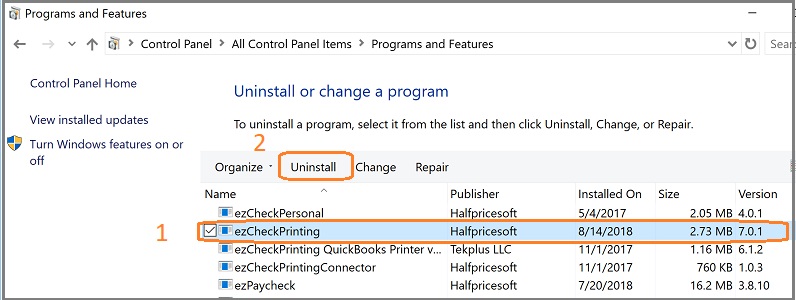 Step 3: Download the previous version.
 Related Links:
How to update ezCheckPrinting I bought a new computer. How can I transfer ezCheckPrinting and data?
 | Design and Print Professional Checks Yourself
- Print checks on blank stock with logo and signature
- Fill in data on pre-printed checks
- Print blank checks to fill in later
- QB virtual printer for QuickBooks/Quicken(for Windows)
- Unlimited accounts and checks for Windows and Mac.
Try ezCheckPrinting free demo version with no obligation and no credit card needed.
|

