Preprinted forms are NOT necessary!
With ezW2 software, you can print hundreds of W2 forms with one simple click. ezW2 software makes it easy to paper print, pdf print and efile W2, W3, 1099-misc and 1096 forms.
Step 1: Start ezW2 software
ezW2 software: SSA Approved. Trusted By Thousands for Two Decades.
Print and eFile Form W2, W3, 1099-NEC & 1096 in House.
Unlimited Company Accounts! Unlimited Forms!
Compatible with Windows 11, 10, 8.1, 8, 7, Vista, XP and other Windows computers.
Try it free today. No obligation. No credit card required.
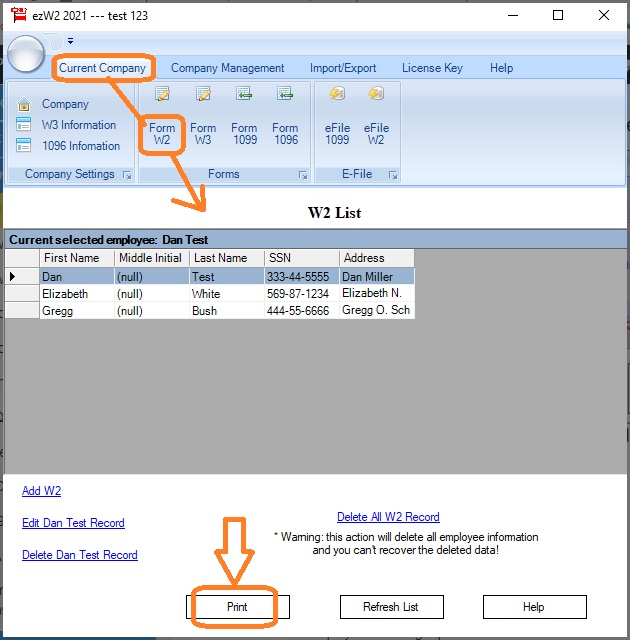
Step 2: You can click the top menu Current Company, then select sub menu Form W2 to open W-2 Form Edit Screen
Step 3: Then click the Print W2 button to open W-2 Print Option screen.
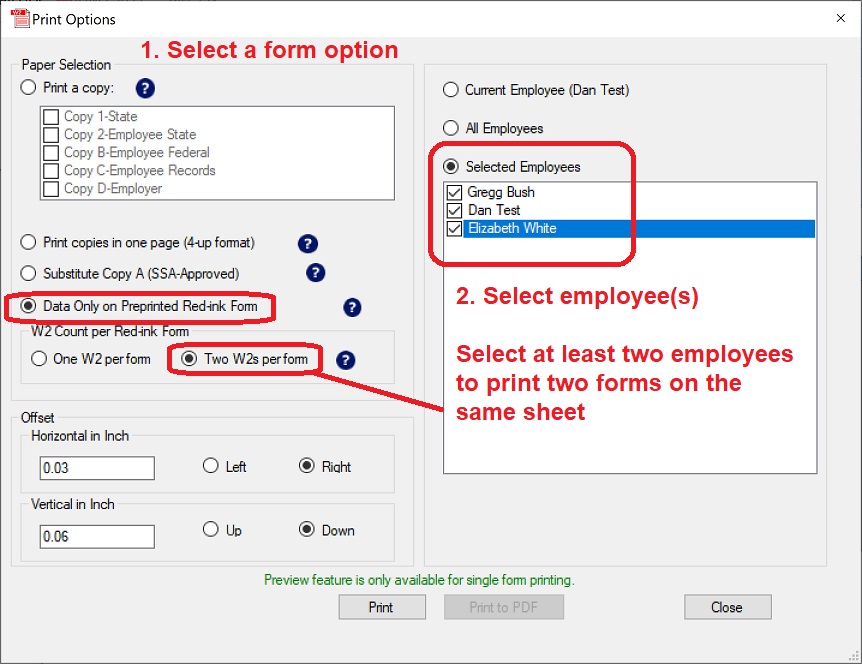
Step 4: Print Forms
- Choose which form you need to print first from left panel
- Then choose the employees from right panel.
- Click the "Print" button to print forms in batch.