ezW2 Software: How to Edit Data Folder Directory
ezW2 makes it easy to print, pdf print and file W2, W3, 1099-misc and 1096.
- For single-user version, the data folder path is fixed and you cannot change it.
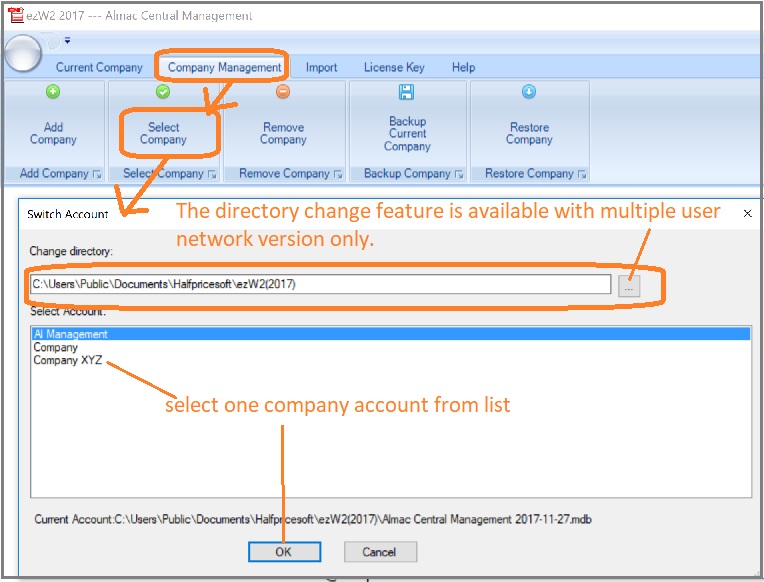
- For multiple-user version, you can edit the data folder directory so multiple users can share the data easily.
The default data folder for ezW2 Software:
C:\Users\Public\Documents\Halfpricesoft\ezW2(201X)
ie: for ezW2 2015, it is ezW2(2015)
Change data folder
You can click the ezW2 software top menu "Company Management->Select Company" to edit current data folder or switch the current account.
Upgrade ezW2
If you purchase ezW2 single-user version and need to upgrade multiple-user version, please feel free to
contact us for the special upgrade purchase link.
Related Links
ezW2: W2, W3
ezW2: 1099-Nec, 1096
ezW2Correction: W2C, W3C
More Forms
- Learn more about 1099s software (1099A, 1099B, 1099C, 1099CAP, 1099DA, 1099DIV, 1099G, 1099H, 1099INT, 1099LTC, 1099MISC, 1099-nec, 1099OID, 1099PATR, 1099Q, 1099R, 1099S, 1099SA)
- Learn more about 1098s software (1098, 1098C, 1098E, 1098 T) software
- Learn more about 5498s(5498, 5498ESA, 5498SA) software
- Learn more about W2G, 1097BTC, 8935, 3921, 3922 software
- Learn more about how to file ACA Form 1095 & 1094 to federal and states
Videos
 How to File and Print W2 Forms How to File and Print 1099 Forms
