ezW2 Software: Export the Recipient List
With ezW2 Enterprise version, you can export the recipient data into .csv file. (This feature is not available with the ezW2 Small Business version.)
Steps to export data:
1. Start ezW2 software, click the top menu "Import/Export". 2. Click the sub menu "Export Staff List". 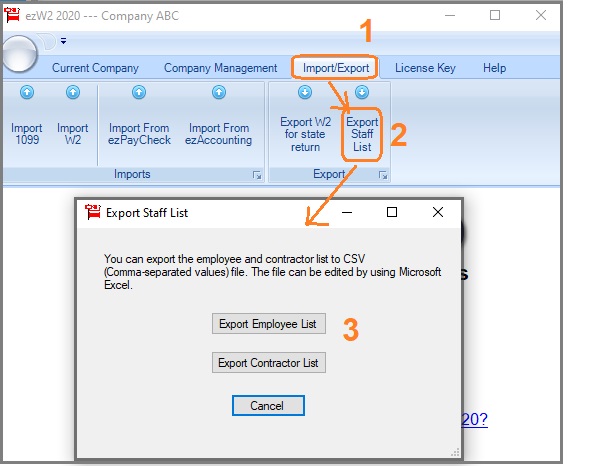 3. Export data
3.1 Click the "Export Employee list" button to export W2 Employees and save the data into .csv file.
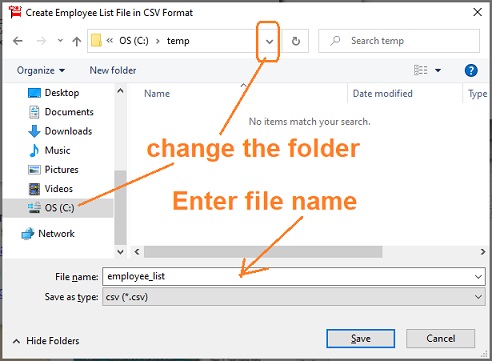
3.2 Click the "Export Contractor list" button to export 1099 contractors and save the data into .csv file..
4. You can view the .csv file with Microsoft Excel application.
Related Links
ezW2: W2, W3
ezW2: 1099-Nec, 1096
ezW2Correction: W2C, W3C
More Forms
- Learn more about 1099s software (1099A, 1099B, 1099C, 1099CAP, 1099DA, 1099DIV, 1099G, 1099H, 1099INT, 1099LTC, 1099MISC, 1099-nec, 1099OID, 1099PATR, 1099Q, 1099R, 1099S, 1099SA)
- Learn more about 1098s software (1098, 1098C, 1098E, 1098 T) software
- Learn more about 5498s(5498, 5498ESA, 5498SA) software
- Learn more about W2G, 1097BTC, 8935, 3921, 3922 software
- Learn more about how to file ACA Form 1095 & 1094 to federal and states

