If you have not yet installed the ezW2 software, you can download it from our download page.
Once installed, you will have three options to start the ezW2 program.
Option 1: Double click the desktop icon to start ezW2 software
After you installed ezW2 software, a desktop icon will be created. You can double click it run ezW2 software.
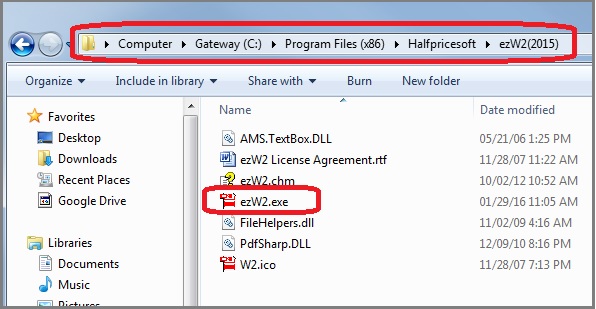
Option 2: Start ezW2 from program folder
The default program folder is
C:\Program Files (x86)\Halfpricesoft\ezW2(20xx)
For example: for ezW2 2015, the path is C:\Program Files (x86)\Halfpricesoft\ezW2(2015)
You can double click the ezW2.exe file to run this application.
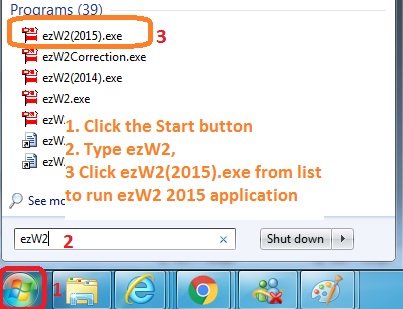
Option 3: Click Start button and type ezW2(20XX) to search for ezW2(20XX).exe file
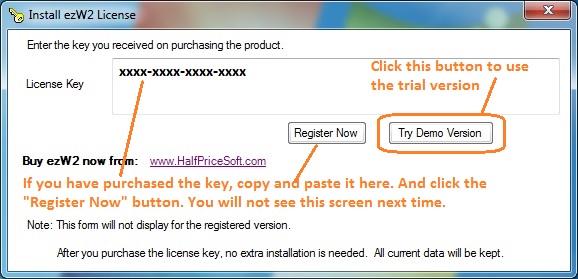
If you are using the trial version, you will see key code pop up screen
If you do not see this screen, that means you have alreaedy entered the key code.
Then you are ready to print your W2 and 1099 forms.
ezW2 software: SSA Approved. Trusted By Thousands for Two Decades.
Print and eFile Form W2, W3, 1099-NEC & 1096 in House.
Unlimited Company Accounts! Unlimited Forms!
Compatible with Windows 11, 10, 8.1, 8, 7, Vista, XP and other Windows computers.
Try it free today. No obligation. No credit card required.