ezW2 software: SSA Approved. Trusted By Thousands for Two Decades.
Print and eFile Form W2, W3, 1099-NEC & 1096 in House.
Unlimited Company Accounts! Unlimited Forms!
Compatible with Windows 11, 10, 8.1, 8, 7, Vista, XP and other Windows computers.
Try it free today. No obligation. No credit card required.
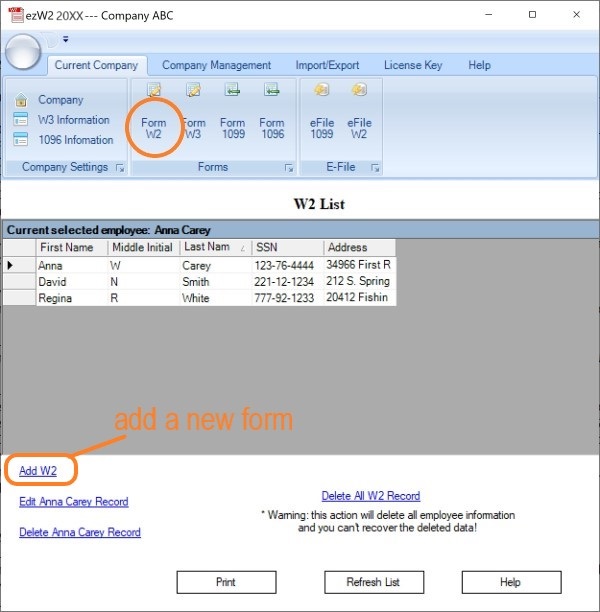
Step 1: Start ezW2 software, click the top menu "Current Company" then "Form W2" to view Form W2 list.
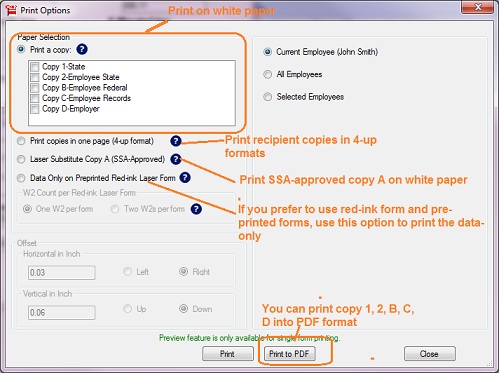
Step 2: Then click the "Print" below the list to open W-2 Print Option screen.
Step 3: Check the form options and recipient option, and click the button "Print to PDF" to generate the PDF file(s).
- You can generate the PDF file for just one W2 form or multiple forms
- You can generate batch PDF files with one PDF file for each employee.
- File name format: firstname_lastnameW2.pdf.
- ezW2 can generate the PDF file for Form W-2 copy 1, 2, B, C and D.
- You can specify the PDF file directory after you click the "Print to PDF" button.
For accountants: compress the PDF files into a .zip file and send to your client.
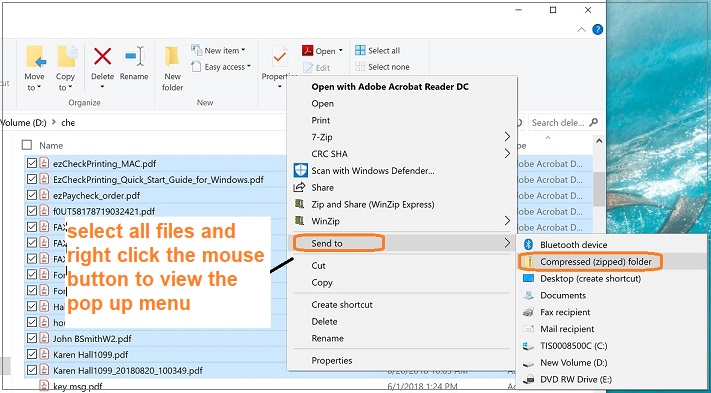
You can compress the PDF forms into a .zip file on Windows computer.
- Select all files and right click mouse button to view the pop up menu.
- Click Send to, and select Compressed (zipped) folder. Windows will create a new compressed ZIP file containing your PDF forms.
Note
1. Form W-3 will be generate automatically based on form W2 information
2. ezW2 allows user to set up unlimited companies with one flat rate. So if you have multiple companies or you are an accountant, you can add new company by clicking top menu Company Management->New company