How to Switch the Current Account within ezW2 Software
ezW2 software can support unlimited company accounts. You can switch the current account easily.
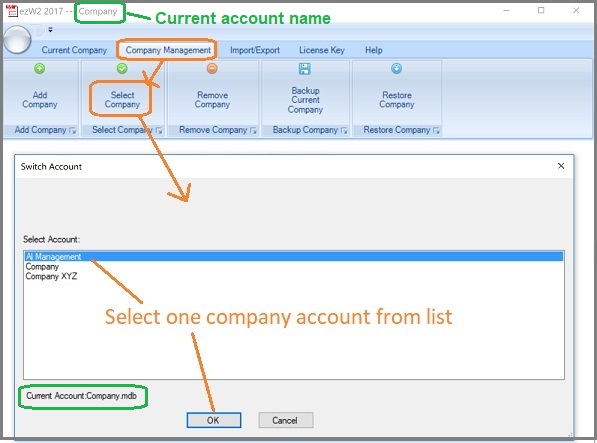
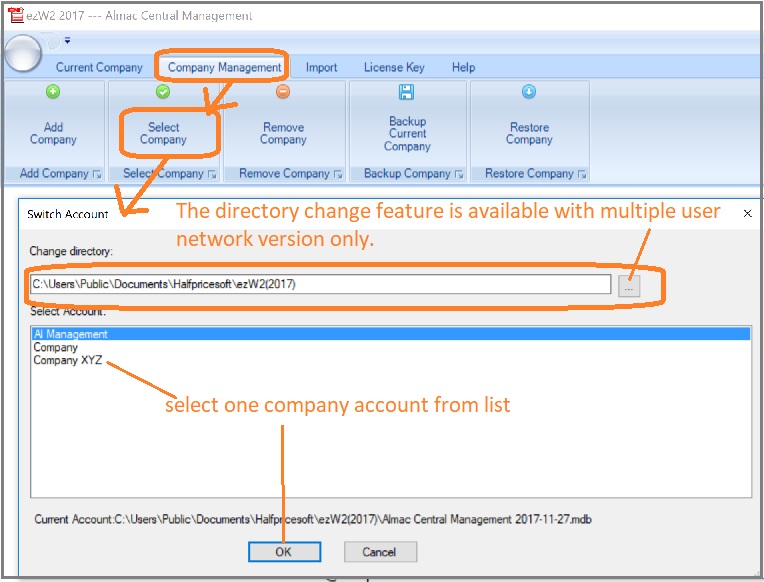
Start ezW2, click the top menu "Company Management->Select Company" to switch the current account.
Option 1: Single-user version
Option 2: Multiple-user network version
Upgrade ezW2
If you purchase ezW2 single-user version and need to upgrade multiple-user version, please feel free to
contact us for the special upgrade purchase link.
Related Links
ezW2: W2, W3
ezW2: 1099-Nec, 1096
ezW2Correction: W2C, W3C
More Forms
- Learn more about 1099s software (1099A, 1099B, 1099C, 1099CAP, 1099DA, 1099DIV, 1099G, 1099H, 1099INT, 1099LTC, 1099MISC, 1099-nec, 1099OID, 1099PATR, 1099Q, 1099R, 1099S, 1099SA)
- Learn more about 1098s software (1098, 1098C, 1098E, 1098 T) software
- Learn more about 5498s(5498, 5498ESA, 5498SA) software
- Learn more about W2G, 1097BTC, 8935, 3921, 3922 software
- Learn more about how to file ACA Form 1095 & 1094 to federal and states
Videos
 How to File and Print W2 Forms How to File and Print 1099 Forms
