HalfpricesoftHalfpricesoft


    How to Print and File Tax Form 1098, Mortgage Interest Statement


    Play

    ez1099 software is the simple, fast and affordable tax forms preparing, printing and eFiling solution for businesses and accountants

    If you have not set up an account and recipients to prepare to 1098 form, you can click here to see


    Step 1: Add a new 1098 form

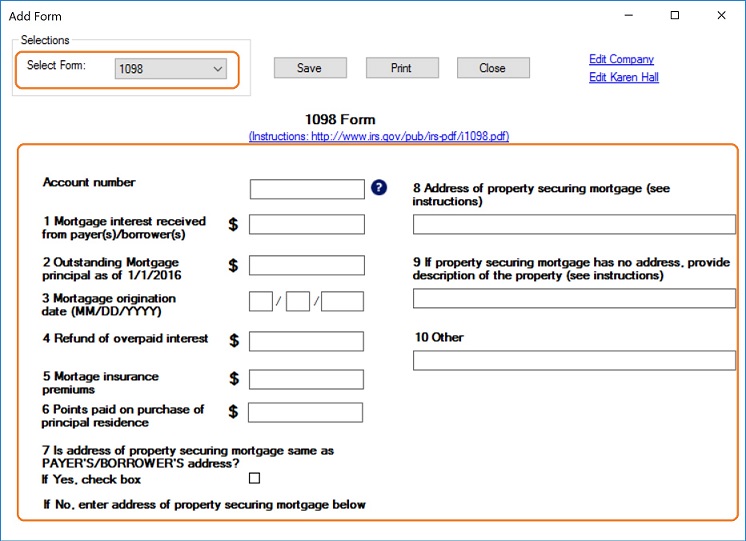
    • Start ez1099 software, select the recipient and click the Add Form button


    Step 2: Enter 1098 form information

    Enter form details. if you have questions, you can also check Form 1098 Instructions at https://www.irs.gov/pub/irs-pdf/i1098.pdf


    If you are ready to print form, you can click the "SAVE" button to save your changes first and click the "PRINT" button to view print options.

    Step 3: Print 1098 form

    If you are ready to print form, you can click the "SAVE" button to save your changes first and click the "PRINT" button to view print options.

    Recipient copies:
    - You can print form on white paper - Or you can fill data on pre-printed forms by choosing data only option for copy A

    IRS copy:
    The Red-ink form is required since IRS does not certify black-and-white substitute form. You need to choose the "Data only" option


    PDF files
    You can click the "PRINT TO PDF" button to print recipient copies into PDF files. However, this feature is only available for advanced version.


    Note:


    Sample Forms:

    • For recipient
    1098 recipient copy

    • 1098 form Copy A for IRS
    1098 copy A for IRS

    • 1098 form data only for pre-printed forms
    1098 copy A for IRS


    1099s softwareez1099 software can prepare, print and efile forms W2G, 1097BTC, 1098s (1098, 1098C, 1098E, 1098F, 1098Q, 1098 T), 1099s (1099A, 1099B, 1099C, 1099CAP, 1099DIV, 1099G, 1099H, 1099INT, 1099K, 1099LTC, 1099MISC, 1099-NEC, 1099OID, 1099PATR, 1099Q, 1099QA, 1099R, 1099S, 1099SA, 1099SB), 5498s(5498, 5498ESA, 5498QA, 5498SA), 8935, 3921, 3922, 1096 forms required by the IRS.

    New ez1099 2026 is available for 2026-2027 tax season!

    If you do not have ez1099 software installed, try it free today with no obligation and no cost.


    Related Links