HalfpricesoftHalfpricesoft


    ezAccounting Software Guide: How to Reset Invoice Serial Number

    ezAccounting -> FAQs -> Manage Customer and Sales


    ezAccounting software makes it easy to generate an invoice. Here is the step by step guide on how to reset starting serial number for invoice feature

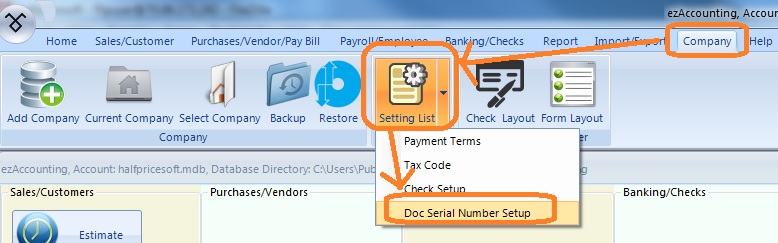
    Step 1: Start ezAccounting application, click the top menu "Company", then click the sub menu "setting List" and choose "Doc Serial Number Setup" option to open the serial number setup screen


    reset serial number menu

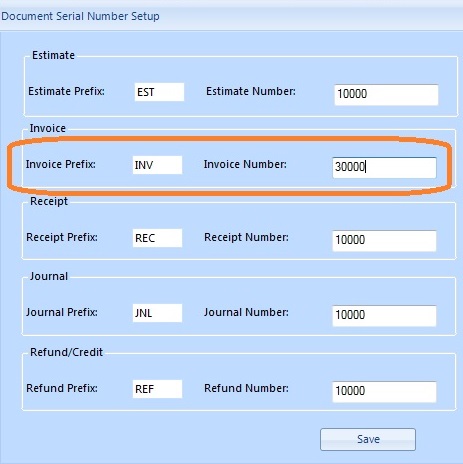
    Step 2: Reset Invoice Serial Number


    You can edit the prefix and the invoice starting number there.

    reset serial number screen
    (Click image to enlarge)

    Step 3: Click the Save button to update


    accounting software
    From $199
    (Regular $219)

    Desktop Accounting & Payroll Solution

    ezAccounting software is the right in house accounting solution for small businesses needing to document and report on incoming and outgoing cash flow including sales, receipts, payments and purchases. It also supports payroll processing and tax form printing.

    Try the ezAccounting free demo - no credit card or obligation required.

    Limited Time Offer: ezAccounting 2026 & 2027 Bundle


    (back to top)

    Related Topics

  • ezAccounting Quick Start Guide

  • Set up Check and Form Layout
  • How to manage customer and sales
  • How to manage vendor and purchase
  • How to write check and manage bank account

  • How to generate invoice
  • How to generate estimate/Quote

  • Sample Paychecks
