HalfpricesoftHalfpricesoft


    ezCheckDraft: How to Customize Check Layout

    ezCheckDraft software can print bank drafts on blank stock. If you are using check paper with pre-printed information, you can customize check layout easily. You hide any fields that have been pre-printed on check paper.

    Step 1: Open check layout screen

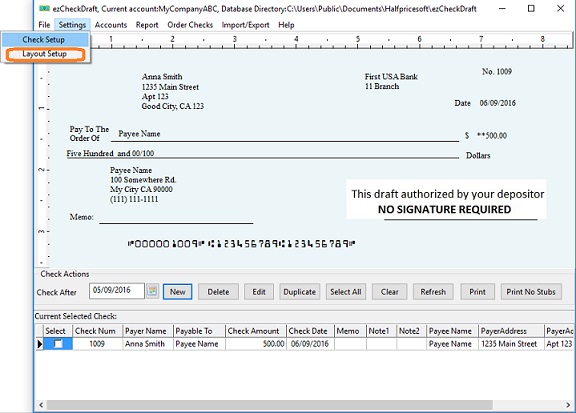
    Click the ezCheckDraft top menu "Settings" then "Layout setup" to view layout set up screen.

    check layout

    Step 2: Customize check layout and save changes

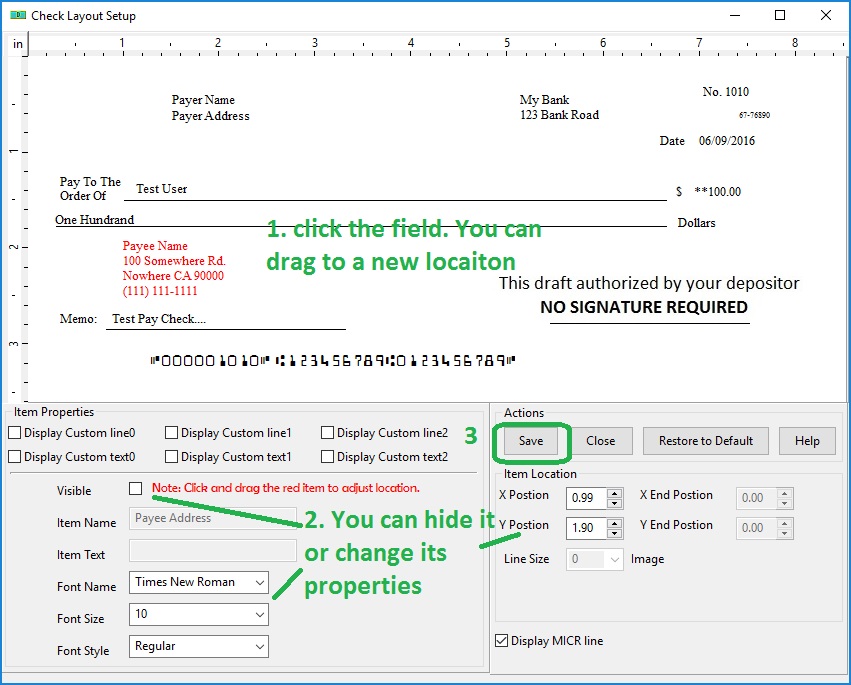
    2.1 You can click a field on the check
    2.2 You can drag the field to a new location
    2.3 You can hide the field by unchecking the visible box
    2.4 You can change font size, font type here
    2.5 Click the SAVE button to save the changes.
    check layout

    Step 3: Add and print a check to view the changes

    You will see new check layout when you add and preview a check on screen.
    Sample

    How to print a draft check without check number

    Check Draft software
    From $59

    Draft Checks Electronically In-House

    ezCheckDraft: Trusted By Thousands.

  • Draft checks electronically
  • Generate ACH files for draft checks
  • Unlimited accounts. Unlimited transactions.
  • For both federal and states.
  • Try free DEMO today. No obligation. No credit card required. No risk.

  • ezCheckDraft is compatible with Windows 11, 10, 8.1, 8, 7, and other Windows system, 32-bit or 64-bit.


    Related Links

  • Quick Start Guide


  • How multiple users can share the same account to print bank drafts


  • How to print 3 checks on the same sheet

  • How to print bank draft with check-on-top format

  • How to print monthly recurring bank drafts

  • How to print EPC-6 code for RCC

  • Sample Check


  • How to accept check by phone

  • How to accept check by fax

  • How to accept check by internet