ezACH Version 4.0.2 and later can generate both balanced and unbalanced ACH files. ezACH will generate the unbalanced ACH file by default. If your bank requires a balanced ach file, you can follow this guide to enable the feature.
1. What is the difference between a balanced and an unbalanced ACH file?
Balanced files contain an offsetting entry. If your bank requests a balanced ACH file, you can enable this feature within ezACH. Then ezACH will insert the offset record into each batch that you create.
2. Enable the balanced ACH file feature
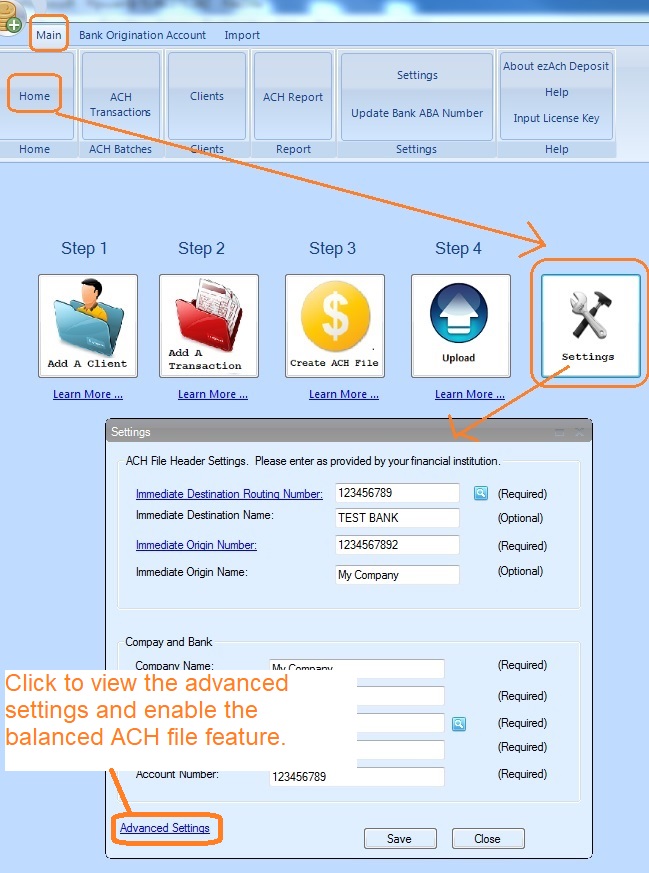
2.1 Start ezACH software, you can click the "Settings" button to view and edit current bank set up.
2.2 Click the "Advanced Settings" to view more settings.
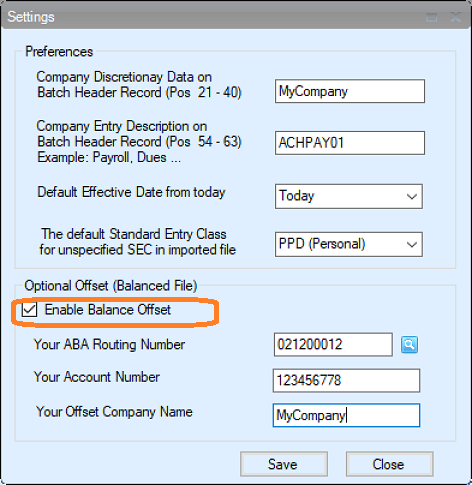
2.3 Select the option to enable the balanced ACH file.
From $295
Generate ACH Files for Direct Deposit In-House
ezACH: Trusted By Thousands.
Generate ACH files for direct deposit paychecks
Generate ACH files for vendor payments
Generate ACH files for government payments
Unlimited accounts. Unlimited transactions.
For both federal and states.
Try free DEMO today. No obligation. No credit card required. No risk.
ezACH is compatible with Windows 11, 10, 8.1, 8, 7, and other Windows system, 32-bit or 64-bit.