ezACH Network Version: How can Multiple Users Share the Data
ezACH software makes it easy to generate the NACHA ACH (Automated Clearing House) file for electronic funds transfers. If you purchased ezACH multiple-user version, here are two options share the data over network.
Option 1:Share data only
Option 2: Install ezACH on server
From $295
Generate ACH Files for Direct Deposit In-House
ezACH: Trusted By Thousands.
Generate ACH files for direct deposit paychecks
Generate ACH files for vendor payments
Generate ACH files for government payments
Unlimited accounts. Unlimited transactions.
For both federal and states.
Try free DEMO today. No obligation. No credit card required. No risk.
ezACH is compatible with Windows 11, 10, 8.1, 8, 7, and other Windows system, 32-bit or 64-bit.
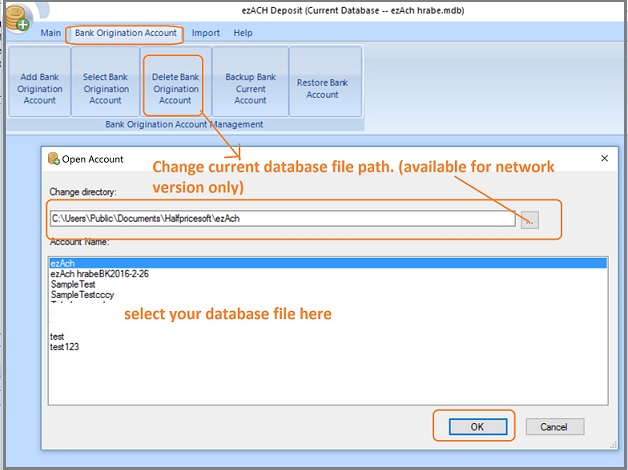
Option 1: Install ezACH on Client Machines and Share the Same Database File on the Server.
Step 1: Download and install ezACH on your first machines with administrator permission
You need the administor permission to install ezACH.
3. Log on client machine and test ezACH.
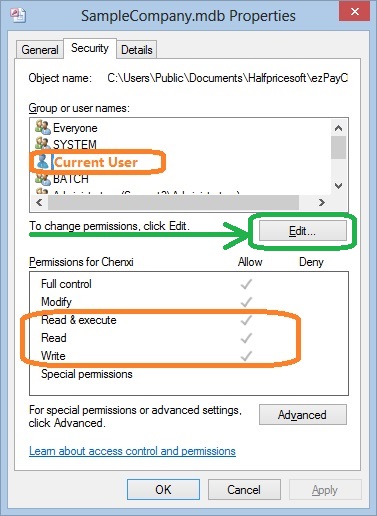
Each client should enough permissions(read, write and execute permissions) to access ezACH application and database file.
Note:
When you share the folder and database file on the server, please give FULL CONTROL permission (or at least Read, Write and Execute Permissions) to ezACH users.
How can I know I have enough permission to access the database on the server
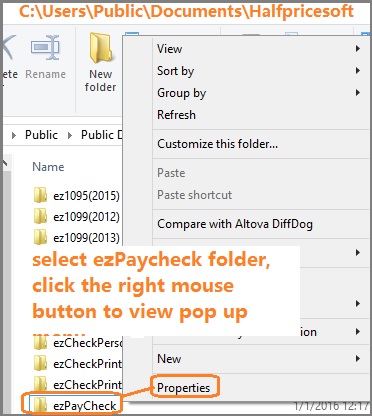
- Open Windows Explore, navigate to the database folder on the server
- Select the database file by mouse, right click to view properties. You need to have read, write and execute permisson.