ezACH software makes it easy to generate the NACHA ACH (Automated Clearing House) file for electronic funds transfers. How to read ezACH database backup file (.mdb file)
ezACH database file is .mdb file and this file is password protected. Please do NOT open this file manually or with Microsoft Access. You must open the file with ezACH software. Please follow the steps below to read your data.
Option 1: If you back up data in the default data folder
Option 1: Switch the current company account to view data if you back up data in the default data folder
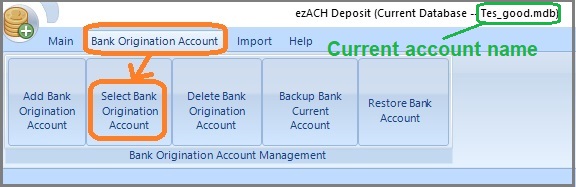
1.1 Start ezACH, click the top menu "Bank Origination Account" then "Select Bank Origination Account".
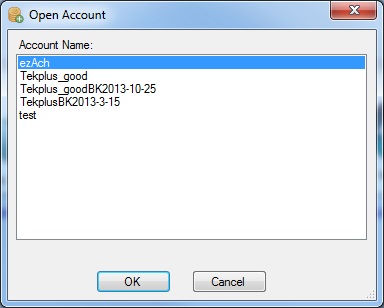
1.2 Switch account
Option 2: Use ezACH Restore function if you back up to the USB disk, server, cloud or other data storage location
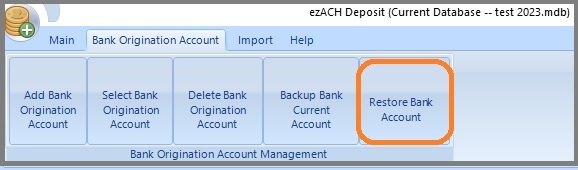
2.1 Start ezACH, and click the top menu "Bank Origination Account", then click "Restore Bank Account" to copy the database file from USB disk to your computer.
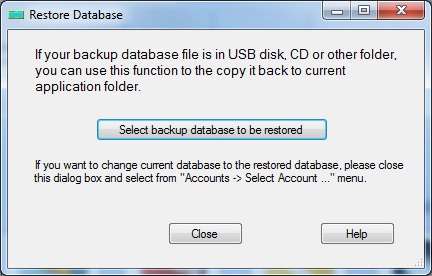
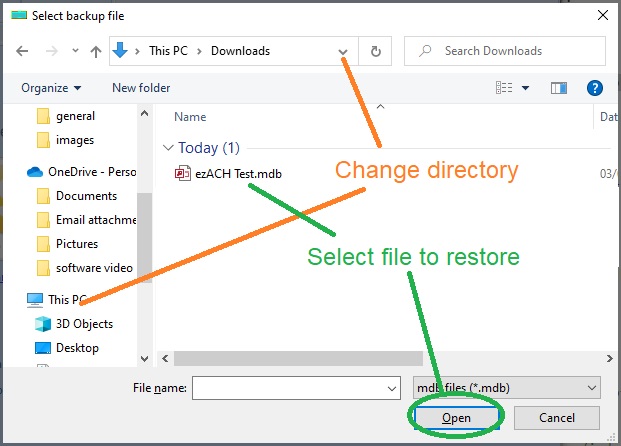
2.2 On the Database Restore screen, click "Select backup database to be restored" button to select your database file.
2.3. Select your file and click the open button. Then ezACH will copy the backup database file to the application folder.
2.4. Switch current account by clicking the top menu "Bank Origination Account" then "Select Bank Origination Account".
Option 3: Restore Multiple Accounts Manually
If you are a CPA and have many client accounts, it will be faster to restore the data manually.
The database file is .mdb file
The default data folderis:
C:\Users\Public\Documents\Halfpricesoft\ezAch
3.1 Copy the database file from the USB disk to the data folder.
3.2 Switch the current account by clicking the ezACH top menu "Bank Origination Account", then click sub menu "Select Bank Origination Account".