Once you installed ezACH, you will see the ezACH shortcut on desktop. You can double click it to run ezACH software.
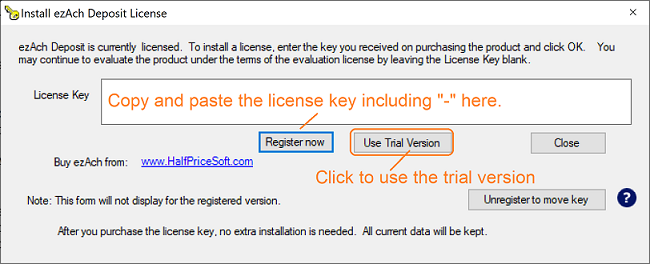
1.2. Register license: copy and paste the key code including dashes ("-")
- You will see the key code pop up message when you start ezACH software if you have not registered the key code.
- You can also click ezACH top menu "help" then "Input License" to register license.
How to copy and paste
Double-click on the text you want to copy, or highlight it. With the text highlighted, press Ctrl + C to copy. Move your cursor to the appropriate location and press Ctrl + V to paste
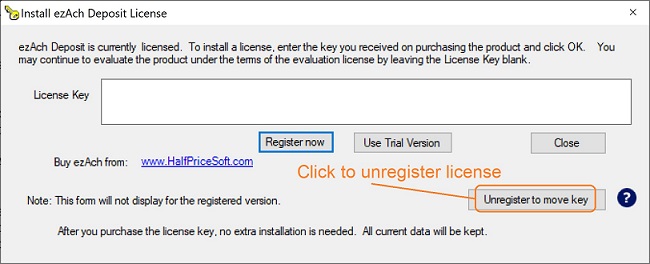
2. Unregister Key
Start ezACH, click the top menu "help" then "Input License" to view the license screen.
From $295
Generate ACH Files for Direct Deposit In-House
ezACH: Trusted By Thousands.
Generate ACH files for direct deposit paychecks
Generate ACH files for vendor payments
Generate ACH files for government payments
Unlimited accounts. Unlimited transactions.
For both federal and states.
Try free DEMO today. No obligation. No credit card required. No risk.
ezACH is compatible with Windows 11, 10, 8.1, 8, 7, and other Windows system, 32-bit or 64-bit.