ezACH software can support multiple accounts on the same computer with no extra charge. You can follow this guide to switch the current account, or to change the data folder if you are using the multiple-user version.
Option 1: Single-user version
Option 2: Multiple-user version
1: Single-user version
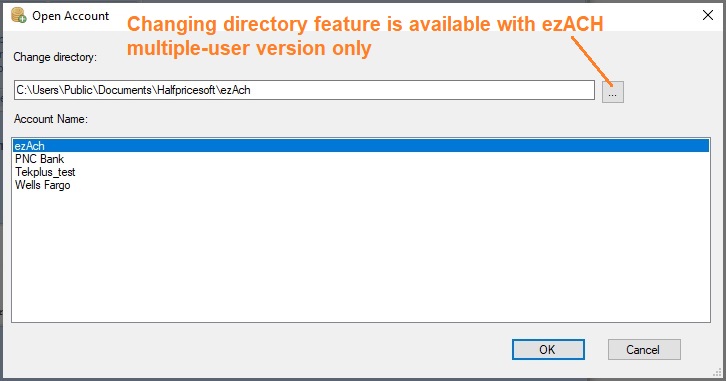
Note: You cannot change the default data folder path with the sinlge user version. This feature is available for multiple-user version only.
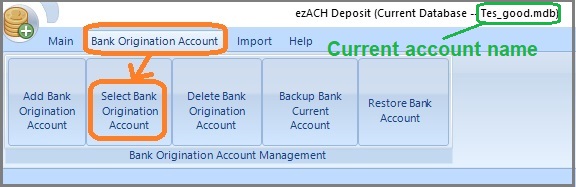
1.1 Start ezACH, click the top menu "Bank Origination Account" then "Select Bank Origination Account".
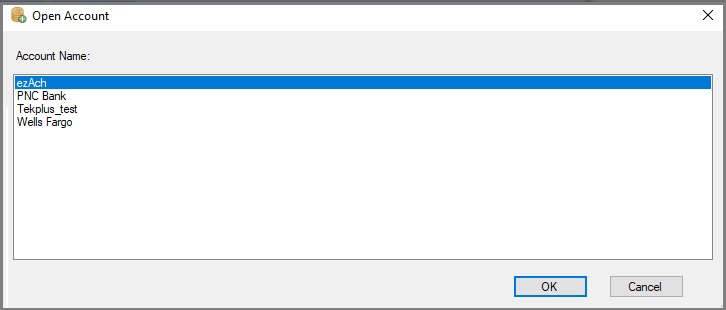
1.2 Select an account
2: Multiple-user version
1.2 Start ezACH, click the top menu "Bank Origination Account" then "Select Bank Origination Account".
1.2 Change the data folder and select an account
From $295
Generate ACH Files for Direct Deposit In-House
ezACH: Trusted By Thousands.
Generate ACH files for direct deposit paychecks
Generate ACH files for vendor payments
Generate ACH files for government payments
Unlimited accounts. Unlimited transactions.
For both federal and states.
Try free DEMO today. No obligation. No credit card required. No risk.
ezACH is compatible with Windows 11, 10, 8.1, 8, 7, and other Windows system, 32-bit or 64-bit.