DIY ezPaycheck Payroll Tax Software: How to Set up FUTA and SUTA
Download Now >
Buy Now
ezPaycheck payroll software estimates the unemployment tax based on your set up. Some companies may be able to take credit to pay unemployment tax at lower rate. In some states, your local office will mail you the new rate for next year in Dec. You can also call them to find your rate.
If you entered a higher rate or a lower rate by mistake, you still have the chance to correct it when you file the year-end report (ie: form 940) to make deposit.
In this guide, you will find:
1. How to set up FUTA and SUTA 2. Tax Forms and Tax Deposit 3. Reports to view FUTA and SUTA data 4. Common issues and solutions
1. How to Set up FUTA and SUTA
Step 1.1: Open company tax information setup screen
Start ezPaycheck payroll software
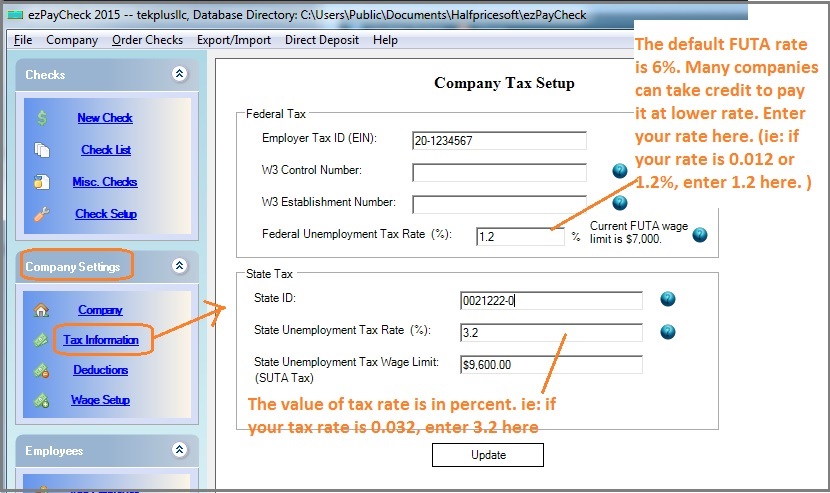
Click the left menu "Company Settings" then click the sub menu "Tax Information" to open the company tax setup screen
(Click image to enlarge)
Step 1.2: Federal Unemployment Tax
FUTA (Federal Unemployment Tax) is Employer-side tax only and will not be printed on paycheck stubs
The default tax rate for 2026 is 6%. However, many companies can take up to 5.4% credit. Please check with your local IRS office to see what rate you should use.
For example:
- If your FUTA rate is 0.06 (6%), please enter 6 there.
- If your FUTA rate is 0.006 (0.6%), please enter 0.6 there
The FUTA tax applies to the first $7,000 you paid to each employee as wages during the year.
If you set up the wrong FUTA rate before, you still have chance to correct it when you file Form 940.
Step 1.3: State Unemployment Tax
SUTA (State Unemployment Tax) is Employer-side tax only and will not be printed on paycheck stubs
Usually your state goverment will mail you the new SUTA rate each year. If you are not sure about your rate, you can contact your state office.
Step 1.4: Click the UPDATE button to save your changes
When you add a new paycheck, ezPaycheck payroll software will use this new tax rate to withhold FUTA and SUTA. The change of FUTA or SUTA rate will NOT affect existing paychecks.
2. Tax Forms and Tax Deposit
2.1 Federal Form
IRS releases Form 940 in Dec each year. ezPaycheck estimates FUTA based on your settings and the current IRS guide. When you make FUTA deposit, please use the value from the tax form if they are different.
How to print Form 940 How to make federal tax deposit payment using EFTPS site 2.2 State Forms
ezPaycheck does not generate the state forms. It will prepare the data for you. Please refer to the reports part.
3. SUTA and FUTA Reports
SUTA and FUTA are employer side taxes. They will not be printed on employee paystubs. Here are some options to view FUTA and SUTA data.
3.1. You can select one paycheck on check list from ezPaychekc main screen, then click the "
VIEW" button to see FUTA and SUTA for one paycheck.
3.2. Or you view the SUTA from report part:
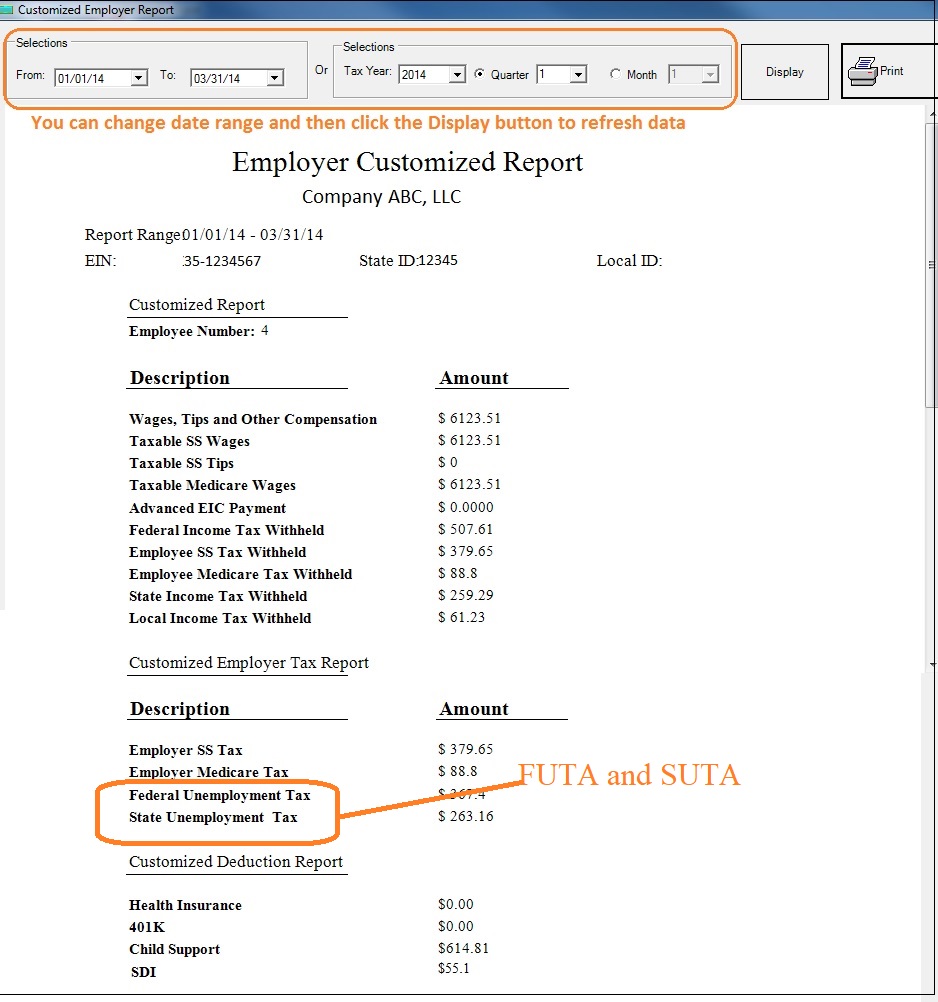
Employer Customized Report: company level summary data Employee Summary List: Summary data grouped by employee 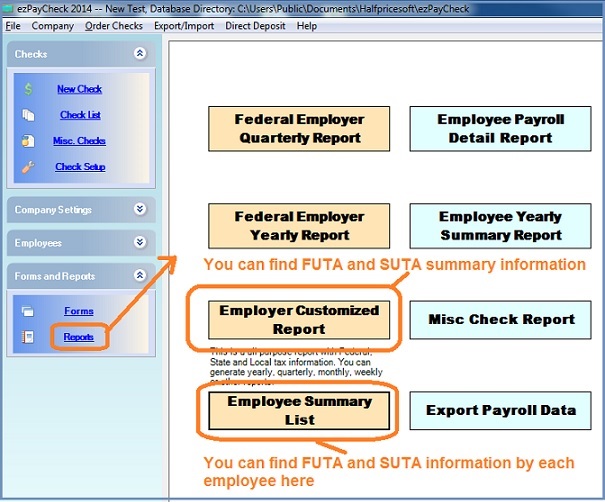
(
back to top)
Related Topics
ezPaycheck Quick Start Guide How a add a new company account How to handle both employees and contractors How to handle restaurant tips How to add a custom deduction and withhold it from each paycheck automatically How to handle local taxes How to handle State Disability Insurance (SDI) How to print paycheck in different formats: check-on-top, check-in-middle, check-at-bottom or 3-per-page How to print paycheck on blank stock How to print paycheck on pre-printed checks How to print paycheck with company logo How to adjust check printing position Sample Paychecks Determine a Company's Name for e-Filing

