Payroll Software: How to Add a New Company Account
In house payroll software ezPaycheck can print paychecks on blank stock and pre-printed checks. It also supports multiple company accounts with no extra charge. Here is the step by step guide about how to add a new account quickly.
Option 1: Add a new account from scratch
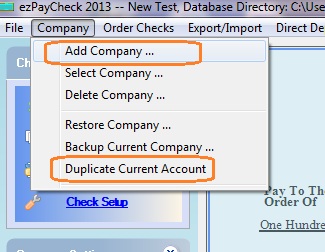
Start ezPaycheck payroll software, click the top menu "Company" then click sub menu "Add Company" to add a new company. Then you just follow the wizard to finish each step. You can learn more from ezPaycheck Quick Start Guide.