ezW2 Software: Transfer the License Key Try ezW2 now Buy it now Step 1: Unregister the license from the current computer
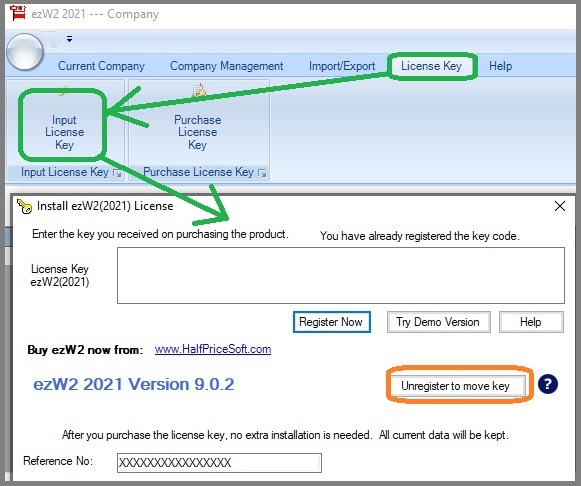
1.1 Click ezW2 software top menu "License Key" then "Input License Key" to access the key input screen.
1.2 Click the button "Unregister to remove key".
Step 2. Register the same license key on a new computer
2.1. Install ezW2 software on a new computer
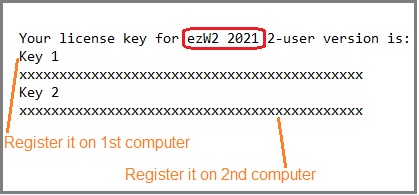
2.2 Start ezW2, and copy and paste the keycode including dashes there.
License key message
Troubleshooting License issue and solution How to purchase/retrieve the license If you are a new customer or if you are a previous customer (ie: You purchased ezW2 2020 and need the new license for current version), you can purchase license from our site. If you lost your license (ie: You purchased ezW2 2020 license and cannot find 2020 license):
-
Please search your email account for the license key message from "[email protected] " .
- If you cannot find the license message from your email account, please
follow our resend key instructions. .
ezW2 software : SSA Approved. Trusted By Thousands for Two Decades.Print and eFile Form W2, W3, 1099-NEC & 1096 in House. Unlimited Company Accounts! Unlimited Forms! Compatible with Windows 11, 10, 8.1, 8, 7, Vista, XP and other Windows computers. Try it free today. No obligation. No credit card required. Try ezW2 now Buy it now
Related Links ezW2: W2, W3 ezW2: 1099-Nec, 1096 ezW2Correction: W2C, W3C More Forms Learn more about 1099s software (1099A, 1099B, 1099C, 1099CAP, 1099DA, 1099DIV, 1099G, 1099H, 1099INT, 1099LTC, 1099MISC, 1099-nec, 1099OID, 1099PATR, 1099Q, 1099R, 1099S, 1099SA) Learn more about 1098s software (1098, 1098C, 1098E, 1098 T) software Learn more about 5498s(5498, 5498ESA, 5498SA) software Learn more about W2G, 1097BTC, 8935, 3921, 3922 software Learn more about how to file ACA Form 1095 & 1094 to federal and states