ezW2Correction software makes it easy to print W2C and W3C forms. ezW2Correction software can also support multiple accounts with no extra charge. Here are two options to roll forward ezW2Correction previous data to a new version.
Option 1: For employers
Option 2: For CPAs or employers with multiple accounts
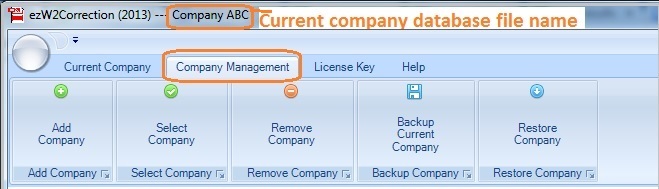
After you roll forward the data, do not forget to switch the current account to view data by clicking the top menu "Company Management->Select Company"!
With ezW2Correction, you can paper print, PDF print and efile W-2C and W-3C forms for the previous 10 years. The white paper printing and data import features can save you valuable time and money.
Please feel free to test drive ezW2Correction demo version for free before purchasing with no registration needed and no obligation. You can follow the step by step online instructions to finish the installation in minutes
ezW2Correction software is compatible with Windows 11, 10, 8.1, 8, 7, 2003 Vista and other Windows computers.
#Option 1: For Employers
Step 1.1. Start ezW2Correction and back up data
Start ezW2Correction , click the top menu "Company Management-> Backup current company". You can rename and save the database file to a folder or a flash disk that you can access easily. For example: you can rename the database file to "ABC Company W2C 2025".
Step 1.2. Install ezW2Correcion 2025 and restore data
1.2.2 Start ezW2Correction 2025, click the top menu "Company Management-> Restore company". Then select the "Restore Company" to copy the data to current data folder.
Step 1.3: Switch account to view data
Start ezW2Correction 2025, select this new database file as your current database file by clicking the top menu "Company Management->Select Company".
Step 1.4. Edit the data and file the new forms
#Option 2: For CPAs
If you have multiple companies accounts, it will be faster to transfer data manually.
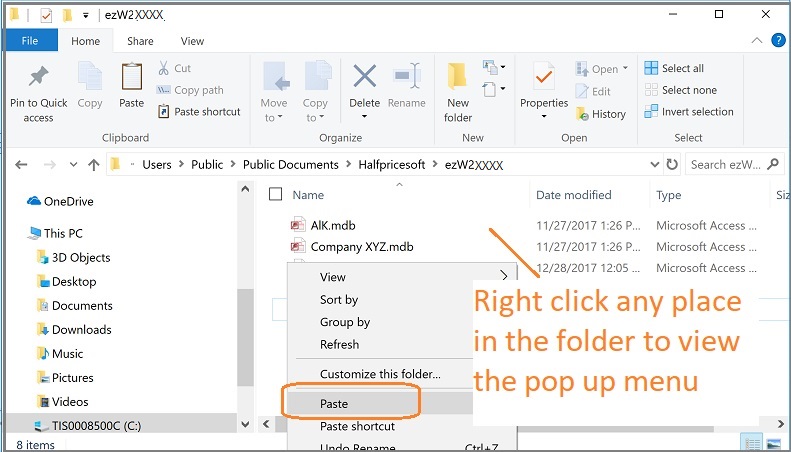
Step 2.1. Open ezW2Correction database folder and copy the .mdb files
The default database folder is:
C:\Users\Public\Documents\Halfpricesoft\ezW2Correction()
The database file is .mdb file (Microsoft Access Database file)
Tips: How to select multiple files
To select consecutive files, click the first item, press and hold down SHIFT, and then click the last item.
To select nonconsecutive files, press and hold down CTRL, and then click each item.
Step 2.2. Paste the .mdb files to ezW2Correction 2025 folder
The default database folder for ezW2Correction 2025 is:
C:\Users\Public\Documents\Halfpricesoft\ezW2Correction(2025)
If you are using multiple-user network version, you may need to copy the data to your shared folder on local computer or netowrk location.
Do not open the .mdb file manually or with other application (ie: MS Access). Please follow Step 2.3 and 2.4 to view the data with ezW2Correction software.
Step 2.3: Switch current database
Start ezW2Correction 2025, select one new database file as your current database file by clicking the top menu "Company Management->Select Company".
Step 2.4. Edit your data there and print your new forms.